If you're trying to work out whether the version you're running is still covered, the short answer is this: Odoo 20 was released on 24 September 2026, and the Odoo versions receiving standard support are now Odoo 20, Odoo 19 and Odoo 18. Odoo 17's standard support ends this month, September 2026.
If you're trying to work out whether the version you're running is still covered, the short answer is this: Odoo 20 was released on 24 September 2026, and the Odoo versions receiving standard support are now Odoo 20, Odoo 19 and Odoo 18. Odoo 17's standard support ends this month, September 2026. Odoo 16 and earlier have passed standard support, though paid extended support remains available on some hosting types. That last distinction gets misreported constantly, so every date and policy statement below has been checked against Odoo's own support documentation rather than borrowed from another blog.
Last verified: 29 September 2026 (updated for the Odoo 20 release). Source: Odoo's official standard and extended support documentation.
Quick answer
- Latest major version: Odoo 20.0, released 24 September 2026. See what's new in Odoo 20.
- Under standard support: Odoo 20.0, Odoo 19.0 and Odoo 18.0.
- Odoo 17: standard support ends September 2026, the month Odoo 20 arrived. If you are on 17, plan your upgrade now.
- Odoo 16: standard support ended September 2025. Extended support, at a mandatory extra fee, is still offered on Odoo.sh and on-premise. On Odoo Online it is simply not supported.
- Odoo 15, 14 and older: same pattern, earlier dates.
- The rule: every major release gets three years of standard support.
- Upgrade constraint: you can upgrade to supported versions only. The most recent unsupported version stays usable as an upgrade target for up to six months after its end-of-life date.
Odoo support lifecycle and end-of-life dates
Here are the Odoo supported versions and their end-of-life dates, covering every major release still in the field. Dates marked planned are Odoo's own forward-looking estimates and can move.
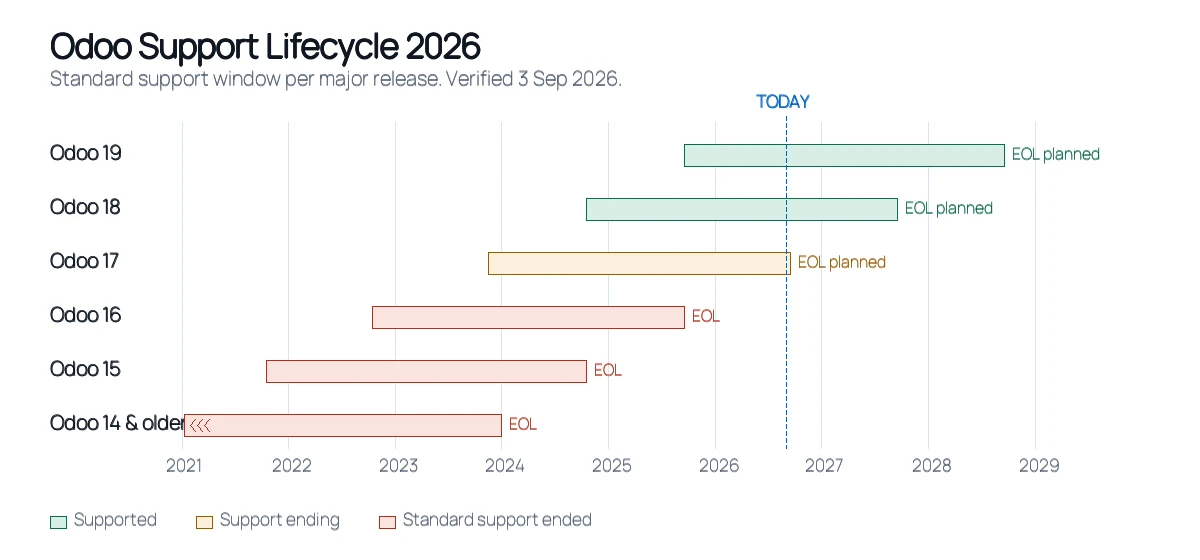
| Odoo version | Release | Standard support ends | Status in 2026 | What should you do? |
|---|---|---|---|---|
| Odoo 20.0 | September 2026 | Not yet published by Odoo (the three-year rule points to around September 2029) | Supported (newest) | Longest runway. Best for new projects once your apps support it. |
| Odoo 19.0 | September 2025 | September 2028 (planned) | Supported | A safe, settled target for most upgrades today. |
| Odoo 18.0 | October 2024 | September 2027 (planned) | Supported | Fine to stay on for now. Plan your next move within a year. |
| Odoo 17.0 | November 2023 | September 2026 (planned) | Support ending now | Start your upgrade now. Standard support ends this month. |
| Odoo 16.0 | October 2022 | September 2025 | Standard support ended | Upgrade. Extended support is paid, and not offered on Odoo Online. |
| Odoo 15.0 | October 2021 | October 2024 | Standard support ended | Upgrade, and budget for compatibility work. |
| Odoo 14.0 and older | Before 2021 | Before 2024 | Unsupported | Upgrade, most likely staged through an intermediate version. |
What each status actually means
- Supported — the version is inside its three-year standard support window: helpdesk support, bug fixing and security updates.
- Support ending — still supported, but the end date is close enough that an upgrade should already be scoped.
- Standard support ended — outside the three-year window. Extended support may be purchasable depending on where the database is hosted.
- Unsupported — no standard support, and on some hosting types no extended support either.
The detail most articles miss: support status is not the same across hosting types. For Odoo 16, 15 and 14, extended support is available on Odoo.sh and on-premise — but those versions are not supported at all on Odoo Online. Two businesses on the same version can be in genuinely different positions depending on where their database lives.
Running Odoo 16 or older? The useful first step isn't booking the upgrade — it's finding out what the upgrade actually involves for your database, your custom modules and your integrations. That scope determines everything else. Get a free Odoo migration assessment.
How does the Odoo support lifecycle work?
Odoo's policy is simpler than the version numbers make it look, and it's the rule that determines which releases count as Odoo supported versions at any given moment. Every major release gets three years of standard support, covering helpdesk support, bug fixing and security updates. That's the window that matters for most businesses.
After those three years, extended support becomes available — but it works differently in two ways worth understanding. It carries a mandatory additional fee, and its scope is narrower: Odoo describes it as helpdesk support and bug fixes, the latter depending on feasibility. Read that list carefully, because security updates are not part of it. If you're staying on an old version specifically to avoid an upgrade, that's the trade you're actually making.
Alongside the major releases, Odoo ships intermediary versions — the SaaS or online releases — every two to three months. These exist only on Odoo Online and are not eligible for extended support at all. If you're on Odoo Online you're generally moved along these automatically, which is why hosting type changes the conversation so much.
One rule catches people out when they leave an upgrade too long. You can upgrade to supported versions only. There is a narrow allowance on top of that: the most recent unsupported version can still be used as an upgrade target for up to six months after its end-of-life date. This is worth stating precisely, because it's widely misdescribed as a grace period on support. It isn't. It doesn't extend anyone's support by a day — it only affects which version you're permitted to land on. Your source version stays unsupported throughout.
Finally, the planned dates. Odoo marks future end-of-support dates as planned, and treats them as such. Odoo 17's September 2026 date and Odoo 18's September 2027 date both carry that qualifier. At the time of writing, Odoo has not yet added Odoo 20.0 to its support table; under the three-year rule, expect its standard support to run to around September 2029. Plan against these dates, but don't treat them as contractual.
Is Odoo 17 still supported in 2026?
Only until the end of September 2026. Odoo 17's standard support ends this month on Odoo's published schedule, the same month Odoo 20 was released. With Odoo 20 out, the three supported versions are Odoo 18, 19 and 20. If you're on Odoo 17, the upgrade is no longer a future project. It is a current one.
That's not a reason to rush the work. It's a reason to start scoping it, because scope is what determines whether this is a three-week job or a three-month one.
Custom modules are almost always the deciding factor. Code written against Odoo 17's API doesn't reliably install on 18, 19 or 20 — method signatures shift, view definitions change, and deprecated helpers get removed. Each module needs a code-level review rather than a reinstall. Third-party apps carry the same risk with less of your control over the fix, since you depend on the vendor having released a compatible version.
Then there's everything around the database itself: a verified backup before anything starts, a migration rehearsed in a staging environment rather than attempted on production, and validation that compares migrated records against the originals field by field. Cutover should be scheduled around your actual quiet hours, with a rollback plan you've tested rather than assumed. None of that is exotic — it's just the difference between a migration that holds and one that surfaces problems in week two.
Is Odoo 16 still supported?
Not under standard support. Odoo 16's standard support ended in September 2025. What remains is extended support at a mandatory extra fee, available on Odoo.sh and on-premise — and not available at all on Odoo Online.
Here's the distinction that causes most of the confusion: a database that keeps running is not the same as a version that's still supported. Odoo 16 will start tomorrow morning and process orders exactly as it did last year. Nothing switches off. The change is in what you're entitled to when something goes wrong, and in what stops arriving quietly in the background.
The practical implications build up gradually rather than arriving all at once. Security patches for newly discovered vulnerabilities are the significant one — for a system holding financial records, customer data and stock positions, an indefinitely open vulnerability is a real exposure, and it's increasingly the thing that gets flagged during client security reviews and audits. Beyond that, third-party app vendors progressively stop shipping compatible releases, integrations start failing in small ways as the services at the other end move on, and the gap between your version and the current one widens, which makes the eventual upgrade larger rather than smaller.
If you're on 16, you're not in an emergency. You are, though, in the position where waiting has a cost and no corresponding benefit.
Odoo 19 vs Odoo 20: which version should you upgrade to?
The reflexive answer is "the newest one", and it's often right — but not always, and it's worth about ten minutes of thought before you commit, because changing target mid-project is expensive.
Odoo 20 usually makes sense when support runway and new features are what you're buying. It is the newest release, so it has the longest support ahead of it, and it brings AI agents, offline mode, a rebuilt bank reconciliation and new India GST features (see Odoo 20 features). If your custom modules are being rewritten during the migration anyway, the extra effort of targeting 20 over 19 is often small — you're already in the code. For a live system, give the new release a few months of bug fixes and test it on a copy first.
Odoo 19 can be the better target when compatibility drives the decision. If you depend on specific third-party apps, the practical question isn't which Odoo version is newest but which one your app vendors have actually shipped stable releases for. An ecosystem around a version that's been out longer tends to be more settled. Similarly, if you're coming from an old release with heavy customisation, an intermediate landing point can reduce how much changes at once — and you can plan the step to 20 later, when it's a smaller job.
The version gap matters here too. Moving from Odoo 17 to 18 is a single step. Moving from Odoo 14 to 20 is six, and the further the gap, the more compatibility issues compound. It's technically possible to jump several versions at once, but testing at each stage catches problems while they're still separable rather than tangled together. Our Odoo 18 to 19 migration guide covers that particular step in detail.
One framing that helps: pick the target that minimises total work across the next three years, not the one that minimises work this quarter.
What happens when Odoo support ends?
Nothing dramatic, which is precisely why it's easy to ignore. Your Odoo doesn't stop working, your data isn't locked, and your team logs in on Monday exactly as before. What changes is your risk position, and it changes slowly enough that the cost only becomes visible later.
The most consequential loss is access to standard security updates. Any vulnerability discovered after your version leaves support stays open on your system indefinitely unless you're paying for extended support — and even then, security updates aren't part of what extended support covers. Bug fixes go the same way: problems that would have been patched centrally become something you pay a developer to work around locally.
Compatibility erodes next, and it's usually what people notice first. Third-party app vendors stop maintaining builds for older releases, while payment gateways, shipping APIs and CRM connectors update on their own schedules. Integrations that worked for years begin failing in small, quiet ways — one field at a time rather than all at once.
Underneath it all, technical debt accumulates. Every workaround written around a missing native feature is code someone maintains now and deals with during the eventual upgrade. The version gap widens, and migration effort scales with it. The difference between a straightforward version step and a full rebuild is worth understanding separately — we've covered it in Odoo migration vs Odoo upgrade.
What to do before your Odoo version reaches end of life
This is roughly the checklist we'd expect a business to have worked through before asking anyone for a migration quote.
- Version assessment — confirm your exact version and hosting type, since both change your options.
- Database backup — a complete backup, and one you've actually verified restores.
- Custom module audit — list every custom module and what it does. Undocumented modules are where migrations overrun.
- Third-party app review — check whether each vendor has released a version compatible with your target.
- Integration review — list every connected system: payment, shipping, CRM, accounting, POS, warehouse.
- Test migration — run the whole thing in a staging environment first.
- Staging environment — a genuine copy of production, not a fresh install with sample data.
- User acceptance testing — the people who use the system daily verify their actual tasks.
- Regression testing — confirm that what worked before still works, not only that new features function.
- Production migration — scheduled around your real low-activity hours.
- Rollback planning — a tested route back, decided before go-live rather than during it.
- Post-migration validation — reconcile records, balances and stock against pre-migration figures.
How to upgrade an unsupported Odoo version
An Odoo version upgrade is not a one-click update, and treating it as one is how businesses end up with a broken production system on a Monday morning. Database structure changes between versions, custom code written against an old API needs real rework, and integrations need individual re-verification. Here's the sequence that works, and why each step exists.
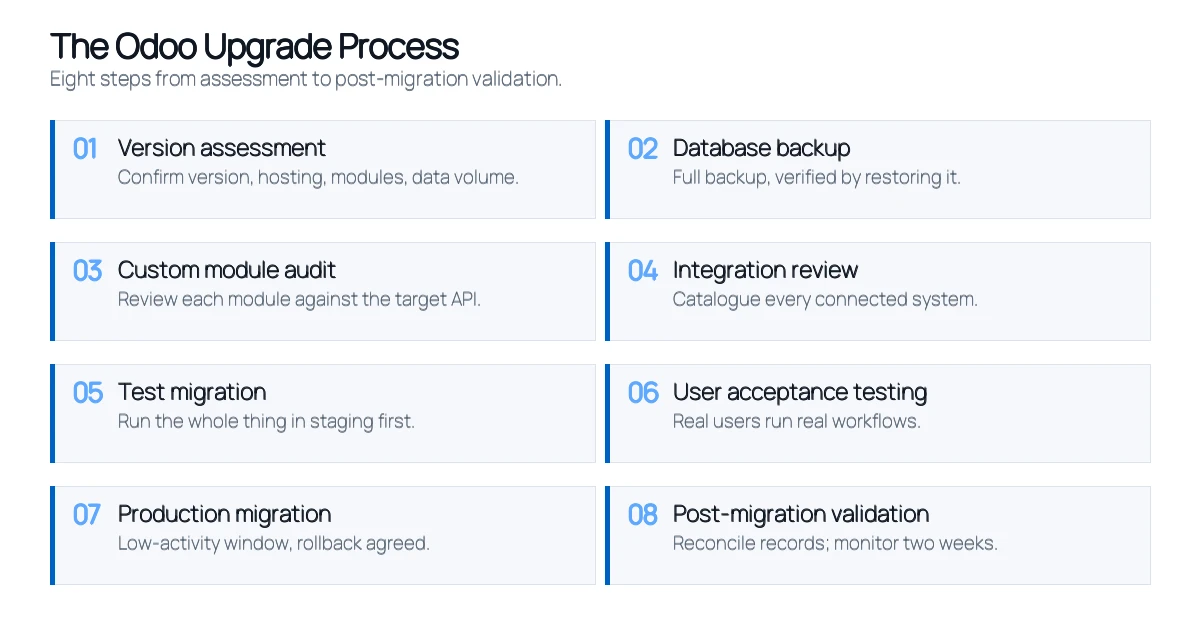
Step 1 — Version assessment. Establish exactly what you're running, on what hosting, with what modules and what data volume. This determines whether you're looking at a single step or a staged path through intermediate versions, and it's the input everything else depends on.
Step 2 — Database backup. A full backup before any work starts, verified by restoring it somewhere. An unverified backup is an assumption, not a safety net. On a multi-stage migration, take one before every major stage rather than only at the beginning.
Step 3 — Custom module audit. Review each module's code against the target version's API. Expect deprecated methods, changed signatures and restructured view definitions. This step produces the realistic estimate for the whole project — skip it and every later number is a guess.
Step 4 — Integration review. Catalogue every connected system and check what each one requires from the target version. Integrations tend to fail quietly rather than loudly, so they need explicit verification rather than an assumption that a working connection means correct data flow.
Step 5 — Test migration. Run the full migration in a staging environment that mirrors production. This is where problems are supposed to surface — every issue caught here is one that never reaches your live system. Compress this step and you've moved the risk, not removed it.
Step 6 — User acceptance testing. Have the people who use the system daily run their real workflows against the migrated data. Technical validation confirms the records moved; UAT confirms the business still functions. They catch different failures.
Step 7 — Production migration. Execute during a genuine low-activity window with the rollback plan agreed in advance. Go-live is a scheduling exercise as much as a technical one.
Step 8 — Post-migration validation. Reconcile migrated data against the originals: chart of accounts, tax configuration, stock levels, open orders, user permissions. Then monitor closely for a couple of weeks, because some issues only appear once real transaction volume flows through.
How long this takes depends almost entirely on customisation, third-party apps, integrations, data volume and quality, hosting, and how much downtime the business can absorb.
Not sure whether your custom modules will survive the upgrade? That's the question a proper assessment answers first, because it determines timeline, cost and risk for everything that follows. Get my migration plan.
How much does Odoo version migration cost?
There's no fixed price, and any figure quoted before someone has looked at your system is a guess dressed up as an estimate. Two businesses on the same Odoo version, moving to the same target, can receive very different quotes for legitimate reasons.
The variables that actually move the number are these. Version gap — a single step costs less than a multi-version jump requiring staged work. Database size and data quality — larger histories take longer to migrate and validate, and duplicate or inconsistent records often need cleaning first. Custom modules — usually the largest single driver, since each needs review, refactoring and testing. Third-party apps and integrations — each connected system needs individual reconfiguration and verification. Hosting environment — Odoo Online, Odoo.sh and on-premise each impose different constraints. Downtime tolerance — a near-zero-downtime cutover requires more planning and phased execution than a weekend window. Testing requirements — regulated industries typically need more validation and documentation.
The honest way to get a real number is a scoped assessment of your actual environment. That's also the point at which timelines become meaningful rather than generic.
Odiware's approach to Odoo version migration
We treat an Odoo upgrade as a business continuity exercise rather than a software update, because that's what it is when the system holds your financial records and your team needs it working on Monday.
The sequence starts with a version assessment and a custom module audit — understanding what exists before proposing what changes. Every migration then runs first in a staging environment, separate from the live system, where compatibility problems surface without business impact. Custom modules get refactored based on what that rehearsal reveals rather than on assumptions, and migrated data is validated field by field against the original records before anything reaches production. Go-live is scheduled around real low-activity hours with a tested rollback route, and monitoring continues afterwards, since some issues only appear once genuine transaction volume flows through.
That methodology holds whether the project is a single version step or a legacy ERP move, and it's what our Odoo migration services are built around. A recent example: a mid-sized IT services company running HRMS, payroll and recruitment moved from Odoo 17 Community to Odoo 18 Community, with custom Indian payroll rules — PF, ESI, PT and TDS — that had to keep calculating correctly throughout. Monthly payroll cycles ran without disruption. The full Odoo migration case study covers how.
Odoo version support FAQ
What are the Odoo supported versions in 2026?
Odoo 20.0, Odoo 19.0 and Odoo 18.0 are the supported versions now that Odoo 20 has been released (September 2026). Odoo 17's standard support ends in September 2026 on Odoo's published schedule. Odoo 16 and older have passed standard support, though extended support at an additional fee may still apply depending on hosting type.
Is Odoo 17 still supported?
Only until the end of September 2026, when its standard support ends on Odoo's published schedule. Odoo 20 was released the same month. If you're on Odoo 17, this is the point to scope an upgrade rather than defer it, since the scoping work itself takes time before any migration begins.
Is Odoo 16 still supported?
Not under standard support — that ended in September 2025. Extended support is available at a mandatory extra fee on Odoo.sh and on-premise, but not on Odoo Online. Your database will keep running either way; what you lose is entitlement to standard security updates and bug fixes.
What is the latest Odoo version?
Odoo 20.0, released on 24 September 2026 at Odoo Experience in Brussels. The previous major version, Odoo 19.0 (September 2025), is supported until September 2028 (planned). Odoo also ships intermediary SaaS releases every two to three months, but those are available only on Odoo Online and aren't eligible for extended support.
When does Odoo 18 support end?
Odoo 18.0 was released in October 2024, and its standard support is planned to end in September 2027. As with all forward-looking dates in Odoo's documentation, that's marked as planned and could shift.
What happens when an Odoo version reaches EOL?
Your system keeps running — nothing switches off. What ends is entitlement to standard security updates, bug fixes and helpdesk support. Over time, third-party apps and integrations stop being maintained for that version, and the eventual upgrade grows larger the longer it's deferred.
Can I upgrade directly from Odoo 16 to Odoo 20?
It's technically possible, but a four-version jump surfaces more compatibility issues at once, particularly across custom modules. Testing each step separately keeps problems isolated rather than tangled. The right path depends on how much custom code and how many integrations are involved.
Can custom Odoo modules be migrated?
Yes, though they nearly always need code-level review rather than a straight reinstall. Modules built against an older API typically require updates for changed method signatures, restructured views and deprecated functions. This is usually the largest single factor in migration effort.
How long does an Odoo migration take?
It depends on customisation, integrations, database size and downtime tolerance. A lightly customised database on standard modules is a substantially shorter project than a heavily customised one with multiple live integrations. A scoped assessment of your actual environment is the only way to get a meaningful timeline.
Your Odoo version may still run. That doesn't mean you should keep running it.
Support dates aren't a countdown to failure — they're a marker for when risk starts accruing without anything visible happening. The businesses that handle this well are the ones that scope the upgrade while it's still optional, because a migration planned six months ahead is a fundamentally different project from one triggered by a failed integration or a flagged security audit.
Whichever of the Odoo supported versions you're on, the first step is the same and it isn't booking the migration. It's understanding your database, your custom modules, your integrations and what the upgrade would actually require. Everything else follows from that.
Know exactly where you stand before you commit to anything. A migration assessment maps your current version, custom modules, integrations and data against your target version, and comes back with real scope, timeline and risk. No obligation attached. Book a free Odoo migration assessment.
Editorial note: this article was last verified against Odoo's official support documentation on 29 September 2026, after the Odoo 20 release. Support dates marked as planned may change. This page is reviewed around each major Odoo release.
We migrate Odoo v13–v20 with custom modules and integrations intact, on a fixed scope and a 2–4 week timeline for straightforward environments.
 ODOO IMPLEMENTATION PARTNER