If you're running Odoo and thinking about moving to a newer version, you've probably noticed that "migration" and "upgrade" get used almost interchangeably - by vendors, in forum threads, and sometimes in Odoo's own documentation. That inconsistency isn't just a vocabulary annoyance.
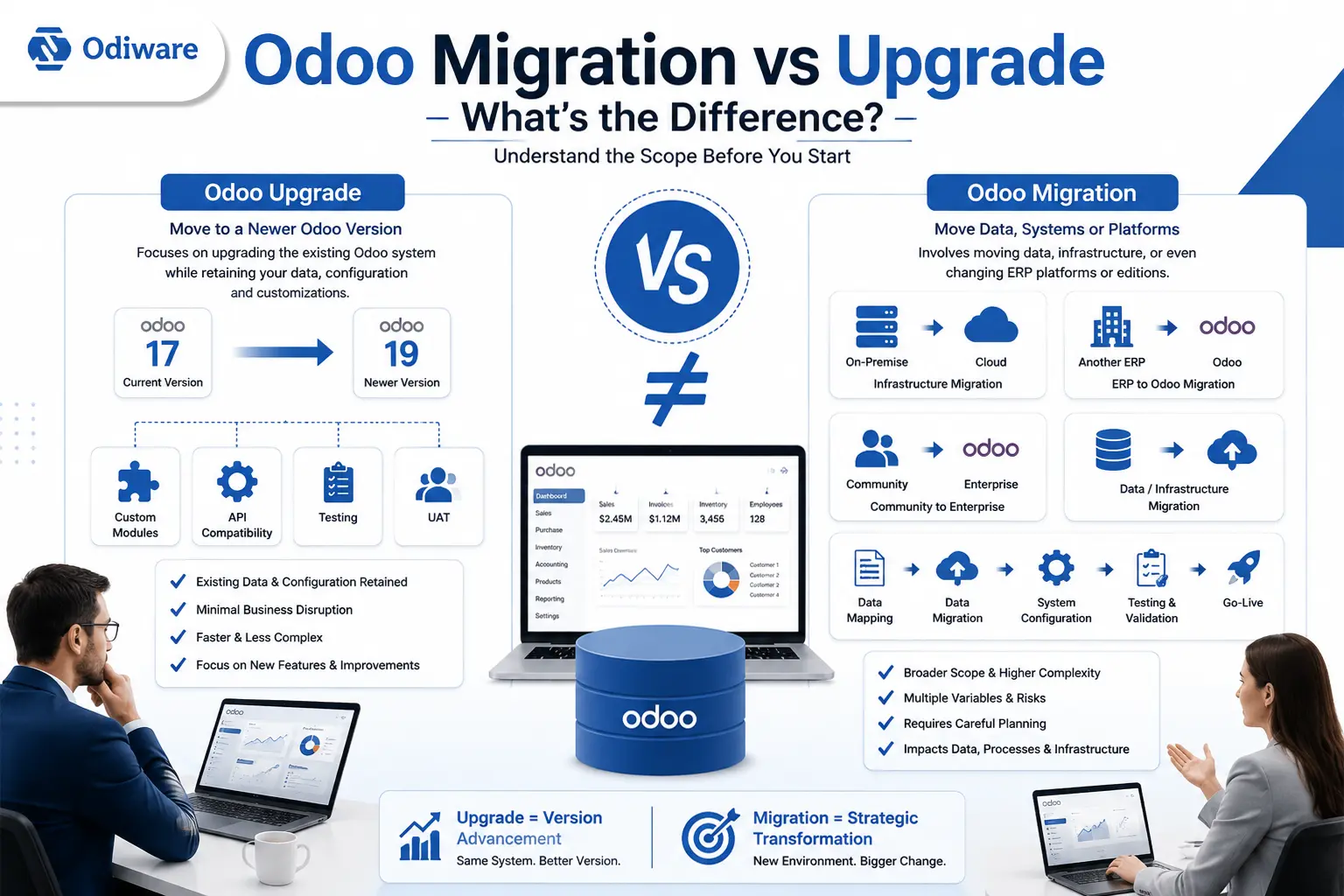
If you're running Odoo and thinking about moving to a newer version, you've probably noticed that "migration" and "upgrade" get used almost interchangeably - by vendors, in forum threads, and sometimes in Odoo's own documentation. That inconsistency isn't just a vocabulary annoyance. Before you can scope a project or compare quotes, you need to know which one you're actually looking at, because the two can involve very different amounts of work. This matters enough that it's usually the first thing we walk through with a client at Odiware before recommending any Odoo migration services - get the classification wrong, and the quote you request won't match the project you actually need.
This article breaks down what each term means in practice, where they genuinely overlap, and how to figure out which one applies to your situation.
Odoo Migration vs Odoo Upgrade: The Short Answer
An Odoo upgrade moves an existing database from one Odoo version to a newer supported one - say, Odoo 17 to Odoo 19 - while keeping your data, configuration, and history intact. Odoo migration is the broader term: it can include a version change, but it can also mean moving your data to a different hosting environment, switching from another ERP to Odoo, or changing editions. A lot of real projects involve more than one of these at once.
Here's a quick side-by-side before we go deeper:
|
Factor |
Odoo Upgrade |
Odoo Migration |
|---|---|---|
|
Basic purpose |
Moving to a newer Odoo version |
Moving data, systems, environments, or platforms |
|
Existing database |
Retained and transformed through the upgrade process |
May be transformed, moved, or replaced |
|
Data mapping |
Usually limited |
Can be extensive |
|
Must be checked for compatibility with the target version |
May need adaptation or rebuilding |
|
|
Hosting change |
Not necessarily involved |
May be involved |
|
ERP/platform change |
Usually no |
Can involve switching from another ERP |
|
Testing |
Essential |
Essential |
|
Main risks |
Compatibility and functionality |
Data integrity, mapping, and infrastructure |
Is Odoo Migration the Same as an Upgrade?
Not exactly, and this is worth answering directly since it's the question most people are actually typing in. An upgrade is a specific type of migration - one focused narrowly on moving a database's version number forward. Migration is the umbrella category that also covers hosting changes, ERP-to-Odoo transitions, and Community-to-Enterprise moves, none of which necessarily touch the Odoo version at all. Every upgrade is a migration in the broad sense; not every migration is an upgrade.
What Is an Odoo Upgrade?
An Odoo upgrade is the process of moving your existing production database from one Odoo version to a newer one, while keeping your data, configuration, and history intact. You're not starting fresh - you're bringing your current setup forward so you can use newer features, keep receiving support, and stay on a version Odoo still maintains. If you don't have an existing Odoo instance to bring forward, you're looking at Odoo implementation instead, which is a different starting point entirely.
How an Odoo Version Upgrade Actually Works
Take a company running Odoo 17 that wants Odoo 19. The starting point is the existing database - every record, configuration, and piece of history built up over time. Between that and the target version, the database passes through an upgrade process that adjusts the underlying schema and data structures to match what the newer version expects.
This runs on upgrade scripts, not a copy-paste operation. Odoo maintains an official upgrade path for exactly this purpose, and its documentation is the right reference point for version support windows and the general mechanism.
Two things complicate this almost every time: custom modules and third-party modules. If a company built an internal approval workflow, a specific report, or a shipping integration, each one needs to be checked against the target version. Odoo's APIs change between releases. Fields get renamed or removed. Code that worked fine on Odoo 17 can throw errors on Odoo 19 until it's updated.
Once the technical upgrade is done, testing comes next - confirming reports still generate correctly, integrations still talk to external systems, and daily workflows behave the way employees expect. Only after that does the upgraded database move to production.
How much work this takes depends on the current version, the target version, the hosting environment, and how much customization is involved. A company on a recent version with a mostly standard setup has a much lighter upgrade than one jumping several versions with heavy customization.
What Is Odoo Migration?
Migration is the wider umbrella. It covers any project where something significant is moving - data, infrastructure, platform, or edition - and a version upgrade is one type of migration, not a synonym for all of them.
Odoo Version Migration
This is where the terms overlap most. Moving from Odoo 16 to Odoo 19 gets called both a version migration and a version upgrade, and both descriptions are reasonable. The larger the version gap, the more the project starts to resemble a full migration in scope, since it may need to pass through intermediate versions and account for more breaking changes along the way.
Odoo Server or Hosting Migration
This is a different kind of project entirely. Moving from on-premise hosting to Odoo.sh, or between hosting providers, doesn't necessarily change the Odoo version at all - but it brings its own considerations: server configuration, deployment pipelines, SSL and domain setup, filestore transfer, and backup routines all need rebuilding or reconfiguring in the new environment. Sometimes a hosting change is bundled with a version upgrade; sometimes it happens entirely on its own.
Migration From Another ERP to Odoo
Moving from SAP, Microsoft Dynamics, or a legacy in-house system to Odoo is a different category of work. It usually starts with extracting data from the source system, then transforming it into a structure Odoo can use - mapping customer records, product catalogs, chart of accounts, and historical transactions to their Odoo equivalents. Validation matters a lot here, because data from a different platform rarely maps cleanly. Beyond the data, business processes often need rethinking too, since workflows built around one ERP's logic don't always translate directly into Odoo's.
Community to Enterprise Migration
Switching from Odoo Community to Odoo Enterprise sometimes gets treated as a minor change, but it isn't the same thing as a version upgrade. Enterprise includes modules and features Community doesn't, so this kind of migration can involve enabling and configuring new functionality, adjusting existing workflows around Enterprise-only features, and reviewing licensing implications. It can happen alongside a version upgrade or entirely independently of one.
Odoo Migration vs Upgrade: Key Differences
Purpose. An upgrade brings an existing setup forward to a newer Odoo version. Migration moves something - data, infrastructure, or platform - from one place to another. A version upgrade is one specific type of migration, focused narrowly on the version number rather than the broader environment.
Data handling. In an upgrade, your data generally stays where it is; upgrade scripts transform the database structure while keeping the underlying records intact. In a broader migration - especially ERP-to-Odoo - data handling is a much bigger job: extracting records from the source system, mapping fields to their Odoo equivalents, validating nothing was lost or corrupted, and confirming the resulting structure actually reflects the business accurately.
Custom modules and integrations. Custom code is one of the biggest variables in either type of project. Modules need checking for API compatibility with the target version. Integrations - payment gateways, shipping carriers, accounting tools, e-commerce platforms - need retesting to confirm they still function. Reports and automated workflows built on standard Odoo models can break silently if underlying fields change, which is why this gets checked explicitly rather than assumed fine. Where this involves actual code changes rather than configuration, it's development work - Odiware's Odoo developers handle this as a distinct compatibility review, not a bolt-on to the migration checklist.
Infrastructure. This is where a straightforward version project can turn into something bigger. If the upgrade also involves a hosting change - on-premise to Odoo.sh, or between cloud providers - server configuration, deployment processes, and environment setup all become part of the scope. A version upgrade alone doesn't require any of this; a hosting migration does, whether or not the version is also changing.
Testing and downtime. Both project types need real testing, not a quick check after deployment. That means working in a staging environment first, running the new setup through user acceptance testing (UAT), and only then planning the actual go-live. Some downtime should be expected during final data transfer or cutover - even a well-executed project can require the system to be briefly unavailable - and that needs to be communicated to the business ahead of time, not discovered on the day. Larger databases with tighter uptime requirements are usually better served by a phased or rolling approach than a single hard cutover; a rollback plan is worth having regardless of which approach you choose.
Complexity and cost. Complexity depends on scope, not on whether a project is labeled a migration or an upgrade. For upgrades, complexity increases with a large version gap, a high number of custom modules, third-party applications, and business-critical workflows that can't tolerate errors. For migrations, complexity increases with data volume, differences between source and target systems, poor data quality, the amount of field mapping required, and whether infrastructure or business processes are changing too.
When Do You Need Both an Odoo Upgrade and a Migration?
More often than you'd think - this isn't an edge case. Take a company running Odoo 16 on-premise that wants to end up on Odoo 19 in the cloud. That single project involves a version upgrade to move the database forward, an infrastructure migration to move from on-premise to the cloud, a custom module compatibility review, data validation, integration testing, a UAT phase, and deployment planning that accounts for both changes happening together.
Treating this as "just an upgrade" or "just a migration" understates what's involved. Scoping it as both from the start - which is exactly what a proper technical assessment is for - avoids surprises partway through. If you're still deciding which category your project falls into, that's a scoping conversation, not a guess; Odiware's Odoo consulting team works through this before any migration work starts, specifically to avoid quoting the wrong project.
What Happens to Custom Odoo Modules During an Upgrade?
Custom modules are usually the biggest source of unpredictability in an upgrade, so they deserve a closer look.
The process generally starts with a custom module audit - going through every piece of custom code and every third-party module to understand what exists and what it depends on. Each module then gets checked for source-code compatibility with the target version. Odoo's APIs change between major releases, and some methods or fields get deprecated entirely, which means code written against an older API may not run correctly on a newer one without changes.
Models and fields can change too - a field that existed in one version might be renamed, restructured, or removed in a later one, which affects any custom code or report referencing it directly. Third-party modules from the Odoo App Store or other marketplaces face the same scrutiny, since they're subject to the same compatibility issues as in-house code.
Not every custom module needs rewriting from scratch. Some work with no changes. Others need minor adjustments. A few need significant rework. How much depends entirely on how that specific module was built and how far it sits from the target version's current API - testing reveals this, not assumption.
How Much Do Odoo Migration and Upgrade Projects Cost?
There's no honest fixed number here, and any source that gives you one without knowing your setup is guessing.
What actually drives cost: the current and target Odoo versions (a bigger version gap usually means more compatibility work), database size (affects how long validation and testing take), the number of custom modules and third-party applications in use, integrations with external systems (each one needs independent verification), whether hosting is also changing, how clean the source data is - especially in ERP-to-Odoo migrations - and how much downtime the business can tolerate, since low-downtime projects need more staged planning.
This is why two companies both moving from Odoo 16 to Odoo 19 can end up with very different quotes: one has a clean, lightly customized database; the other has a decade of custom workflows, five integrations, and a hosting change bundled in.
If you want a working sense of scale rather than a guess: a straightforward migration with minimal customization typically runs a few weeks, while a complex environment with multiple custom modules and integrations can run considerably longer. The only way to get a real number is to have your specific database, modules, and integrations actually assessed.
Which Odoo Approach Does Your Business Need?
Use this as a starting point, not a final answer - an actual review of your database and setup is still the right next step before committing to a scope.
|
Business Situation |
Likely Approach |
|---|---|
|
Odoo 17 → Odoo 19, minimal customization |
Version upgrade |
|
Odoo 16 → Odoo 19 with custom modules |
Upgrade + customization compatibility review |
|
On-premise → Odoo.sh, same version |
Hosting migration |
|
Odoo 17 on-premise → Odoo 19 cloud |
Upgrade + infrastructure migration |
|
SAP or another ERP → Odoo |
ERP migration |
|
Odoo Community → Enterprise |
Edition migration |
|
Same Odoo version, new server |
Server migration |
If your situation doesn't map cleanly onto one row - and a lot of real projects don't - that's usually the sign you need a proper assessment rather than a self-diagnosis. Getting the classification right before requesting quotes is the difference between comparing apples to apples and comparing three unrelated project scopes. If you'd rather have this reviewed directly than guess from a table, book a migration assessment and get a scope based on your actual version, modules, and integrations rather than a general framework.
Frequently Asked Questions
Is Odoo migration the same as an upgrade?
Not exactly. An upgrade is typically a version change on an existing database. Migration is the broader term, covering version changes as well as hosting moves, ERP-to-Odoo transitions, and edition changes. A version upgrade is one type of migration, but not all migrations are upgrades.
Can I upgrade directly from an older Odoo version?
In many cases yes, though the process may need to pass through intermediate versions depending on how far apart the current and target versions are. The larger the gap, the more compatibility checks are usually needed for custom modules and integrations along the way.
Will an Odoo migration cause downtime?
Some downtime is generally expected during final data transfer and cutover, even in a well-planned project. How much depends on data volume, complexity, and how the go-live is staged - a single hard cutover versus a phased, rolling approach. Planning for this ahead of time, rather than discovering it during deployment, is part of doing the project properly.
Do custom modules need to be updated during an Odoo upgrade?
Often yes, though not always extensively. Custom modules need checking against the target version's API and data structures. Some require no changes, others need adjustments, and a few may need significant rework - it depends on the specific module and the version gap involved.
Can I change hosting and upgrade Odoo at the same time?
Yes, and it's a common combination. It adds infrastructure work - server setup, deployment configuration, environment testing - on top of the version upgrade itself, so it's worth scoping as one combined project rather than two separate ones handled casually.
Can I migrate from Odoo Community to Enterprise?
Yes. This involves enabling and configuring Enterprise-specific features and reviewing how they affect existing workflows. It can be done independently or alongside a version upgrade, but it isn't automatically included just because the version is changing.
Should I test an Odoo upgrade before moving to production?
Yes, regardless of how small the project seems. Testing in a staging environment, followed by user acceptance testing, is how compatibility issues, broken reports, or integration failures get caught before they affect the live system.
Final Thoughts
An upgrade is generally about moving to a newer Odoo version. Migration is the broader term - it can involve data, infrastructure, platforms, or editions, and in a lot of real projects, the two overlap. What actually determines how much work is involved isn't the label you put on the project; it's the specifics underneath it: how much customization exists, how clean the data is, how many integrations need to keep working, and whether infrastructure is changing at the same time.
At Odiware, this distinction is usually the first thing we sort out with a client, precisely because it changes what an accurate quote looks like. If you're still unsure whether your project is a straightforward version upgrade or something broader, that's exactly what a technical assessment is for - a more useful starting point than trying to force your situation into one label or the other. Odiware works across Odoo implementation, consulting, migration, and development as a connected practice, not separate teams handing off a project - you can see the full range on the Odiware site if you're weighing more than migration alone.
Get a free 30-minute review with an Odiware Odoo consultant — bring your current setup and we'll map the fastest route to a working configuration.
 ODOO IMPLEMENTATION PARTNER