A Tally to Odoo migration moves your ledgers, party masters, stock items and transaction history out of Tally ERP 9 or TallyPrime and into Odoo's accounting and inventory modules — and unlike an Odoo version upgrade, it is a mapping exercise between two systems that model accounting completely differently.
A Tally to Odoo migration moves your ledgers, party masters, stock items and transaction history out of Tally ERP 9 or TallyPrime and into Odoo's accounting and inventory modules — and unlike an Odoo version upgrade, it is a mapping exercise between two systems that model accounting completely differently. Tally thinks in ledgers, groups and vouchers. Odoo thinks in accounts, journals and documents. Almost every difficulty in this project comes from that gap, and almost every failed migration comes from someone assuming the two line up neatly.
Last verified: 6 September 2026. GST rules and Tally's export interfaces both change; confirm current filing requirements with your CA before you plan a cutover.
Quick answer
- What it is: moving masters, opening balances and transaction history from Tally into Odoo, with GST configuration rebuilt on the Odoo side.
- Getting data out: TallyPrime exposes an XML gateway over HTTP on port 9000, plus TDL for custom report extracts. ODBC still exists but is deprecated from TallyPrime 4.0 onwards, so don't build a new pipeline on it.
- The Odoo side: the Indian fiscal localization (
l10n_in) supplies the chart of accounts and GST tax structure, withl10n_in_edifor e-invoicing,l10n_in_ewaybillfor e-way bills andl10n_in_reportsfor GST return reports. - The hardest part: not the data transfer — the GST reconciliation. Migrated figures must produce the same GSTR-1 and GSTR-3B values your Tally data did.
- Most common approach: migrate masters and opening balances, plus a defined window of transaction history, rather than every voucher since inception.
- Cutover timing: almost always a financial year or quarter boundary, never mid-period.
Why Indian businesses move from Tally to Odoo
Tally is genuinely good at what it was built for. It is fast, it is everywhere, and most Indian accountants can operate it without training. Businesses rarely leave because Tally does accounting badly.
They leave because the rest of the business outgrew the accounts department. Inventory across multiple locations, a sales pipeline, manufacturing with bills of materials, purchase approvals, a website that needs live stock — these sit outside what Tally was designed to carry, and they end up living in spreadsheets that someone reconciles by hand each month. The trigger is usually a specific breaking point rather than a strategy: a second warehouse, an export order that needs proper documentation, an auditor asking questions the spreadsheets can't answer.
Odoo's appeal is that accounting becomes one module among many rather than the system of record everything else works around. That's a real gain, but it comes with a real cost: you are replacing a tool your finance team knows completely with one they don't. Plan for that, and treat it as an implementation project rather than a data transfer. If you're weighing the wider rollout, our Odoo implementation team works from the same methodology as the migration side.
How Tally data maps into Odoo
This mapping is the whole project. Every later decision — what to migrate, how to validate it, what will reconcile and what won't — follows from getting it right first.
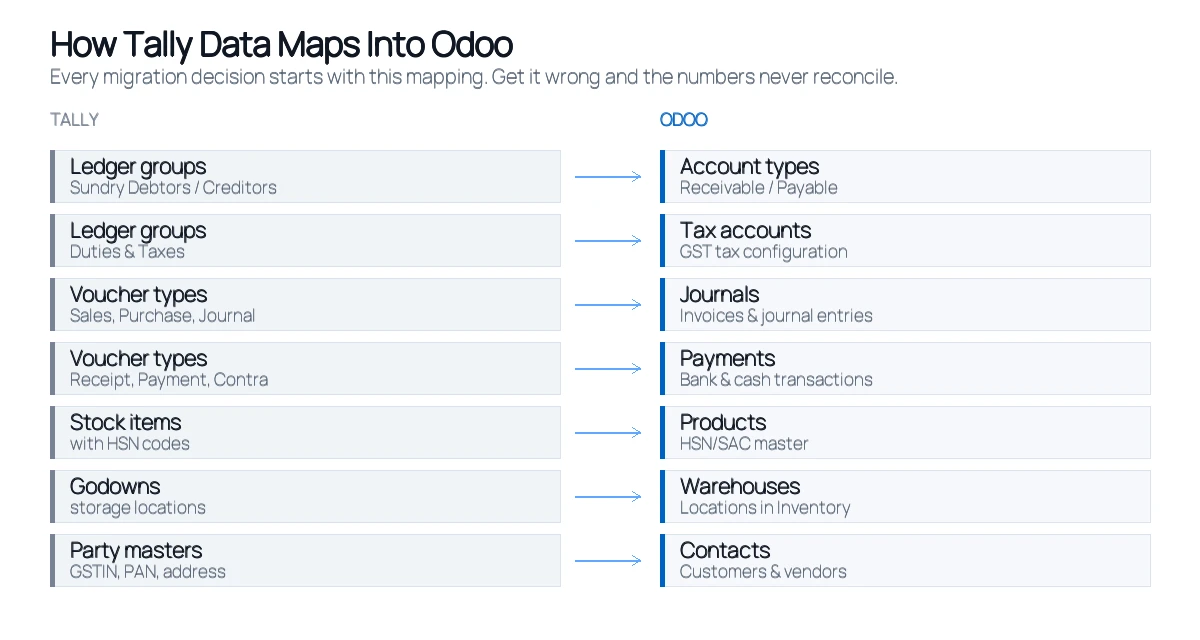
| Tally concept | Odoo equivalent | What to watch |
|---|---|---|
| Ledger under Sundry Debtors / Creditors | Contact + receivable/payable account | Tally makes every party a ledger. Odoo separates the contact from the account. One Tally ledger becomes two objects. |
| Duties & Taxes ledgers | Tax accounts and tax configuration | Don't migrate these as balances. Rebuild GST natively in Odoo, then bring the closing balances across. |
| Sales / Purchase vouchers | Customer invoices / vendor bills | Map to real invoice documents, not raw journal entries, or GST reports won't populate. |
| Receipt / Payment / Contra | Payments and bank transfers | Contra entries (bank-to-cash) have no direct Odoo equivalent — they become internal transfers. |
| Journal vouchers | Journal entries | The one near-direct mapping. Still needs the correct journal assigned. |
| Stock items | Products (storable) | HSN/SAC codes must come across, or every invoice fails GST validation later. |
| Godowns | Warehouses and internal locations | Odoo's location hierarchy is deeper than Tally's. Decide the structure before importing stock. |
| Units of measure | UoM and UoM categories | Odoo enforces conversion within a category more strictly than Tally does. |
The row that causes the most trouble is the first one. In Tally, a customer is a ledger with a balance. In Odoo, a customer is a contact, and their balance lives in a receivable account that many contacts share. Teams who miss this end up creating hundreds of unnecessary accounts, and the chart of accounts becomes unusable within a year.
How to get your data out of Tally
Tally is more open than its reputation suggests. There are three practical routes, and choosing the wrong one costs weeks.
The XML gateway. Tally runs a small HTTP server on port 9000 that speaks XML. You POST an Export request to read a collection — ledgers, vouchers, stock items, outstanding bills — and get structured XML back. This is the most reliable route for a migration because it returns exactly the fields Tally holds, including the ones the standard Excel export drops. It's also scriptable, which matters when you run the extract repeatedly during testing.
TDL. Tally Definition Language lets you define custom report formats and export precisely the shape you want. Worth the effort when the default collections don't give you a field you need — commonly cost centre allocations or bill-wise breakups.
ODBC. Long the standard answer, and still widely recommended in older guides. It is deprecated from TallyPrime 4.0 onwards. It may work on your installation today; it is not what you should build a new migration pipeline on in 2026.
Whatever route you pick, extract to a staging layer first — a set of intermediate CSV or JSON files you can inspect, clean and re-run. Going straight from Tally into Odoo gives you nowhere to see what went wrong. The same principle applies to any source system, and we've written more generally about how Odoo handles data migration from other systems.
Setting up the Odoo side for India
Before any data lands, the Odoo database needs its Indian fiscal configuration in place. Install the localization first, because installing it after you've imported data means re-tagging everything.
l10n_in— Indian Accounting. The default fiscal localization package: chart of accounts and tax structure.l10n_in_edi— Indian e-invoicing, for IRN generation against the Invoice Registration Portal.l10n_in_ewaybill— e-way bill integration, withl10n_in_ewaybill_stockif you need e-way bills raised from the Inventory app.l10n_in_reports— Indian accounting reports, including GST return filing reports.
Alongside the modules, three configuration items need to be correct before import: your company GSTIN and PAN, the HSN/SAC master (which can be bulk imported and then populates automatically on invoices), and your GST tax rates mapped to the right fiscal positions for intra-state versus inter-state supply. Get the fiscal positions wrong and every migrated invoice will compute CGST/SGST where it should compute IGST.
If you use e-invoicing, the GSP configuration is a separate step and needs credentials from your provider. Don't leave it until go-live week — portal registration has its own lead time.
The step-by-step migration process
Step 1 — Decide how much history to move. This is a business decision, not a technical one, and making it first shrinks the whole project. Most businesses migrate masters, opening balances as of the cutover date, and one to two years of transaction history. Everything older stays in Tally as an archive you keep licensed and readable. Migrating fifteen years of vouchers to satisfy a hypothetical audit costs far more than it saves.
Step 2 — Clean the data in Tally. Duplicate party ledgers, stock items with no HSN code, ledgers under the wrong group, dormant accounts — fix these in Tally before extraction. Cleaning is dramatically cheaper on the source side, where your team already knows what each record means.
Step 3 — Extract to a staging layer. Pull ledgers, groups, party masters, stock items, godowns and vouchers into intermediate files. Verify counts and control totals against Tally's own reports at this point — trial balance total, stock value, party outstanding — before anything touches Odoo.
Step 4 — Configure Odoo, then import masters. Localization first, then chart of accounts, then contacts, products and warehouses. Import masters before transactions, always: a transaction referencing a contact that doesn't exist yet fails, and partial imports are painful to unwind.
Step 5 — Load opening balances. Bring in the trial balance as of the cutover date as an opening journal entry, plus bill-wise detail for outstanding receivables and payables so ageing reports work from day one. Stock comes in as an inventory adjustment valued to match Tally's closing stock value.
Step 6 — Migrate transaction history. Load the agreed window as proper invoices and bills rather than journal entries, so GST reports and party ledgers populate correctly. Expect this step to reveal problems the earlier ones hid.
Step 7 — Reconcile, then run parallel. Covered in detail below, because it's where migrations succeed or quietly fail. Then run both systems for at least one full period before switching off Tally entirely.
The GST reconciliation checkpoint
This is the section that matters most, and the one most Tally-to-Odoo guides skip entirely.
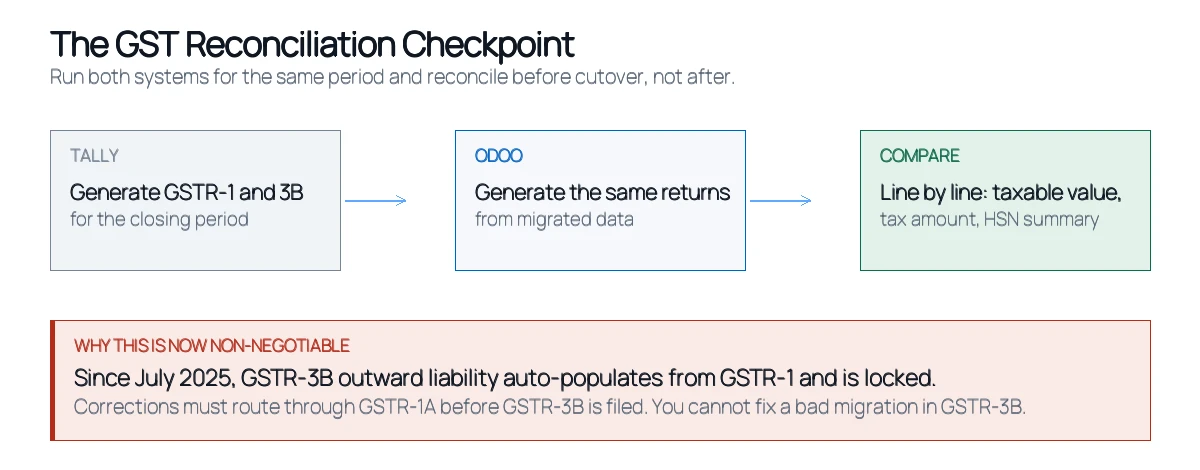
Before you cut over, generate GSTR-1 and GSTR-3B from Tally for the closing period, generate the same returns from the migrated data in Odoo, and compare them line by line: taxable value, tax amount, rate-wise breakup and HSN summary. Not totals — line by line. A migration can produce a correct grand total while individual invoices sit under the wrong tax rate, and the grand total is not what gets filed.
This has become materially more important recently. Since the July 2025 tax period, the outward liability auto-populated into GSTR-3B from GSTR-1 is hard-locked and no longer editable. Corrections have to be routed through GSTR-1A, and GSTR-1A must be filed before GSTR-3B for that period — once GSTR-3B is filed, the window is gone. The filing process saw further changes from April 2026, so confirm the current mechanics with your CA rather than relying on any blog, this one included.
The practical consequence is straightforward: the old habit of adjusting a discrepancy at the GSTR-3B stage no longer works. If your migrated data produces the wrong GSTR-1, you are correcting it through a formal amendment under time pressure, in your first month on a new system. That is precisely the situation a pre-cutover reconciliation exists to prevent.
Two further checks worth running before go-live: reconcile input tax credit against GSTR-2B for the same period, and confirm that place-of-supply logic produces IGST on inter-state invoices and CGST/SGST on intra-state ones. Place of supply is the single most common source of post-migration GST errors.
What doesn't migrate cleanly
Being straightforward about this is part of doing the job properly.
- Cost centres. Tally cost centres map to Odoo analytic accounts, but the models differ enough that the mapping needs designing rather than converting.
- Bill-wise details. They migrate, but the linkage between a payment and the specific invoice it settles often needs rebuilding to make ageing reports accurate.
- Tally customisations. Anything built in TDL has no Odoo equivalent. It gets re-implemented, not converted.
- Multi-currency history. Historical exchange-rate treatment differs between the two systems; revalued balances rarely match exactly without adjustment.
- Inventory valuation method. If Tally is on FIFO or weighted average, Odoo must be configured to match before stock loads, or your closing stock value will differ.
- Reports and print formats. Every custom invoice layout is rebuilt in Odoo's template engine.
How long does a Tally to Odoo migration take?
For a single-company Tally file with clean masters, standard GST, one location and one to two years of history, the data migration typically runs a few weeks. Multi-company or multi-godown setups, heavy TDL customisation, multi-currency transactions, or poor data quality push it considerably longer — and the wider Odoo implementation around it (training, process design, integrations) is usually the larger share of the project either way.
The variables that actually drive cost: number of Tally companies to consolidate, volume and quality of master data, how much transaction history you migrate, the complexity of your GST setup, whether e-invoicing and e-way bills are in scope, and how much custom reporting has to be rebuilt. There's no meaningful figure without looking at the actual Tally file — anyone quoting one before that is guessing.
One decision saves more time than any other: cutting over at a financial year boundary. Opening balances are cleaner, the reconciliation window is natural, and your team isn't running two systems through a GST filing cycle.
Wondering what your Tally data would actually require? An assessment looks at your company structure, masters, GST configuration and history volume, then comes back with real scope and timeline. Book a free migration assessment.
Odiware's approach to Tally to Odoo migration
We treat this as a business continuity exercise rather than a data transfer, because a finance team that can't close the month is a bigger problem than a delayed project.
The sequence starts with a mapping workshop: your Tally groups, ledgers and voucher types against Odoo's account types, journals and documents, agreed on paper before any extraction. Migration then runs into a staging database first, where GST reports are generated and reconciled against Tally's own returns for the same period. Custom TDL reports get scoped as rebuild work rather than discovered late. Cutover is planned to a period boundary, with Tally kept live and readable as an archive rather than switched off on day one.
That methodology is the same one behind our Odoo migration services, whether the source is Tally, SAP or an older Odoo version. A recent example from the same team: a mid-sized IT services company migrated HRMS, payroll and recruitment from Odoo 17 Community to Odoo 18 Community, with custom Indian payroll rules — PF, ESI, PT and TDS — that had to keep calculating correctly throughout. Monthly payroll cycles ran without disruption. The full Odoo migration case study covers how that was handled.
If you're also deciding which Odoo release to land on, our guide to Odoo supported versions covers the current support windows and end-of-life dates — worth reading before you commit to a target version.
Tally to Odoo migration FAQ
Can Tally data be migrated to Odoo?
Yes. Ledgers, party masters, stock items, godowns, opening balances and transaction history can all be moved. The work isn't extracting the data — Tally's XML gateway handles that reliably — it's mapping Tally's ledger-and-voucher model onto Odoo's account-and-journal model correctly.
How do I export data from Tally for migration?
TallyPrime runs an XML gateway over HTTP on port 9000 that returns structured data for ledgers, vouchers, stock items and outstanding bills. TDL can produce custom extracts where the standard collections fall short. ODBC also exists but is deprecated from TallyPrime 4.0 onwards.
Should I migrate all my Tally history?
Usually not. Most businesses move masters, opening balances and one to two years of transactions, keeping the Tally file as a readable archive for anything older. Full-history migrations cost significantly more and rarely earn it back.
Will my GST filings still work after migrating to Odoo?
Yes, provided the Indian localization is configured before import and you reconcile GST reports against Tally's for the closing period before cutover. Odoo's Indian accounting reports module generates GST return reports; the risk is misconfigured tax rates or place-of-supply logic, not the filing itself.
What happens to my Tally cost centres?
They map to Odoo's analytic accounts, but the two models differ enough that the mapping has to be designed rather than converted mechanically. Treat it as a configuration decision made during the mapping workshop, not an automated step.
When is the best time to migrate from Tally to Odoo?
At a financial year boundary, or failing that a quarter end. Opening balances are cleaner, reconciliation has a natural cut-off, and your finance team isn't running parallel systems through a GST filing cycle.
Can I run Tally and Odoo at the same time?
For a defined parallel period, yes, and it's recommended — typically one full month or quarter where both systems record the same transactions and the results are compared. Running both indefinitely is not sustainable, since double entry into two systems reliably drifts.
Does Odoo support e-invoicing and e-way bills in India?
Yes, through the Indian e-invoicing and e-way bill modules in the fiscal localization. E-invoicing requires a GSP configuration with valid credentials, which has its own registration lead time — start it well before go-live rather than during cutover week.
Start with the mapping, not the export
Most Tally to Odoo migrations that go badly went badly at the very beginning: someone exported the data before anyone had agreed how Tally's structure would translate into Odoo's. The extract is the easy part. Deciding that a Sundry Debtors ledger becomes a contact plus a shared receivable account, that Duties & Taxes gets rebuilt rather than migrated, and that contra vouchers become internal transfers — that's the work, and it's cheap to do on paper and expensive to fix in production.
If you're considering the move, the first useful step isn't scheduling a cutover. It's a look at your actual Tally file: how many companies, how clean the masters are, how your GST is configured, and how much history genuinely needs to come across.
Find out what your Tally data would actually require. A migration assessment maps your current setup against Odoo and comes back with real scope, timeline and risk. No obligation attached. Book a free Odoo migration assessment.
Editorial note: this article was last verified on 6 September 2026. GST filing rules and Tally's export interfaces both change — confirm current requirements with your CA and against Tally's and Odoo's official documentation before planning a migration.
We handle the full transfer — masters, opening balances, historical transactions — validated at every step so your books reconcile after go-live.
 ODOO IMPLEMENTATION PARTNER