Here is the part most guides bury: moving from Odoo Community to Odoo Enterprise is not a data migration. Your database doesn't move anywhere. You back it up, stop the server, install a single module called web_enterprise, restart, and enter your subscription code — and the same database is now an Enterprise database, with every record exactly where it was.
Here is the part most guides bury: moving from Odoo Community to Odoo Enterprise is not a data migration. Your database doesn't move anywhere. You back it up, stop the server, install a single module called web_enterprise, restart, and enter your subscription code — and the same database is now an Enterprise database, with every record exactly where it was. The technical switch is genuinely simple. The work that actually costs you time sits either side of it: the custom modules you've accumulated, and the decision about whether the subscription earns its price at all.
Last verified: 6 September 2026 against Odoo's official documentation. Pricing, app availability and module names change between versions — confirm against Odoo's current documentation before you plan a switch.
Quick answer
- It's a switch, not a migration. The same PostgreSQL database is converted in place. No records are exported, transformed or re-imported.
- The mechanism: install the
web_enterprisemodule, then link the database to your Odoo Enterprise subscription code. - What you keep: all data, users, configuration and history. Your chart of accounts, customers, invoices and stock stay exactly as they are.
- What you gain: Enterprise-only apps such as Studio, integrated payroll, advanced manufacturing, and accounting features including
account_accountantandaccount_reports. - Where the real work is: custom modules that assume a Community backend, and OCA apps that duplicate what Enterprise now provides natively.
- The honest caveat: Enterprise is a recurring per-user subscription. For plenty of businesses, staying on Community is the right answer.
First, the thing most guides get wrong
Search for "Odoo Community to Enterprise migration" and you'll find articles describing data extraction, field mapping and validation cycles. That's a description of migrating between two different systems, and it doesn't apply here.
Odoo's own documentation doesn't call this a migration at all. It calls it switching, and the distinction is not pedantic — it changes your risk profile entirely. Community and Enterprise share the same core, the same ORM and the same database schema. Enterprise is the same software with additional modules and a licence attached. Installing web_enterprise flips the database's edition flag and unlocks the Enterprise app set. Nothing is transformed.
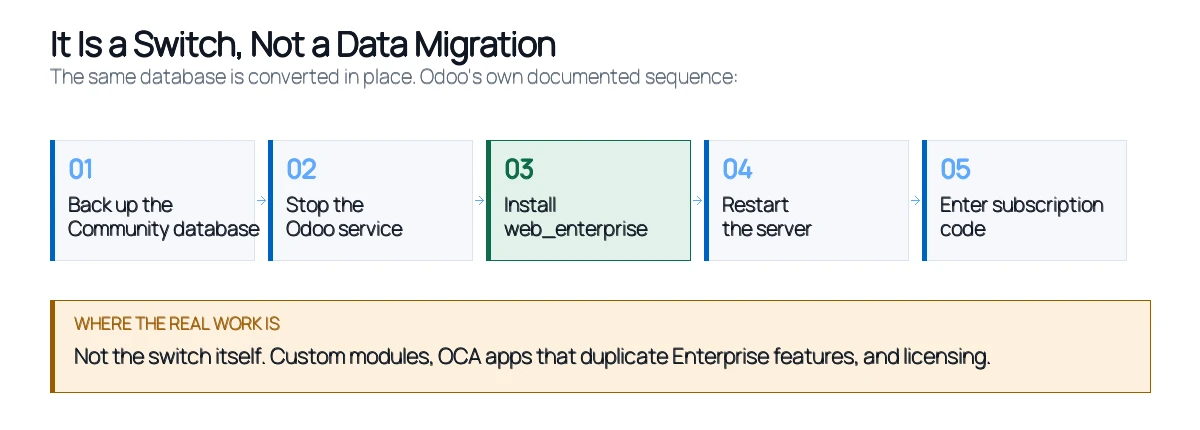
Practically, that means the failure modes people fear most in a migration — lost transactions, broken account balances, orphaned records — are not the risks here. The risks are compatibility and cost, and they need a different kind of preparation.
The documented switch process
Odoo publishes the sequence, and it's short. The general shape is the same on every platform: back up the Community database, shut down the server, install web_enterprise, restart, and enter the subscription code you receive by email.
The specifics differ by how you installed Odoo.
On Linux, using the installer. Back up, stop the service with sudo service odoo stop, then install the Enterprise .deb package — it installs over the Community package. Update the database with odoo-bin -d <database> -i web_enterprise --stop-after-init, then log in as usual and enter your subscription code.
On Linux, from source. Shut down, back up, then update the --addons-path in your launch command to include the Enterprise addons. Install web_enterprise the same way, then restart the server using the updated addons path. Missing that path update is the single most common reason this fails on source installs.
On Windows. Back up, uninstall Odoo Community using its uninstaller — PostgreSQL stays installed, which is what preserves your data — then run the Enterprise installer, pointing it at the same folder. Uncheck the option to start Odoo at the end, then run the module install from the server subfolder before letting the service come up.
Depending on database size, the module installation can take a while. That's normal; it's writing to every relevant table rather than hanging.
One caveat worth stating clearly: this is the on-premise procedure. If you're on Odoo Online or Odoo.sh, the path is different and largely handled through your subscription rather than the command line — talk to Odoo or your partner rather than following these steps.
Where the real work actually is
If the switch is five commands, why do these projects take weeks? Because of what you've built on top of Community in the meantime.
Custom modules. Anything written against Community will still load, but modules that inherit or override views the Enterprise UI replaces can behave oddly — the Enterprise web client is a different frontend. Every custom module needs testing against the switched database before production, not after.
OCA apps that now duplicate Enterprise features. This is the one that catches people. Community users typically install Odoo Community Association modules to fill gaps — accounting reports, asset management, document handling. After the switch, Enterprise provides native equivalents, and running both creates genuine conflicts: duplicated menu entries, competing field definitions, and occasionally two modules writing to the same records. Every OCA module needs a decision: keep it, or uninstall it and adopt the native feature. Uninstalling is not always trivial if it holds data.
Reports and print templates. Custom QWeb templates usually survive, but ones built to compensate for a missing Community feature are worth retiring rather than maintaining alongside a native report that does it better.
This is genuinely closer to an upgrade than a migration in the effort it demands, and the same discipline applies. If you're weighing this against a version upgrade at the same time, our note on Odoo migration vs Odoo upgrade covers where the two differ.
Does the switch earn its cost?
Enterprise is a recurring per-user subscription, so this is a budget decision that repeats every year, not a one-off project cost. It deserves an honest answer, and for a meaningful number of businesses the honest answer is no.
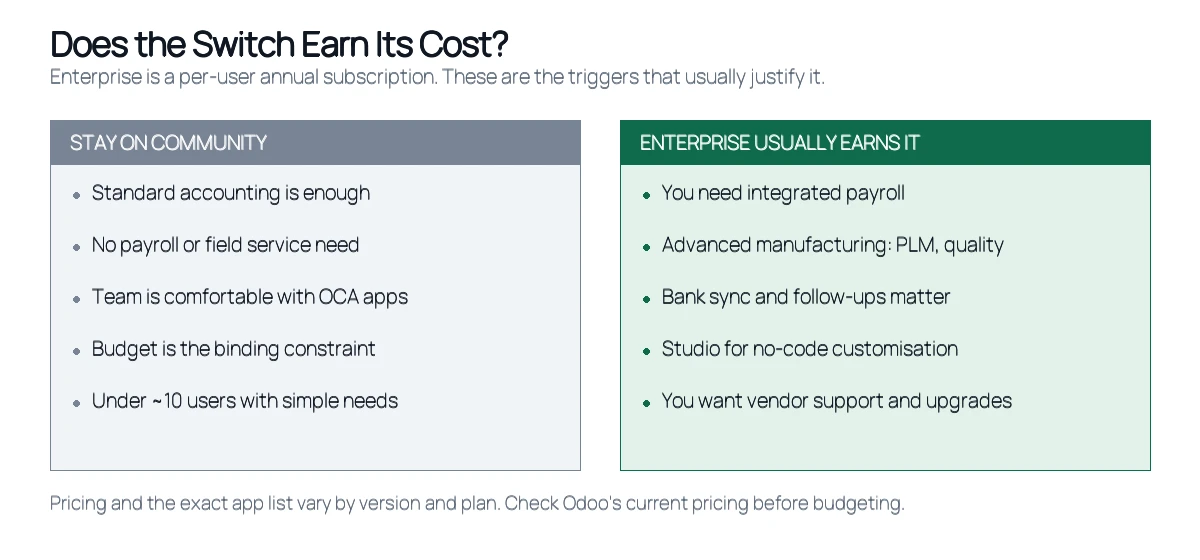
The triggers that usually justify it are specific rather than general. Integrated payroll is the most common one — running payroll outside the ERP and reconciling it back is a recurring monthly cost that Enterprise removes. Advanced manufacturing is another: if you need PLM, quality control or maintenance scheduling, Community will have you building or buying most of it. Bank synchronisation and automated follow-ups matter enormously to a finance team processing volume. And Studio, which lets non-developers adjust forms and workflows, changes who in your business can make small changes without raising a ticket.
The reasons to stay are equally concrete. If standard accounting covers you, if your team is genuinely productive with the OCA modules they've chosen, and if budget is the binding constraint, Community remains a complete ERP rather than a crippled trial. The version you're on gets security patches either way while it's in support.
What doesn't justify the switch: a vague sense that the paid version must be better, or pressure to standardise. Price the subscription across three years at your actual user count, then compare it against what you'd spend solving the same problems on Community. Sometimes the answer is obvious in the other direction.
Want that comparison run against your actual numbers? An assessment prices the subscription at your real user count and weighs it against what the same capability would cost you on Community. Get a free Odoo assessment.
For a feature-by-feature comparison of the two editions rather than the mechanics of moving between them, we've covered the difference between Odoo Community and Odoo Enterprise separately.
What the subscription actually includes
The apps get the attention, but a meaningful part of what you're buying isn't a feature at all.
Vendor support. Community has the forum and whatever partner you engage. Enterprise includes a support channel with Odoo itself. For a business whose operations stop when the ERP stops, that changes the risk calculation more than any single module.
Upgrade service. Odoo runs version upgrades for Enterprise subscribers. On Community you handle upgrades yourself or pay a partner each time. Since a major version arrives annually and standard support runs three years, that's a recurring cost Community users carry regardless — and it's the line most people leave out of the comparison.
Hosting options. An Enterprise subscription lets you run on Odoo Online or Odoo.sh rather than maintaining your own server, patching it and owning the backups. If your Community instance currently lives on a VPS somebody set up years ago, moving that burden off your plate has real value that never shows up on a feature matrix.
Studio. Worth calling out separately because it changes who can make changes. Adjusting a form, adding a field or altering a workflow stops being a developer task. For businesses without in-house Odoo skills, that alone can justify the subscription.
Weigh those four against the per-user cost. A comparison that only counts modules will usually undervalue the switch.
What to do before you switch
- Take a verified backup — and restore it somewhere to prove it works. This is your only route back.
- Inventory every installed module, separating core, OCA and custom. You need this list before anything else.
- Flag the OCA modules Enterprise replaces and decide keep-or-retire for each, in advance.
- Confirm your Odoo version is still supported, since switching edition and upgrading version at once is harder to debug.
- Count your actual users, not your headcount — the subscription is priced per user and this drives the whole business case.
- Rehearse on a copy of production, never on production itself.
- Test custom modules and reports against the switched copy before go-live.
- Plan the licence timing so you aren't paying for a subscription weeks before you're ready to use it.
One sequencing point worth emphasising: decide on your target version before you switch edition. If you're on an older release, it's usually cleaner to reach a supported version first, then switch, so any problem has one obvious cause. Our guide to Odoo supported versions covers the current support windows and end-of-life dates.
If you're still running Community on your own server
A large share of the businesses asking this question are running a self-installed Community instance, often set up quickly and never revisited. If that's you, two things are worth checking before you think about editions at all: whether your instance is on a supported version, and whether your backups actually restore.
Plenty of Community installs were stood up following a setup guide — including our own guide to installing Odoo Community on Windows and Linux — and then accumulated modules and customisations without much record of what changed. Rebuilding that picture is the first real task. The switch itself is the easy part; knowing what's in your database is the work.
Odiware's approach
We treat an edition switch as a compatibility exercise rather than a data project, because that's what it actually is.
The sequence starts with a module audit: every installed module classified as core, OCA or custom, with a keep-or-retire decision made on paper before anything is touched. The switch is then rehearsed on a restored copy of production, where custom modules and reports are tested against the Enterprise web client and OCA conflicts surface without business impact. Only then does the licensed switch happen on production, at a quiet point in the week, with the verified backup as the rollback route. Afterwards we stay close for the first couple of weeks, since conflicts between a retired OCA module and its native replacement tend to appear in ordinary daily use rather than in testing.
That methodology is the same one behind our Odoo migration services, whether the project is an edition switch, a version upgrade or a move from a different ERP entirely. A recent example from the same team: a mid-sized IT services company running HRMS, payroll and recruitment moved between Odoo Community versions with custom Indian payroll rules — PF, ESI, PT and TDS — that had to keep calculating correctly throughout. Monthly payroll cycles ran without disruption. The full Odoo migration case study covers how that was handled.
Community to Enterprise FAQ
Is moving from Odoo Community to Enterprise a data migration?
No. The same database is converted in place by installing the web_enterprise module and entering a subscription code. No data is exported or re-imported, and all records, users and configuration are preserved exactly as they were.
Will I lose any data switching to Enterprise?
Not through the switch itself, since nothing is moved. The realistic risk is a module conflict — typically an OCA app duplicating a native Enterprise feature — which is why you rehearse on a restored copy and keep a verified backup before starting.
Can I switch back from Enterprise to Community?
There's no supported one-click reverse. In practice you restore the pre-switch backup, which is precisely why that backup matters. Any data created after the switch would need handling separately, so treat the decision as effectively one-way once you're live.
Do my custom modules still work after switching?
Usually, since the core and ORM are the same. The exceptions are modules that inherit or override views the Enterprise web client replaces. Every custom module should be tested against a switched copy before production rather than assumed to be fine.
What happens to my OCA modules?
They keep working, but several will now duplicate features Enterprise provides natively, which can cause duplicated menus and conflicting field definitions. Each needs a deliberate keep-or-retire decision, and retiring one that holds data takes more care than a simple uninstall.
How long does the switch take?
The technical step is short — often under an hour, longer on large databases while the module installs. The project around it, meaning the module audit, rehearsal and testing, is what determines the real timeline and depends entirely on how much custom and OCA code you've accumulated.
Does Enterprise cost more per user every year?
Yes. Enterprise is a recurring per-user subscription rather than a one-time licence, so the correct comparison is three years of subscription against what solving the same problems on Community would cost. Check Odoo's current pricing for figures, since plans and rates change.
Should I upgrade my version and switch edition at the same time?
Generally not. Doing both at once means any problem has two possible causes. Reaching a supported version first, then switching edition, keeps each step debuggable — and if something breaks you know which change caused it.
The switch is easy. The decision isn't.
If you take one thing from this: stop thinking about the Community-to-Enterprise move as a migration project. Your data isn't going anywhere, and nobody needs to map a field. What deserves your attention is the module inventory you've never written down, and an honest three-year cost comparison at your real user count.
Get those two right and the technical switch is an evening's work with a backup in hand. Get them wrong and you'll spend a month untangling an OCA module fighting its native replacement, while paying a subscription for features you hadn't planned to use.
Not sure whether Enterprise earns its cost for your setup? An assessment reviews your installed modules, customisations and user count, then comes back with a straight answer — including when that answer is "stay on Community". Book a free Odoo assessment.
Editorial note: switch procedures, app availability and pricing are taken from Odoo's official documentation as of 6 September 2026 and change between versions. Verify against current Odoo documentation before planning a switch.
We check which of your Community modules and customizations carry over, what Enterprise replaces, and what the switch involves for your data.
Not ready to talk yet? Get the Odoo migration checklist: a printable PDF and a tracking spreadsheet for every step, free.
 ODOO IMPLEMENTATION PARTNER