If your filing cabinet is bursting, your inventory count never matches what's actually on the shelf, and your team spends more time re-entering data than serving customers, you're not alone. Thousands of business owners are asking the same question: how to digitize a small business without disrupting the day-to-day work that keeps the lights on.
If your filing cabinet is bursting, your inventory count never matches what's actually on the shelf, and your team spends more time re-entering data than serving customers, you're not alone. Thousands of business owners are asking the same question: how to digitize a small business without disrupting the day-to-day work that keeps the lights on.
Digital transformation isn't a buzzword reserved for big corporations anymore. It's become a practical necessity for small businesses that want to reduce manual processes, cut down on costly errors, and free up time for growth. This guide walks you through a step-by-step business automation roadmap, from your first process audit to going fully digital, so you can make the switch with confidence.
What Does It Mean to Digitize a Small Business?
Digitizing a small business means replacing manual, paper-based, or disconnected processes with connected digital systems that talk to each other. It isn't about buying more software. It's about giving your business a single source of truth.
Think about how orders move today. A customer calls in, someone jots the order on a notepad, another person keys it into an Excel sheet, and a third checks a paper stock ledger to see if the item is even available. Every handoff is a chance for a mistake. Digitizing that same order flow means the order is captured once, inventory updates automatically, and an invoice is triggered without anyone touching a spreadsheet.
At its core, digitizing business processes is about accuracy, speed, and visibility, not technology for its own sake.
Why Small Businesses Need Digital Transformation
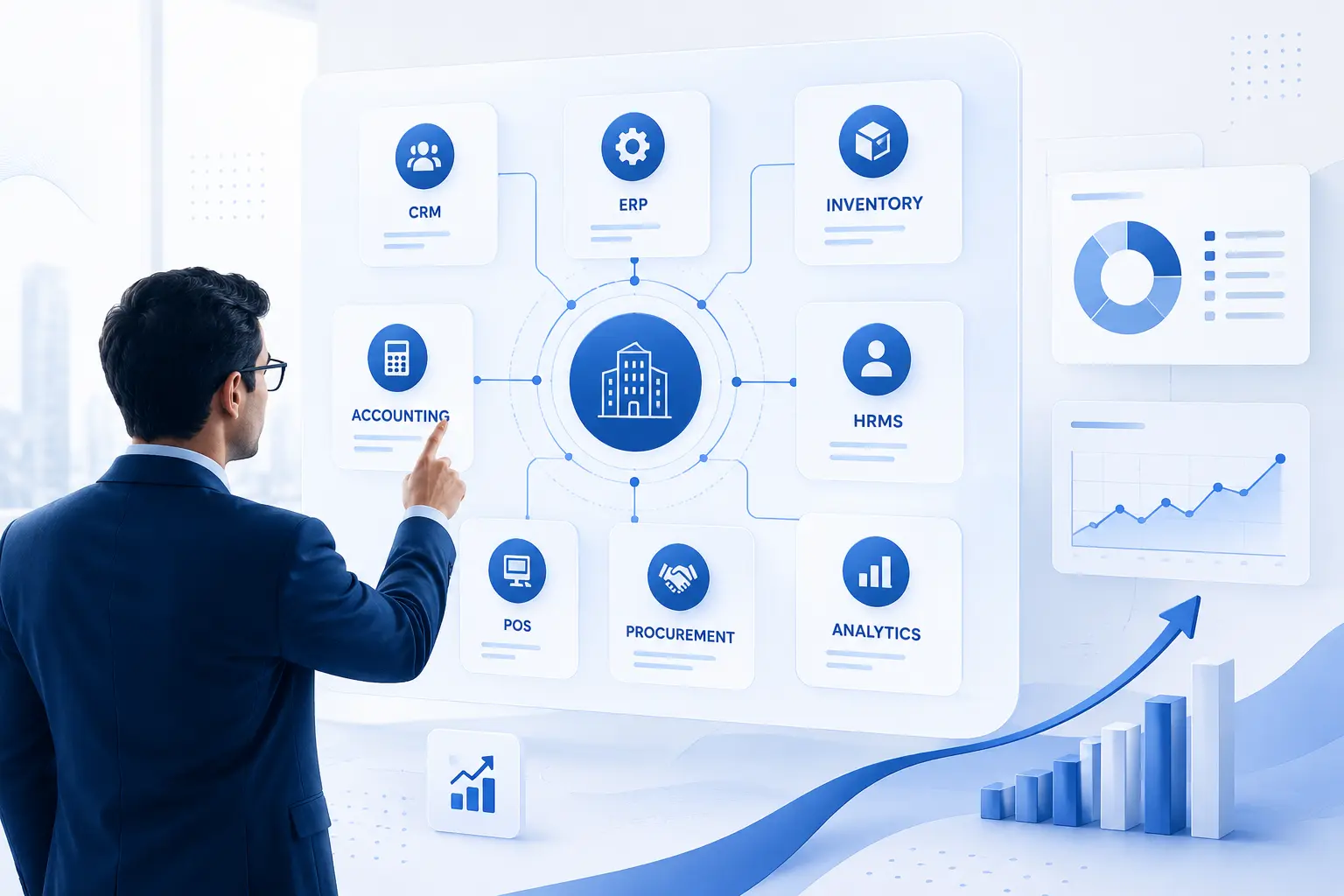
Small business digital transformation isn't optional anymore. Customers expect fast responses, accurate invoices, and real-time order updates. Competitors who've already automated repetitive tasks can quote faster, ship faster, and serve more customers with the same headcount.
There's a cost side to this too. Manual processes hide inefficiencies. A staff member manually reconciling invoices might spend three hours a week doing something a connected accounting system finishes in minutes. Multiply that across every department, and you start to see how much time, and money, gets lost to paperwork and duplicate data entry.
A digital transformation strategy isn't about replacing people. It's about removing the repetitive, error-prone tasks that keep your best people from doing higher-value work.
Signs Your Business Needs Digitization
You don't need a consultant to tell you it's time. Most business owners already sense it. Common signs include:
- You keep multiple versions of the same spreadsheet and aren't sure which one is current
- Inventory counts on paper or in Excel rarely match what's actually on the shelf
- Employees re-enter the same customer or order data into two or three different tools
- Month-end reporting takes days because data lives in different files
- You've lost a sale because no one could quickly check stock or order history
- New employees take weeks to learn "how we do things" because nothing is documented
If two or more of these sound familiar, your business is already paying an invisible tax on manual work.
How Different Types of Businesses Can Digitize Their Operations
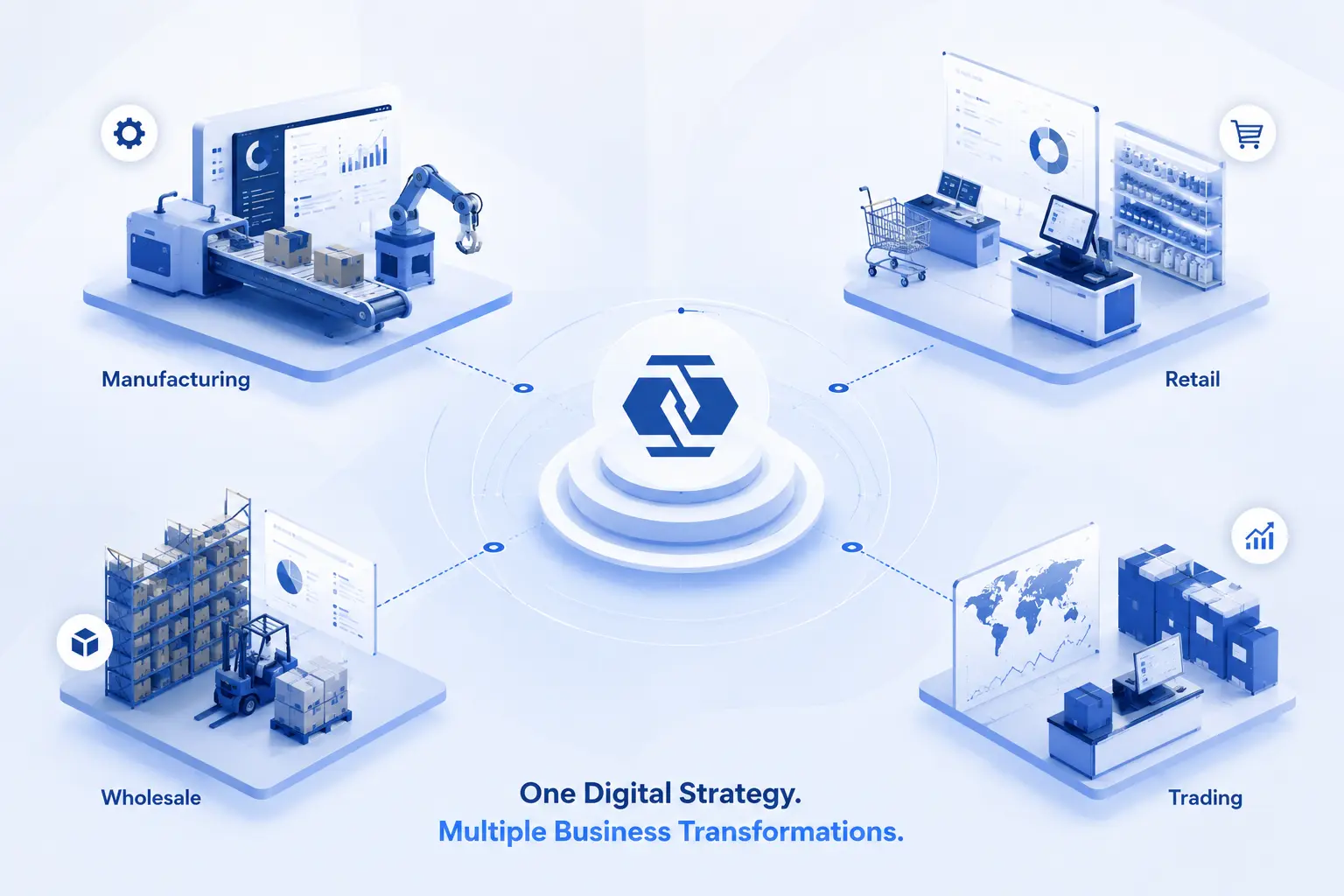
Digitization looks different depending on what you sell and how you operate. The core idea, replacing manual work with connected systems, stays the same, but where it hurts most changes by industry. Here's what it typically looks like across the businesses we see most often.
Manufacturing
Production schedules often live on a whiteboard or a shared spreadsheet that's out of date by lunchtime. Raw material shortages get discovered mid-production, not before it. Quality issues get traced back manually, days after the batch has already shipped.
Digitizing production planning gives everyone, from the shop floor to purchasing, the same live schedule. Raw material levels are visible before a job starts, and quality checks get tied directly to each work order instead of a separate paper log.
The outcome: fewer production stoppages, tighter delivery timelines, and less material wasted on rework.
Retail
Stock counts on the shelf rarely match what the system says, especially once a business sells both in-store and online. End-of-day reconciliation eats into an hour or two every single night.
Digitizing retail operations means the point of sale, online store, and inventory all update from the same data, in real time. A sale in-store reduces the same stock count a customer sees online.
The outcome: fewer stockouts and overselling, a faster daily close, and a smoother checkout experience for customers.
Wholesale
Bulk orders often move through phone calls and email threads. Pricing tiers for different buyers get tracked in spreadsheets that only one person fully understands, and invoicing happens days after goods have already left the warehouse.
Digitizing wholesale operations means orders are captured directly into the system, tiered pricing applies automatically, and an invoice goes out the moment goods are dispatched, not whenever someone gets to it.
The outcome: a faster order-to-cash cycle, fewer pricing disputes, and stronger relationships with repeat buyers.
Trading
Trading businesses juggle documentation, currency conversions, and margin calculations for every single deal, often redone by hand in a spreadsheet each time. Shipment updates get scattered across emails from different freight partners.
Digitizing trading operations centralizes deal tracking, documentation, and margin calculations in one place, with shipment status visible without chasing an email chain.
The outcome: faster deal turnaround, fewer compliance slip-ups, and a clearer picture of profitability on every transaction.
Small and Medium Enterprises (SMEs)
As a small business adds headcount, it often keeps running on shared spreadsheets and one person's institutional memory. New hires take weeks to learn processes that were never written down anywhere.
Digitizing early gives a growing team standardized workflows that don't depend on any single person being in the office.
The outcome: smoother scaling, less operational chaos as the team grows, and processes that survive employee turnover.
Step 1: Audit Existing Business Processes
Before you touch any software, map out how work actually happens today, not how it's supposed to happen on paper. Walk through each department: sales, purchasing, inventory, accounting, HR. For every process, note who does it, how long it takes, what tools they use, and where errors tend to creep in.
This audit becomes your baseline. It tells you which processes cost you the most time and which ones are safe to leave alone for now. Most businesses discover that a small share of their processes create most of their daily headaches, usually order management, inventory tracking, and invoicing.
Step 2: Replace Paper Records
Paper is the starting point for almost every business, and it's usually the first thing to go. Filing cabinets full of invoices, delivery notes, and employee files aren't just space-consuming, they're a liability. A single flood, fire, or misplaced folder can wipe out years of records.
Moving from paper to digital doesn't mean scanning everything and calling it done. It means capturing information once, at the source, in a system other departments can access instantly. For a deeper walkthrough of this stage, our guide on paper records to business software covers digitizing paper documents in more detail, including how to handle historical records during the transition.
Businesses that get this step right find replacing manual records is less about buying software and more about deciding what information actually needs to be tracked going forward, one useful benchmark for moving from paper to digital overall.
Step 3: Stop Managing Data in Excel
Excel is often the bridge between paper and a real system, and it's a useful one. But spreadsheets break down fast once more than one or two people need to update the same file. Version conflicts, broken formulas, and "who has the latest copy" emails are signs you've outgrown it.
The real risk with spreadsheets is that they don't talk to each other. Your sales sheet doesn't know what's in your inventory sheet. Your accounting sheet doesn't know a sale even happened until someone updates it manually. That gap is exactly where errors and delays happen.
If you're weighing whether to keep patching together spreadsheets or move to dedicated software, our comparison on ERP vs Excel breaks down where ERP software vs spreadsheets diverge on accuracy, scalability, and reporting speed. Many owners only realize why Excel isn't enough after a costly mistake: a missed reorder, a double invoice, a payroll error, all reasons more businesses look at managing business with ERP instead.
Step 4: Choose the Right Business Software
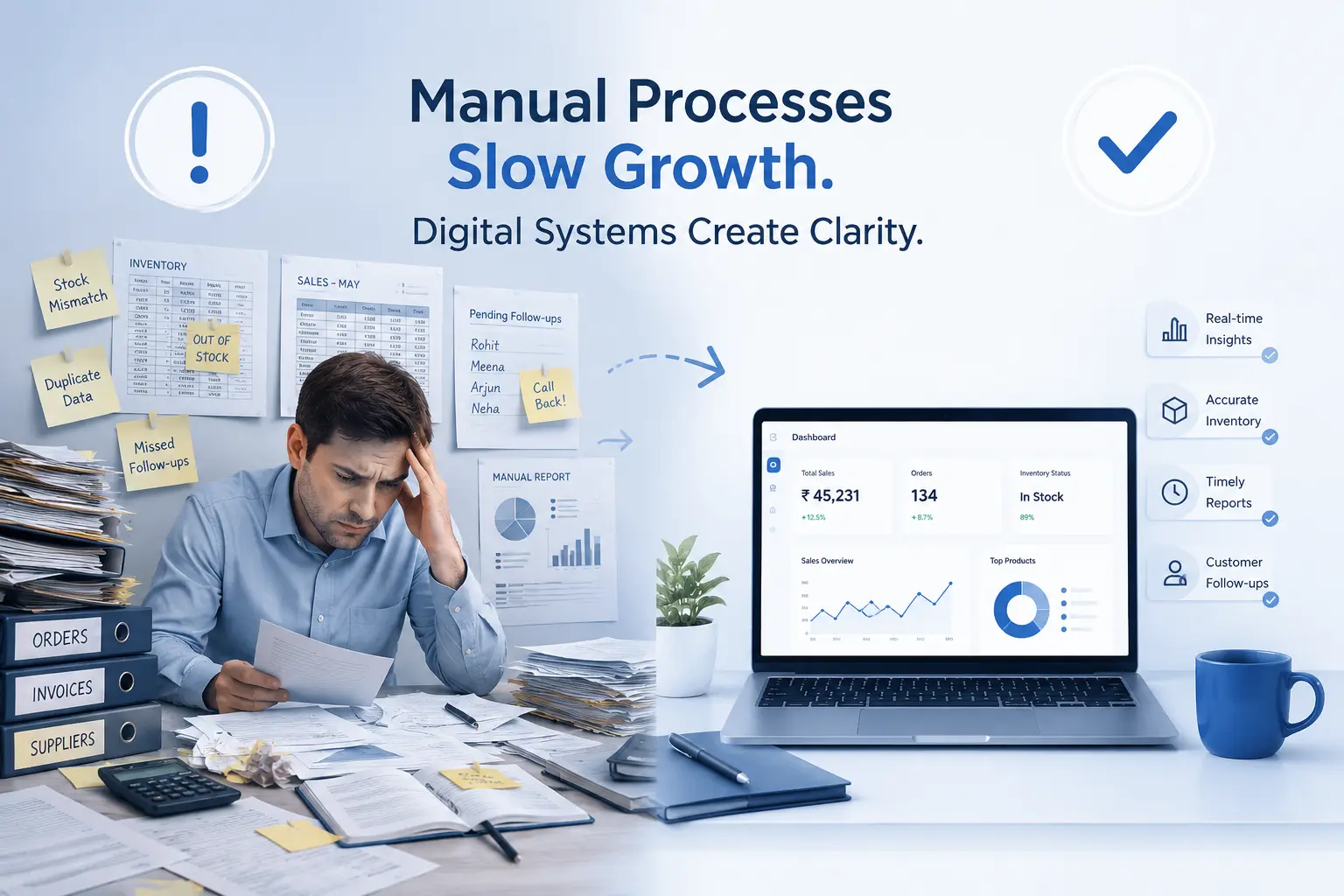
This is where most owners feel overwhelmed, because there are dozens of categories and even more tools. Here's how to think about it in plain business terms:
- CRM: Keeps track of every customer conversation, quote, and follow-up, so leads don't fall through the cracks.
- ERP: Connects sales, inventory, accounting, and operations into one system, so information flows automatically between departments.
- Accounting Software: Handles invoicing, expenses, and financial reporting without manual reconciliation.
- Inventory Management: Gives you real-time visibility into stock levels across locations, so you never oversell or run short.
- HRMS: Manages employee records, attendance, payroll, and leave in one place instead of scattered files.
- POS: Captures in-store sales and syncs them instantly with inventory and accounting.
You don't need every tool on day one. Many small businesses start with two or three connected pieces and expand as they grow. The priority is choosing software that fits how your business actually operates, not the tool with the longest feature list. A simpler way to make this decision is to start from the business need, not the software category. Here's how the two usually line up:
|
Business Need |
Recommended Software |
Business Benefit |
|---|---|---|
|
Track every customer conversation and follow-up |
CRM |
No lead or quote falls through the cracks |
|
Real-time stock visibility across locations |
Inventory Management |
You never oversell or run short |
|
Accurate invoicing and financial reporting |
Accounting Software |
Less time reconciling books by hand |
|
Manage payroll, attendance, and leave |
HRMS |
Fewer manual HR and payroll errors |
|
Fast in-store checkout synced with stock |
POS |
Sales and inventory always match |
|
Connect sales, inventory, accounting, and operations |
ERP |
One source of truth across every department |
Most small businesses start by solving one or two of these needs, usually CRM or accounting first, because those pains show up earliest. The friction shows up later, once each tool has its own login, its own data, and its own version of the truth. That's usually the point where business owners start looking at whether one connected platform, rather than five disconnected ones, makes more sense.
This is where integrated ERP platforms like Odoo ERP tend to enter the conversation, not as a bigger, more complicated system, but as a way to bring CRM, accounting, inventory, and HR under one roof so the data only has to be entered once.
Step 5: Automate Daily Operations
Once your core data lives in one place, automation becomes possible. This is where business automation earns its reputation for saving real time. Instead of manually creating a purchase order when stock runs low, the system flags it automatically. Instead of manually chasing overdue invoices, reminders go out on their own.
Start small. Automate the tasks your team repeats every single day: order confirmations, low-stock alerts, invoice generation, approval routing. These digital workflows free up hours each week without requiring a complete operational overhaul.
Step 6: Train Employees
The best software in the world fails if your team doesn't trust it or know how to use it. Training isn't a one-time event, it's an ongoing habit. Start with the people who'll use the system daily, not just managers. Give them real scenarios to practice, not just a slideshow.
Expect some resistance. Employees who've done a task manually for years may worry the new system makes their role obsolete or exposes past shortcuts. Address this directly: explain that automation removes the repetitive part of the job, not the job itself.
Step 7: Track KPIs and Improve Continuously
Digitizing your business isn't a finish line, it's a starting point for better decision-making. Once your data is centralized, you can finally track KPIs that used to be guesswork: order fulfillment time, inventory turnover, customer response time, and cash flow cycles.
Review these numbers monthly, not just at year-end. Businesses that treat their new system as a live dashboard, rather than a filing cabinet with a login, get the most value out of digital transformation.
Common Mistakes Businesses Make During Digital Transformation
- Digitizing everything at once instead of prioritizing high-impact processes first
- Choosing software based on price alone, without checking if it fits actual workflows
- Skipping employee training and assuming the system is "self-explanatory"
- Migrating messy or duplicate data instead of cleaning it up first
- Treating digitization as a one-time IT project instead of an ongoing process
- Not assigning a clear internal owner to manage the transition
Here's how those mistakes typically play out, and what tends to work better instead:
|
Mistake |
Business Risk |
Better Approach |
|---|---|---|
|
Buying the cheapest option available |
Missing features force a second purchase within a year |
Compare total cost against what the business needs today and in 12 months |
|
Choosing software based on a demo alone |
Real daily workflows don't match the sales pitch |
Trial the system with your own data and real staff before committing |
|
Choosing disconnected point solutions |
Data stays siloed, defeating the purpose of digitizing |
Prioritize systems that integrate, or consolidate into one platform |
|
Skipping employee input during selection |
Low adoption after rollout, staff revert to old habits |
Involve daily users in the evaluation, not just managers |
|
Ignoring scalability |
Outgrowing the software within a year or two |
Choose a platform that can add modules as the business grows |
Benefits of Digitizing a Small Business
The gains from digitization aren't abstract, they show up in the numbers you track every week. Here's what typically changes:
|
Area |
Before Digitization |
After Digitization |
|---|---|---|
|
Record Keeping |
Paper files and physical folders |
Centralized digital records |
|
Data Accuracy |
Manual entry errors, duplicate data |
Single, reliable source of truth |
|
Inventory |
Manual counts, frequent mismatches |
Real-time stock visibility |
|
Reporting |
Days to compile month-end reports |
Reports available instantly |
|
Customer Management |
Scattered notes, missed follow-ups |
Centralized CRM tracking |
|
Employee Time |
Hours on repetitive data entry |
Time freed for higher-value work |
|
Decision Making |
Based on outdated or incomplete data |
Based on real-time analytics |
Is Your Business Ready for Digital Transformation?
Not every business needs to digitize everything at once. Use this quick check to see where you stand:
☐ You're spending more than a few hours a week reconciling spreadsheets
☐ Your inventory or stock counts often don't match what's actually on hand
☐ You've had to apologize to a customer over a data or order mistake
☐ Your team keeps asking the same "where do I find this" questions
☐ Month-end reporting takes more than a day to pull together
☐ You've delayed hiring because training someone on your current process takes too long
☐ You're planning to add a new sales channel, product line, or location within six months
If you checked four or more items, your business is ready to start digitizing, and waiting longer will likely cost more time and money than acting now.
Small Business Digital Transformation Checklist
Featured Snippet Target: "Small Business Digital Transformation Checklist"
☑ Identify manual processes
☑ Replace paper records
☑ Standardize workflows
☑ Choose software
☑ Migrate data
☑ Train employees
☑ Automate repetitive tasks
☑ Monitor KPIs
☑ Improve continuously
Digital Transformation Timeline
Most small businesses can complete a focused rollout in about six weeks:
|
Timeline |
Milestone |
|---|---|
|
Week 1 |
Business Assessment |
|
Week 2 |
Planning |
|
Week 3 |
Software Selection |
|
Week 4 |
Migration |
|
Week 5 |
Training |
|
Week 6 |
Go Live |
Frequently Asked Questions
How do I digitize my small business?
Start by auditing your current processes to see where time and accuracy are being lost. Replace paper records first, then move away from disconnected spreadsheets, and choose software, usually a CRM or ERP, that fits how your business actually works. Roll it out in stages, train your team, and track results before adding more automation.
What is digital transformation for small businesses?
It's the process of moving core business operations, sales, inventory, accounting, and HR, from manual or disconnected methods into a single connected digital system, so data flows automatically instead of being re-entered by hand.
What software does a small business need?
Most small businesses need some combination of a CRM for customer management, accounting software for finances, and inventory management if they hold stock. As operations grow more complex, many consolidate these into a single ERP platform.
How long does digital transformation take?
A focused rollout for a small business typically takes four to six weeks, covering assessment, planning, software selection, data migration, training, and go-live. Larger or multi-location businesses may need longer.
Is ERP necessary for small businesses?
Not on day one. Many small businesses start with simpler tools like a CRM or accounting software and move to ERP once they're managing multiple departments that need to share data in real time, usually when spreadsheets and separate apps start causing errors.
What are the benefits of digitizing business operations?
Fewer manual errors, faster order and invoice processing, real-time inventory visibility, better financial reporting, and more time for employees to focus on customers instead of paperwork.
How much does it cost to digitize a business?
Costs vary based on the number of users, modules, and whether you choose cloud or on-premise deployment. Many small businesses start with a lean, essential setup and add modules as they grow, rather than paying for a large system upfront.
Conclusion
Digitizing a small business rarely happens overnight, and it shouldn't. It starts with an honest look at your paper records and spreadsheets, moves through choosing the right software, and ends with a team that trusts the new system enough to rely on it daily. Each step removes a little more manual work and replaces it with visibility you didn't have before.
None of this requires getting everything right on day one. The businesses that succeed usually start with the one or two processes causing the most pain, prove the value there, and expand from that foundation. What matters most is starting before the cost of staying manual outweighs the effort of changing.
Once the basics are in place, many growing businesses find that a connected platform like Odoo ERP makes the next stage, tying sales, inventory, accounting, and HR together, far easier to manage than juggling separate tools. If the signs in this guide sound familiar, it's worth taking a closer look at whether an ERP system fits where your business is headed over the next few months.
Get a free 30-minute review with an Odiware Odoo consultant — bring your current setup and we'll map the fastest route to a working configuration.
 ODOO IMPLEMENTATION PARTNER