Most small businesses start with a notebook, a calculator, and a lot of hard work. Somewhere along the way, an Excel sheet gets added. Then a WhatsApp group for order updates. Then a second spreadsheet for stock, and a third for payments due.
Most small businesses start with a notebook, a calculator, and a lot of hard work. Somewhere along the way, an Excel sheet gets added. Then a WhatsApp group for order updates. Then a second spreadsheet for stock, and a third for payments due.
This setup works fine when the business is small. One person can remember which customer paid, which supplier is due, and how much stock sits in the back room.
The trouble starts when the business grows. More customers, more orders, more staff, and suddenly nobody has the full picture anymore. Numbers stop matching. Stock goes missing. Invoices get delayed, and small mistakes start costing real money.
This guide explains why paper records and spreadsheets stop working as a business grows, what these manual habits actually cost, and how a business management system, commonly called ERP, fixes these problems department by department.
You will also find real business scenarios from manufacturing, retail, wholesale, distribution, construction and service businesses, a practical migration roadmap, and detailed answers to the questions owners ask most before making the switch.
Why Small Businesses Still Rely on Paper and Spreadsheets
Quick answer: Paper and spreadsheets survive because they are familiar, free to use, and flexible in the early stages of a business. There is no setup cost and no learning curve, since most owners already know how to use a notebook or Excel. For a business handling a few orders a day, this is often good enough.
Every business owner has a reason for sticking with what already works. A notebook doesn't crash. A spreadsheet doesn't need internet. Nobody has to be trained on a new screen.
There's also a comfort factor here. Many owners built their business with these tools, and switching feels like extra work on top of an already full day.
Ramesh, who runs a hardware store in a small town, kept every transaction in a single register for over a decade. It worked, because he handled billing, stock, and supplier payments himself. The moment he hired two more counter staff, the same notebook could no longer keep up.
This pattern repeats across manufacturing units, trading firms, clinics, and service shops. Manual tools aren't wrong for a one-person operation. They simply weren't built to scale.
Why manual tools stay popular in the early stage
- No upfront software cost
- Full control without depending on outside systems
- Format can be changed anytime, no approval needed
- Staff are already comfortable with notebooks or basic Excel
- Feels 'good enough' when order volume is low
Why That System Eventually Stops Working

Quick answer: Paper and spreadsheets are built for single-user, single-location work. Once a business adds employees, locations, or product lines, no one person can track everything by hand anymore, and small errors start compounding into real losses.
A spreadsheet has no idea what happened in a different spreadsheet. If sales, stock, and accounts live in three separate files, someone has to manually connect them, and that person becomes a bottleneck.
Add a second employee editing the same file, and now there are two versions. Add a second location, and now there are two sets of records that never quite agree.
None of this happens overnight. It builds slowly, one missed update at a time, until the owner is spending more time reconciling numbers than running the business.
This is usually the point where a business owner starts asking about business software for small business, not because a salesperson convinced them, but because the manual system is visibly cracking.
Signs You've Outgrown Manual Business Management
Quick answer: A business has outgrown spreadsheets when stock counts stop matching reality, reports take days instead of minutes, and the owner is the only person who understands how all the pieces fit together. These signs usually appear months before the actual breakdown.
Most owners don't notice the shift until something goes wrong, like a stockout during a busy week or a customer being billed twice. Looking back, the warning signs were already there.
Signs You've Outgrown Excel Spreadsheets
☐ You maintain more than one spreadsheet for the same information
☐ Physical stock counts regularly don't match what's on paper
☐ You've found duplicate or missing invoice numbers
☐ Two staff members have quoted a customer two different prices
☐ Month-end reporting takes a full day or more
☐ You've lost a sale because nobody knew stock had run out
☐ The business depends on one person who 'knows everything'
☐ Updating one sheet means updating three or four others by hand
Hidden Costs of Manual Work
Quick answer: Manual processes rarely show their true cost on a balance sheet. They show up as wasted staff hours, pricing errors, forgotten follow-ups, and stock write-offs, all of which quietly eat into profit without ever appearing as a single line item.
Ask a business owner what spreadsheets cost them, and most will say nothing, because the license is free. But the real cost is time and accuracy, not software fees. According to industry studies, employees can spend up to 20-30% of their working hours on repetitive manual data entry and reconciliation.
Hidden Cost Comparison
|
Hidden Cost |
How It Shows Up |
Typical Impact |
|
Staff time |
Hours spent copying data between sheets and files |
5-10 hours per week, per employee |
|
Pricing errors |
Wrong rate quoted from an outdated price sheet |
Lost margin on affected orders |
|
Stock write-offs |
Expired or damaged stock that was never tracked |
2-5% of inventory value per year |
|
Missed follow-ups |
Leads or pending dues that get forgotten |
Lost repeat business and delayed collections |
|
Reporting delay |
Manual compilation before decisions can be made |
Slower response to problems and opportunities |
📌Did You Know?
Many businesses assume paper records and spreadsheets are “free.” In reality, the biggest cost comes from wasted employee time, manual errors, delayed reporting, and missed business opportunities.
Common Business Mistakes Caused by Spreadsheets
Quick answer: Spreadsheets cause predictable mistakes: multiple file versions circulating by email, formulas that break silently, no record of who changed a number, and no real link between sales, stock, and accounts. These aren't user errors, they're limits built into the tool itself.
A spreadsheet will not warn you if a formula is broken. It will not tell you who deleted a row last Tuesday. It will not stop two people from editing the same cell at the same time.
These aren't signs of a careless team. They're simply things a spreadsheet was never designed to handle.
Recurring mistakes tied to spreadsheet use
- Multiple versions of the same file shared over email or WhatsApp
- Formulas breaking quietly after a cell edit
- No access control, so anyone can change any number
- No connection between sales, stock and accounting records
- No history showing who changed what, or when
Paper vs Spreadsheet vs ERP: A Straight Comparison
Quick answer: Paper records offer no automation and no backup. Spreadsheets add calculation but still depend on manual entry and offer no real connection between departments. Business software connects sales, stock, billing and accounts automatically, updating every department the moment a transaction happens.
Here is how the three approaches compare on the things that matter most to a growing business.
Paper vs Excel vs ERP
|
Feature |
Paper Records |
Excel / Spreadsheets |
Business Software (ERP) |
|
Real-time updates |
No |
Manual only |
Automatic across departments |
|
Multiple users at once |
Difficult |
Causes version conflicts |
Built in, with access control |
|
Error checking |
None |
Only what formulas catch |
Validation at data entry |
|
Backup and recovery |
None, physical risk |
Depends on manual saving |
Automatic, cloud-based |
|
Reporting speed |
Days |
Hours |
Minutes |
|
Audit trail |
None |
Rare, easy to bypass |
Full history of every change |
|
Scales with growth |
No |
Limited |
Yes, by design |
How Business Software Solves Each Problem
Quick answer: Business software removes the manual connections between sales, stock, billing and accounts by handling them in one shared system. A sale automatically reduces stock, generates an invoice, and updates the accounts, without anyone re-typing the same information three times.
Take the earlier example of stock mismatches. In a spreadsheet system, stock is updated whenever someone remembers to update it. In an ERP system, stock updates the moment a sale or purchase is recorded, because it's the same transaction feeding every department.
The same logic applies to pricing errors, missed follow-ups, and reporting delays. Each of these problems exists because information lives in separate, disconnected places. Business software's core job is removing that separation.
Department-Wise Benefits of Business Software
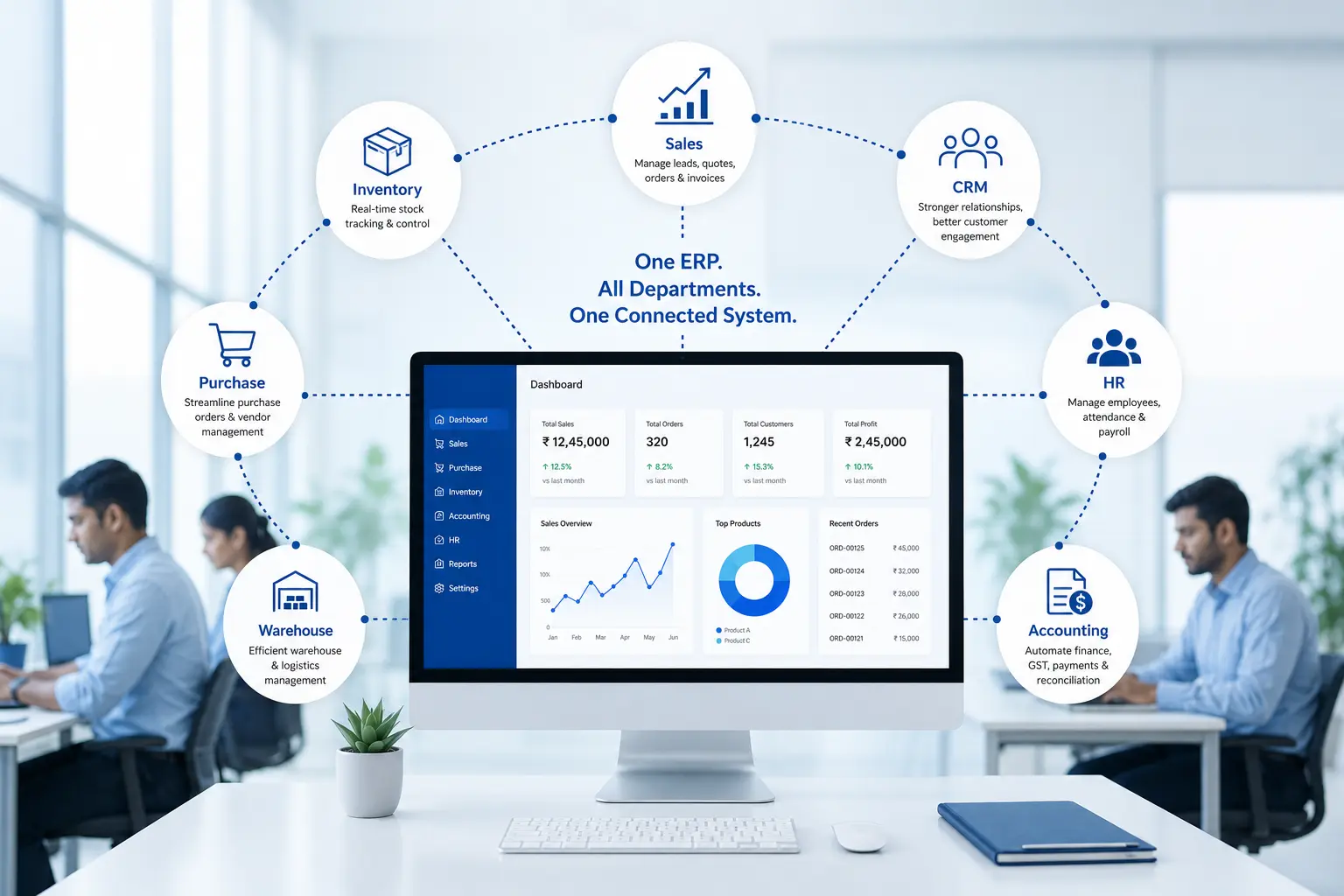
Quick answer: A business management system affects nearly every department: inventory, sales, CRM, accounting, HR, purchase, warehouse, billing, reporting and management dashboards. Each department gets automation suited to its own work, while sharing the same underlying data as everyone else.
Here's what changes in practice, department by department.
ERP Department Mapping
|
Department |
What Changes with Business Software |
|
Inventory |
Live stock counts, automatic reorder alerts, no manual stock registers |
|
Sales |
Order tracking from quote to delivery, without separate sales sheets |
|
CRM |
A centralized customer database with complete interaction history using CRM Software. |
|
Accounting |
Invoices, payments and expenses reconciled automatically |
|
HRMS |
Manage attendance, leave requests, payroll, and employee records with HRMS Software |
|
Purchase |
Purchase orders linked directly to supplier and stock records |
|
Warehouse |
Barcode-based stock movement instead of manual counting |
|
Billing |
Generate GST/VAT-ready invoices quickly using Billing & Invoicing Software |
|
Reports |
Sales, stock and financial reports generated instantly |
|
Management dashboard |
A single screen showing what's happening across the business right now |
Real Business Scenarios by Industry
Quick answer: Manufacturers struggle with raw material tracking, retailers struggle with multi-location stock, and service businesses struggle with scattered client records. Business software addresses each of these differently, based on how that industry actually operates day to day.
Manufacturing: A Growing Manufacturer
A mid-sized components manufacturer tracked raw material use on paper job cards. As orders grew, nobody could say exactly how much material was left until a physical count happened, usually too late to reorder in time. After moving to business software, raw material consumption updates automatically against each production order, and purchase alerts fire before stock actually runs out. (internal link: Manufacturing ERP Software)
Retail: Opening a Second Store
A clothing retailer ran one store comfortably on a spreadsheet. Opening a second location meant two separate stock sheets that never matched, and customers who received different offers depending on which store they visited. Business software gave both stores shared inventory visibility and one loyalty record per customer, instead of two disconnected systems.
Wholesale: A Wholesale Distributor
A distributor supplying regional retailers managed orders through phone calls and a notebook ledger. Payment collection was slow because nobody had a clear view of which retailer owed what. After digitizing, outstanding payments, order history and credit limits became visible in one screen, cutting down collection delays noticeably.
Distribution: Multi-Location Stock Movement
A distribution business moving stock between three warehouses relied on WhatsApp updates for transfers. Stock would show as available in the system while physically sitting in the wrong warehouse. Business software tracks stock movement location by location, so availability shown always matches physical reality.
Construction: Project-Based Cost Tracking
A construction contractor tracked material purchases and labour costs per site using separate paper files for each project. Comparing actual cost against the budget only happened at project completion, often too late to correct course. With project-wise tracking in business software, actual spending against budget is visible while the project is still running.
Service Businesses: Scattered Client Records
A service company managing annual maintenance contracts tracked renewal dates in a spreadsheet that only one employee updated. When that employee was on leave, renewals were missed and clients weren't followed up on time. Centralizing client and contract data meant renewal reminders no longer depended on one person remembering.
A Step-by-Step Migration Roadmap
Quick answer: Moving from paper and spreadsheets to business software works best in stages: mapping current processes, cleaning up existing data, running a pilot with one department, migrating historical records, and rolling out to the full team with training alongside it.
Trying to switch everything overnight usually backfires. A staged rollout gives the team time to adjust while keeping the business running.
Migration Roadmap
- Map current processes: write down exactly how sales, purchase, and billing work today, including the workarounds nobody talks about
- Clean up existing data: remove duplicate customer entries, outdated price lists, and inconsistent product codes before migration
- Choose the right modules: start with the departments causing the most pain, usually inventory and billing
- Run a pilot: test the system with one department or one branch before a full rollout
- Migrate historical data: bring over past invoices, stock records and customer history so reporting isn't left with a gap
- Train the team: hands-on sessions for the people who will use the system daily, not just managers
- Go live in phases: run the old and new systems in parallel briefly, then switch over fully
- Review after 30, 60 and 90 days: fix workflow issues early, before they become habits
✅ Best Practice
Don't try to digitize your entire business in one day. Start with one or two critical departments, such as inventory or billing, and expand gradually after your team becomes comfortable with the new system.
Moving Your Data Out of Excel
Quick answer: Excel data can usually be migrated into business software directly, as long as it's cleaned up first. Product names, customer records and pricing need consistent formatting before import, otherwise the new system inherits the same errors the spreadsheets had.
Most implementation partners provide import templates for products, customers, and opening stock. The real work isn't the technical import, it's deciding which data is worth carrying forward and which is outdated clutter.
A good rule of thumb: migrate at least two to three years of transaction history for reporting purposes, and clean master data (customers, products, suppliers) in full, since this is what the system will use going forward.
Getting Employees to Actually Use the New System
Quick answer: Employee adoption improves when staff understand what the new system removes from their workload, not just what it adds. Framing business software as fewer manual steps, rather than more screens to learn, makes the transition far smoother.
Resistance to new software rarely comes from the software itself. It comes from staff who worry it means more work, more monitoring, or a system they'll be blamed for not understanding.
Involving a few experienced staff early, as pilot users, tends to work better than announcing a company-wide switch overnight. Their feedback also tends to be more practical than a manager's assumptions.
Training Your Team
Quick answer: Effective training focuses on the tasks each role performs daily, rather than covering every feature of the system at once. A counter staff member needs billing training, not accounting training, and vice versa.
Short, role-specific sessions work better than one long general session. A biller needs to know invoicing and returns. A store manager needs stock transfers and reorder alerts. Training everyone on everything just creates confusion.
Most businesses need one to two weeks of hands-on training per department, followed by a support period where questions are answered as they come up in real use.
How Long Implementation Actually Takes
Quick answer: A small business implementation typically takes four to twelve weeks depending on the number of departments involved, how much data needs cleaning, and how many customizations are required. Simple single-location setups move faster than multi-branch or multi-industry operations.
Typical Implementation Timeline
|
Phase |
Approximate Duration |
What Happens |
|
Requirement study |
1-2 weeks |
Mapping current processes and choosing modules |
|
Data preparation |
1-2 weeks |
Cleaning and formatting existing data for import |
|
Configuration |
2-4 weeks |
Setting up modules, workflows and user roles |
|
Data migration |
1 week |
Importing customers, products and historical records |
|
Training |
1-2 weeks |
Role-specific hands-on sessions |
|
Go-live and support |
Ongoing |
Parallel run, issue resolution, and fine-tuning |
Common Fears and Objections, Answered Honestly
Quick answer: The most common objections to business software are cost, complexity, and fear of disruption during a busy season. Most of these concerns come from outdated assumptions about ERP being built only for large enterprises with big IT teams.
"It's too expensive" usually comes from comparing the sticker price to a spreadsheet's zero cost, without factoring in the hidden costs covered earlier in this guide.
"It's too complicated for my staff" is a fair concern, but it points to the training approach more than the software itself. Role-specific training, not a single overwhelming session, is what actually solves this.
"We'll lose data during the switch" is avoidable with a proper migration plan and a parallel run period, where both systems operate together briefly before the old one is retired.
Understanding the Real ROI
Quick answer: Return on investment from business software comes from time saved, fewer errors, and better decisions made from accurate, real-time data, not just from the license cost avoided. Most small businesses see measurable time savings within the first few months.
The clearest ROI usually shows up first in reduced staff hours spent on manual reconciliation, followed by fewer pricing and stock errors, and eventually faster decision-making once management has real-time reports instead of week-old spreadsheets.
It helps to measure this against a business's own current numbers, rather than a generic industry percentage, since the size of the improvement depends heavily on how manual the existing process is.
When Should a Business Actually Make the Move?
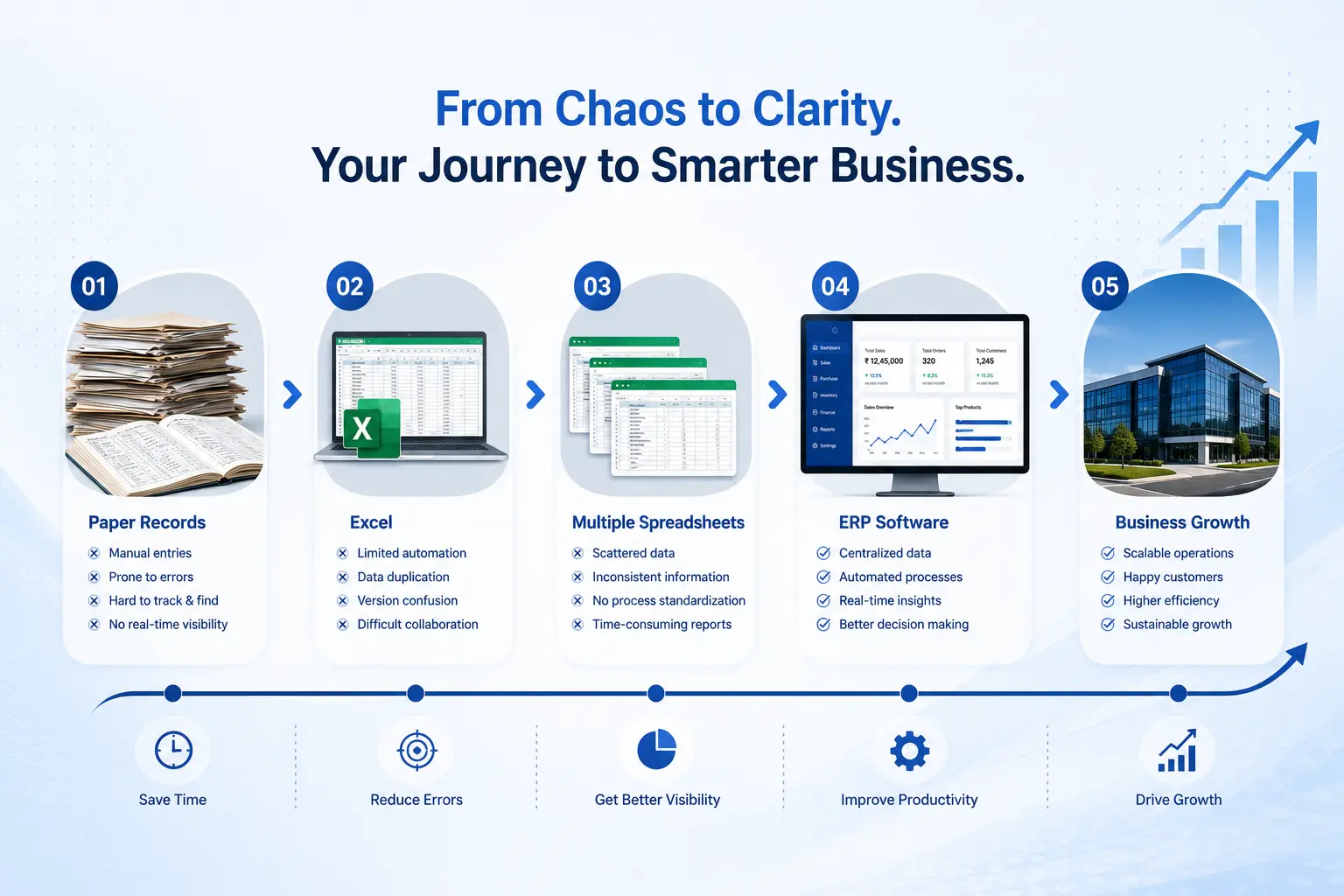
Quick answer: A business is ready to move from spreadsheets to business software when manual work is visibly slowing down decisions, when growth plans include new locations or products, or when errors are starting to affect customer trust.
There's no fixed revenue number or employee count that signals readiness. It's more about whether the current system can still be trusted for day-to-day decisions.
ERP Readiness Checklist
☐ You're planning to open a new branch or location
☐ You're adding new product lines or services
☐ Reporting takes longer than it should for decision-making
☐ Errors have started affecting customer relationships
☐ You've outgrown more than two items from the earlier warning-signs checklist
☐ Staff are spending noticeable time on manual reconciliation
Choosing the Right Implementation Partner
Quick answer: A good implementation partner asks about existing processes before recommending software, offers realistic timelines instead of overpromising, and provides support after go-live rather than disappearing once the system is installed.
Odoo is one widely used option for small and growing businesses, since its modular structure lets a business start with one or two departments and add more later. (internal link: Odoo ERP Implementation)
What matters more than the software brand is the partner implementing it. Look for a team that studies your current workflow before configuring anything, offers training suited to your staff, and stays available for support once the system is live. Odiware works with growing businesses in this way, helping them move from paper and spreadsheets to a connected system at a pace that fits their operations. (internal link: Odoo Consulting)
If a business is already on an older or unsupported version of an existing system, a migration path is worth discussing separately. (internal link: Odoo Migration)
Business Digitization Checklist
☐ List every process currently running on paper or spreadsheets
☐ Identify which processes cause the most repeated errors
☐ Decide which departments to digitize first
☐ Clean up customer, product and supplier data
☐ Choose a system that can grow with the business, not just fix today's problem
☐ Plan a training schedule before go-live, not after
Implementation Checklist
☐ Requirements documented and shared with the implementation partner
☐ Data cleaned and formatted for import
☐ Pilot department or branch identified
☐ Training schedule agreed for each role
☐ Parallel run period planned before full go-live
☐ Support plan in place for the first 90 days after launch
Frequently Asked Questions
How do I know if my business has outgrown spreadsheets?
A business has usually outgrown spreadsheets when stock counts stop matching what's physically on the shelf, when reports take a full day or more to prepare, or when two employees give a customer different information because they're working from different file versions. Another clear sign is depending on one person who understands how all the sheets connect. If that person is away, work slows down or stops. None of these problems mean the team is careless. They're simply limits built into spreadsheets once more than one person, product line, or location gets involved.
What are the signs that manual record keeping is hurting business growth?
The clearest signs are repeated pricing errors, missed follow-ups with customers or suppliers, and slow month-end reporting that delays decisions. Growth also gets harder to plan for, since manual systems can't easily show trends across months or locations. Owners often notice they're spending more time reconciling numbers between sheets than actually running the business. When growth plans, like opening a new branch or adding products, start feeling risky because the current system can't keep up, that's usually a sign manual record keeping has become a real constraint rather than just an inconvenience.
Can a small business digitize operations without hiring an IT team?
Yes. Most small businesses digitize successfully without hiring dedicated IT staff, since modern business software is managed and supported by the implementation partner, not run in-house. The business needs someone internally who understands day-to-day operations well enough to guide setup, but that's usually the owner or an operations manager, not a technical hire. Cloud-based systems also remove the need for in-house servers or maintenance. What matters more than technical skill is picking an implementation partner who handles setup, training and ongoing support, so the business team can focus on using the system, not maintaining it.
What is the easiest way to move from paper records to digital software?
The easiest path is a staged rollout rather than switching everything at once. Start by mapping current processes honestly, including workarounds, then clean up existing customer, product and pricing data. Pick the one or two departments causing the most problems, usually inventory or billing, and run a pilot there first. Once that's working smoothly, expand to other departments with proper training for each role. Trying to digitize an entire business overnight tends to overwhelm staff and increases the chance of errors during the switch. A phased approach keeps the business running while the transition happens.
How long does it take to digitize a small business?
Most small business implementations take between four and twelve weeks from initial requirement study to full go-live, depending on how many departments are involved and how much existing data needs cleaning. A single-location business with straightforward billing and inventory needs might move faster, while a multi-branch or multi-industry operation takes longer due to more customization and testing. Training typically adds another one to two weeks per department. It's worth planning for a support period after go-live as well, since real adoption issues usually surface once the whole team starts using the system daily.
Is ERP only for large companies?
No, this is one of the most common misconceptions. Modern business software is modular, meaning a small business can start with just one or two departments, like billing and inventory, and add more modules as the business grows. Cloud-based systems also removed the large upfront hardware costs that once made ERP feel exclusive to big enterprises. Many small manufacturers, retailers, distributors and service businesses now run on the same underlying platforms as larger companies, just configured at a smaller scale. The right question isn't company size, it's whether current manual processes are creating real, recurring problems.
What is the best ERP software for growing businesses?
There isn't a single best option for every business, since the right choice depends on industry, budget, and how many departments need to be connected. Odoo is a popular choice among small and growing businesses because of its modular structure, letting a business start small and expand as needed without switching platforms later. Other platforms may suit specific industries better. What matters most is matching the software to actual business processes, not just picking based on brand recognition. Working with an implementation partner who studies your operations first usually leads to a better fit than choosing software alone.
What departments can ERP manage?
A typical business management system can cover inventory, sales, CRM, accounting, HR and payroll (HRMS), purchase, warehouse operations, billing and invoicing, reporting, and a management dashboard that pulls data from all of these together. Not every business needs every module from day one. Many start with inventory and billing, since these usually cause the most day-to-day friction, then add accounting, HR or CRM as the business grows. The advantage of an integrated system is that these departments share the same underlying data, so a sale or purchase updates every relevant department automatically.
Can ERP replace Excel?
Yes, for the processes that currently rely on Excel for tracking inventory, sales, billing or customer data, business software replaces the need for separate spreadsheets by handling these functions within one connected system. Excel still has a place for quick, one-off calculations or ad-hoc analysis, but it shouldn't remain the system of record for core business data once a company has grown past a certain size. The key difference is that ERP updates automatically when a transaction happens, while Excel depends entirely on someone remembering to update it manually, which is where most spreadsheet errors originate.
Can ERP integrate inventory, billing and accounting?
Yes, this is one of the core strengths of an integrated business management system. When a sale is billed, stock is automatically reduced, and the transaction is reflected in accounting without anyone re-entering the same information three separate times. This removes the disconnect that spreadsheets create, where inventory, billing and accounts often show different numbers because they're updated independently and at different times. For a growing business, this integration is usually the single biggest improvement, since it removes the manual reconciliation work that currently eats up significant staff time every week.
How difficult is ERP implementation?
Implementation difficulty depends mostly on how prepared the business is going in, not on the software itself. Businesses with clean, organized data and a clear understanding of their current processes tend to have smoother implementations. Difficulty usually comes from unclear requirements, messy historical data, or trying to customize too much too early. Working with an experienced implementation partner reduces this significantly, since they can guide the business through requirement mapping, data cleanup and phased rollout. Most small businesses find implementation manageable when it's broken into stages rather than attempted as one large, overwhelming project.
Can I migrate my existing Excel data into ERP?
Yes, most implementation partners provide import templates for products, customers, suppliers and opening stock balances, making it possible to bring existing Excel data directly into the new system. The important step before migration is cleaning that data, removing duplicate entries, correcting inconsistent formatting, and deciding how much historical transaction data is actually worth carrying forward. Most businesses migrate two to three years of transaction history for reporting purposes, while ensuring master data like customer and product lists is fully cleaned, since this becomes the foundation the new system will run on going forward.
Will my employees need technical knowledge?
No, most day-to-day tasks in modern business software are designed to be as simple as filling a form, similar to how staff already enter data into Excel or a register. Technical knowledge isn't required for regular use, since the underlying setup and configuration are handled during implementation, not by everyday users. What employees do need is role-specific training on the screens and workflows relevant to their job, whether that's billing, stock transfers, or purchase orders. Staff who are comfortable with a smartphone or basic computer use typically adapt within one to two weeks of hands-on practice.
How much training is required?
Training needs vary by role, but most businesses see good results with one to two weeks of hands-on, role-specific sessions, followed by a support period where questions are answered as they arise in real use. Training everyone on every feature at once tends to overwhelm staff and slow down adoption. A more effective approach is training a biller on invoicing and returns, a store manager on stock transfers and reorder alerts, and management on reports and dashboards, separately. Ongoing refresher sessions in the first month or two after go-live also help address gaps that only show up during actual daily use.
What happens if something goes wrong after implementation?
A good implementation partner provides a support period after go-live, typically covering the first 30 to 90 days, where issues are addressed as the team adjusts to daily use. Common post-launch issues include workflow mismatches, minor configuration tweaks, or staff needing extra guidance on specific screens. Running the old and new systems in parallel for a short period before fully switching over also reduces risk, since it gives a safety net if something needs correcting. Choosing a partner who commits to ongoing support, rather than disappearing after installation, is one of the most important decisions in this process.
How much does ERP implementation cost for a small business?
Cost varies widely based on the number of users, modules needed, and level of customization, so there's no single number that applies to every business. What's more useful than a fixed figure is comparing the investment against the hidden costs of staying manual, like wasted staff hours, pricing errors and stock write-offs covered earlier in this guide. Many small businesses start with a limited set of modules, like inventory and billing, keeping initial cost lower, then expand once the value becomes clear. Getting a detailed quote based on your specific processes gives a far more accurate picture than a general estimate.
Is business software worth the investment?
For most businesses experiencing the warning signs covered in this guide, like stock mismatches, pricing errors, or reporting delays, the investment tends to pay for itself through time saved and errors avoided within the first several months. The real question isn't whether it's worth it in general, but whether the current manual process is already costing more in hidden ways than the software would cost directly. Businesses that measure their own reconciliation time, error rates, and missed follow-ups before switching usually have a clearer, more convincing answer than relying on a generic industry claim.
What hidden costs do manual processes create?
Manual processes create costs that rarely appear as a clear line item, including staff hours spent copying data between sheets, pricing errors from outdated price lists, stock write-offs from untracked expiry or damage, missed follow-ups on leads or pending payments, and slower decision-making due to delayed reporting. Individually, each of these might seem minor. Together, they add up to a meaningful drag on both profit and growth. Because these costs are spread across daily operations rather than showing up as one expense, they're often underestimated until a business starts tracking them directly against a digital system's output.
Is business software more secure than spreadsheets?
Generally, yes. Spreadsheets offer little to no access control, meaning anyone with the file can view or change any number, with no record of who did it. Business software typically includes role-based access, so employees only see and edit what's relevant to their job, along with an audit trail showing who changed what and when. Cloud-based systems also handle automatic backups, reducing the risk of losing data to a damaged laptop or an accidentally deleted file, which remains a real risk with spreadsheet-based record keeping stored locally on individual computers.
Which industries benefit most from ERP?
Manufacturing, retail, wholesale, distribution, construction and service businesses all see clear benefits, though the specific pain point differs by industry. Manufacturers benefit most from raw material and production tracking, retailers from multi-location inventory visibility, wholesalers and distributors from order and payment tracking across many customers, construction firms from project-wise cost tracking, and service businesses from centralized client and contract records. The common thread across all of these industries is the same: once a business has more than one person, location, or product line to track, manual systems start breaking down in industry-specific ways.
When should a startup move from spreadsheets to ERP?
A startup should consider moving once spreadsheets start causing operational friction, rather than waiting for a specific revenue milestone. Common triggers include hiring a second or third employee who needs to update the same records, opening a new location, adding product lines, or noticing that reporting takes longer than it should for making decisions. Moving earlier, before the business is deeply dependent on scattered spreadsheets, is usually easier than migrating later once years of inconsistent data have accumulated. It's less about company size and more about whether current tools can still be trusted for daily decisions.
Can business software grow with my company?
Yes, this is one of the main advantages of choosing a modular system like Odoo over building a custom manual process. New departments, users, branches or product lines can typically be added as the business grows, without needing to switch to an entirely new platform. This is different from spreadsheets, which don't scale gracefully and often need to be rebuilt from scratch as complexity increases. Choosing software with this flexibility in mind from the start avoids the disruption of a second migration a few years down the line, once the business has outgrown its first digital system too.
What happens if I open another branch?
With business software, opening another branch typically means adding a new location within the existing system, rather than starting a separate set of records from scratch. Inventory, sales and customer data can be tracked per branch while still being visible centrally, so management gets a combined view without manually merging separate spreadsheets. This is one of the clearest contrasts with a spreadsheet-based setup, where a second branch usually means a second disconnected file that never quite matches the first. Planning for multi-location visibility during initial setup makes future expansion considerably smoother.
Does ERP improve customer service?
Yes, indirectly but meaningfully. When staff have real-time access to accurate stock, pricing and order history, they can answer customer questions correctly the first time, rather than checking with someone else or promising to call back. Centralized CRM data also means any staff member can see a customer's order and payment history, instead of that information being known only to whoever originally handled the account. Fewer pricing errors and faster order processing both contribute to a more consistent customer experience, which matters especially for repeat business and word-of-mouth referrals in small business markets.
Can ERP help reduce operational costs?
Yes, primarily by reducing the hidden costs covered earlier in this guide: wasted staff hours on manual reconciliation, pricing errors, stock write-offs, and missed follow-ups. Automating routine data entry frees up staff time for more productive work, while accurate real-time stock data reduces both overstocking and stockouts. Faster, more accurate reporting also means management can catch problems, like a slow-moving product line or a supplier price increase, earlier rather than at month-end. The savings tend to build gradually rather than appear as one dramatic drop in costs, which is why measuring against your own baseline matters.
Final Thoughts
Paper records and spreadsheets aren't a mistake. They're a natural starting point for almost every small business. The problem isn't that a business used them, it's continuing to rely on them well past the point where they can keep up.
The signs are usually visible long before a serious problem hits: stock counts that don't match, reports that take too long, and small errors that keep repeating. Recognizing these early makes the eventual move to business software far less disruptive.
Moving to an integrated system, whether that's Odoo or another platform, doesn't have to mean overhauling everything at once. A staged approach, starting with the department causing the most pain, tends to work far better than an all-at-once switch.
Where to Go From Here
If some of the signs in this guide sound familiar, it may be worth taking a closer look at how your business currently handles inventory, billing and reporting. A short conversation with an ERP consultant can clarify whether now is the right time, and which departments to prioritize first.
Odiware works with small and growing businesses on exactly this kind of transition, from mapping current processes to full implementation and post-launch support. (internal link: Odoo ERP Implementation) (internal link: Custom Software Development) (internal link: Field Force Management)
Get a free 30-minute review with an Odiware Odoo consultant — bring your current setup and we'll map the fastest route to a working configuration.
 ODOO IMPLEMENTATION PARTNER