That's a fair question, and it deserves a fair answer, not a sales pitch. Excel is a genuinely good tool. It just wasn't built to run an entire company.
Almost every small business starts on Excel. It's already installed, everyone knows the basics, and it does the job when the business is young.
The question we get asked most often isn't "should we use Excel or ERP." It's "how do we know when Excel stops being enough?"
That's a fair question, and it deserves a fair answer, not a sales pitch. Excel is a genuinely good tool. It just wasn't built to run an entire company.
This guide compares ERP and Excel honestly, department by department, cost by cost, so you can judge where your business actually stands, not where a vendor thinks you should be.
What Makes Excel So Popular Among Small Businesses?
Quick answer: Excel remains popular because it's cheap, familiar, and flexible enough to model almost any business process. Most owners already know the basics, there's no approval process to start using it, and it handles simple calculations and reporting well for a small operation.
Nobody sits down and picks Excel after comparing ten tools. It's just already there, on every laptop, bundled with the software the business bought for something else.
For a business with one location and a small product list, that's rarely a problem. A founder can build a working order tracker in an afternoon, no developer required.
There's a real skill advantage too. Someone who's used Excel for years can build formulas, pivot tables, and macros that do genuinely useful things, from tracking margins to flagging slow-moving stock.
Why Excel wins in the early stage
- Comes pre-installed, no separate purchase decision needed
- Nearly every employee already knows the basics
- Can be reshaped instantly for a new process or product
- Formulas and pivot tables handle a surprising amount of analysis
- No setup time, no vendor, no contract
Where Excel Starts Breaking Down
Quick answer: Excel breaks down once more than one person needs to update the same information, or once a business needs the same numbers to show up correctly in three places at once. Version conflicts, broken formulas, and manual re-entry become the norm rather than the exception.
The failure point isn't a single dramatic event. It's usually a slow accumulation of small annoyances that eventually add up to real damage.
One pattern we frequently see: a business builds a solid spreadsheet system while small, then adds a second person to maintain it. Within months, there are two or three copies of the same file floating between emails, each slightly different.
Formula errors are another quiet killer. A cell gets overwritten, a row gets inserted in the wrong place, and a formula silently returns the wrong number for weeks before anyone notices.
None of this means the team is bad at Excel. It means the tool has run out of room to grow with the business.
Where the cracks usually appear first
- Multiple versions of the same file in circulation
- Formulas that break silently after an edit
- Manual updates that depend on someone remembering to do them
- No record of who changed a number, or when
- Real-time collaboration that turns into overwritten work
- Performance that slows down once files get large enough
Reality Check: A spreadsheet doesn't fail loudly. It fails quietly, one small mismatch at a time, until the gap between what's on the sheet and what's true in the business becomes too large to ignore.
What Is ERP, Exactly?
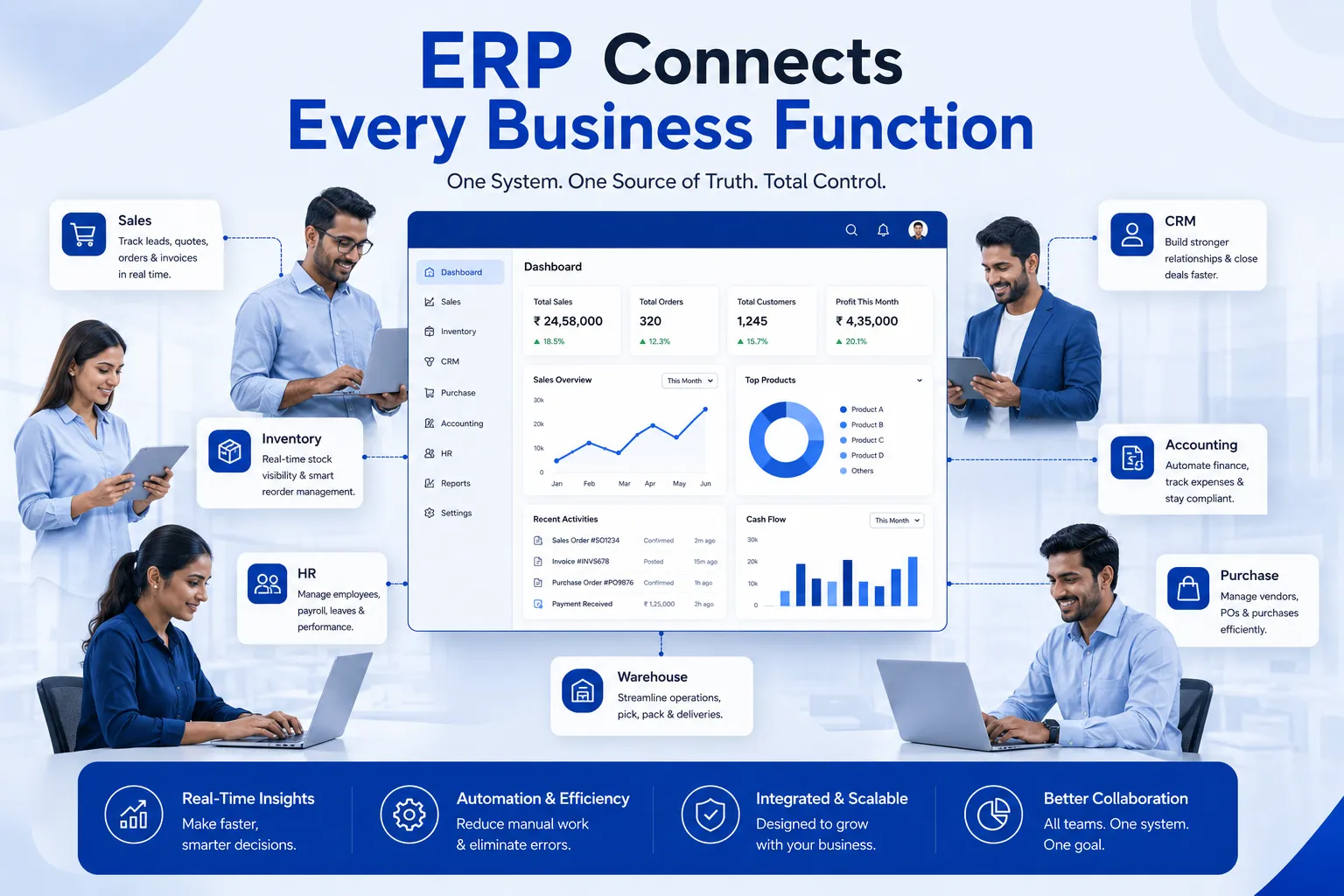
Quick answer: ERP, short for Enterprise Resource Planning, is software that keeps sales, inventory, purchasing, accounting, and other functions connected to one shared set of data. Instead of separate files that need manual updates, every department works from the same live numbers.
Strip away the acronym and ERP is a fairly simple idea: one system, one dataset, used by every department that needs it.
When a sales order is created, the system doesn't just record the sale. It reduces stock, updates the customer's order history, and feeds the accounting ledger, automatically, without anyone re-typing the same numbers into three different sheets.
Modern ERP platforms are modular. A business can start with just inventory and billing, then add CRM, HR, or manufacturing modules later, without switching to a different system altogether. Odoo works this way, which is one reason it's a common starting point for growing SMEs.
Did You Know?: According to Gartner, ERP has consistently remained one of the largest categories of enterprise software spending worldwide, a sign that the demand for connected business systems keeps growing well beyond large enterprises alone.
ERP vs Excel: Side-by-Side Comparison
Quick answer: Excel handles individual tasks well but doesn't connect them. ERP connects inventory, sales, accounting, and reporting into one live system. The difference shows up most clearly in accuracy, collaboration, and how fast a business can generate a trustworthy report.
Here's how the two options stack up across the areas that matter most day to day.
ERP vs Excel: Feature Comparison
|
Area |
Excel |
ERP |
|
Inventory |
Manually updated counts, easy to fall behind |
Live stock levels updated with every transaction |
|
Sales |
Separate order sheets, no automatic linking to stock |
Orders linked directly to inventory and invoicing |
|
CRM |
Contact lists scattered across files |
One shared customer record for the whole team |
|
HRMS |
Attendance and payroll tracked in isolated sheets |
Attendance, leave and payroll in one module |
|
Accounting |
Manual reconciliation between sales and ledgers |
Automatic posting from sales and purchase transactions |
|
Reports |
Built manually, often hours of work |
Generated instantly from live data |
|
Automation |
Limited to formulas and macros |
Built-in workflows and alerts |
|
Scalability |
Slows down as file size and users grow |
Designed to scale with users and transaction volume |
|
Collaboration |
Version conflicts with multiple editors |
Multiple users working on the same live record |
|
Security |
Little to no access control |
Role-based permissions and audit trails |
|
Data accuracy |
Depends on manual entry discipline |
Validated at the point of entry |
|
Multi-location |
Separate files per location, hard to combine |
One system, visibility across all locations |
|
Dashboards |
Manually built, need constant updating |
Live dashboards pulling from current data |
|
Integration |
Rarely connects to other business tools |
Connects with e-commerce, payment and other systems |
Excel vs ERP for Different Departments
Quick answer: Every department feels the Excel-versus-ERP difference differently. Inventory teams notice stock mismatches, finance notices reconciliation delays, and sales notices they can't see real-time stock. ERP addresses each of these by removing the manual handoff between departments.
Inventory
Excel-based inventory relies on someone updating a count after every movement. Miss one update and the number on the sheet no longer matches the shelf. ERP updates stock the moment a sale, purchase, or transfer happens, so the number shown is the number that's actually there.
Sales
A sales team working off Excel often can't see live stock, so they either promise something that isn't available or hesitate on quoting at all. With ERP, sales staff see current stock and pricing directly, and an order automatically becomes an invoice without extra steps.
CRM
Customer details in Excel tend to live in whoever's laptop last touched them. ERP keeps one customer record that every relevant employee can see, including order history and outstanding payments.
Finance
Reconciling sales, purchases, and bank entries by hand is one of the most time-consuming tasks in a spreadsheet-run business. ERP posts these transactions automatically as they happen, cutting down the manual matching work considerably.
Purchase
Excel-based purchase tracking rarely connects cleanly to what's actually in stock, so reorders happen too late or too early. ERP ties purchase orders directly to stock levels and supplier history.
Warehouse
Manual stock counts and paper-based bin tracking are slow and error-prone. ERP systems, especially with barcode scanning, track movement between bins and warehouses automatically.
HR
Attendance and payroll spreadsheets often need manual cross-checking every month. HRMS modules handle attendance, leave, and payroll calculations together, reducing repetitive manual work.
Management Reporting
A manager relying on Excel usually waits for someone to compile numbers from several files before seeing the full picture. ERP dashboards show current figures on demand, without waiting for a manual report to be built.
Real Business Examples: Before and After
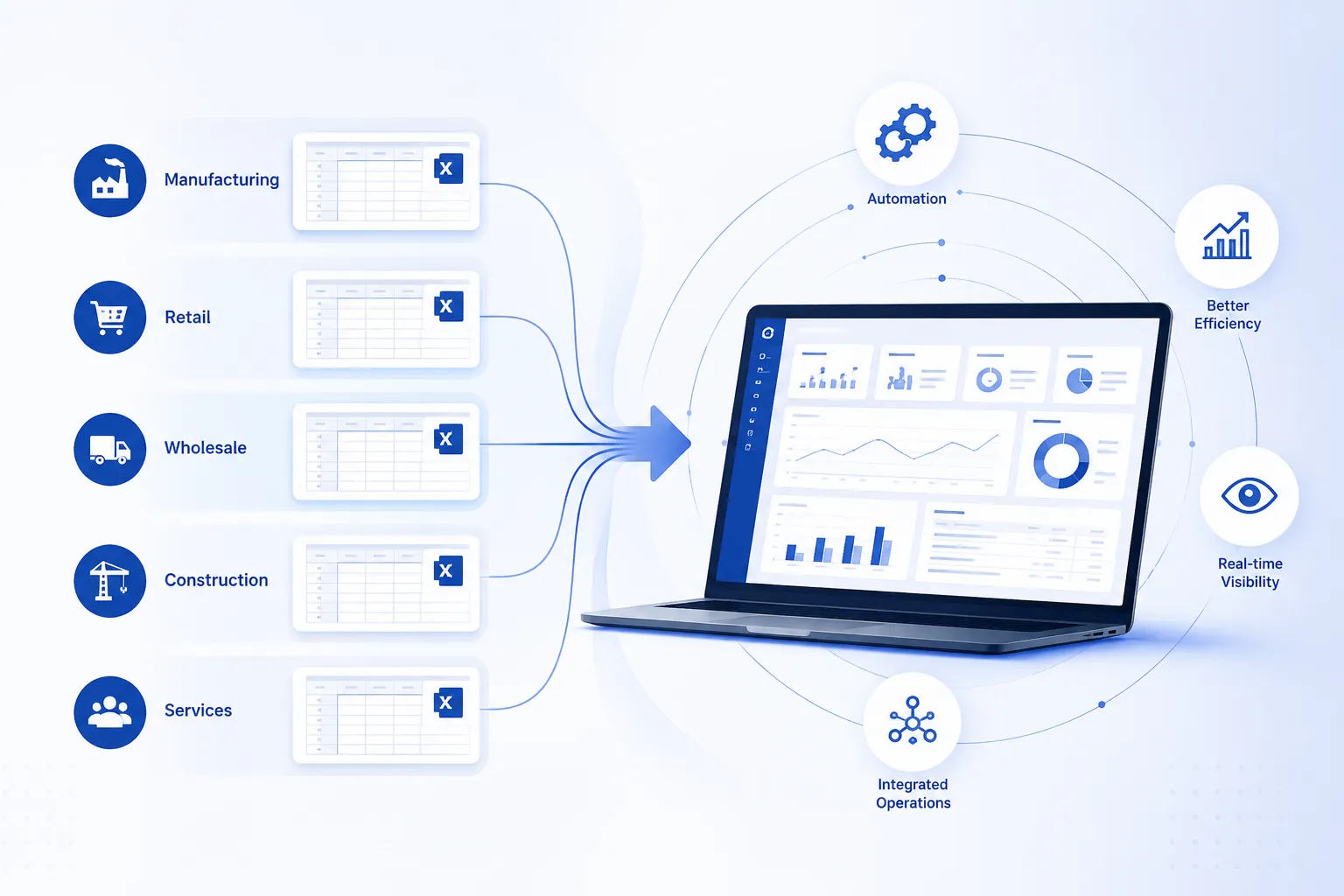
Quick answer: Six different businesses, from food manufacturing to professional services, show the same underlying pattern: Excel worked well early on, then specific operational cracks appeared as each business added complexity. ERP addressed the exact crack each business hit.
Food Manufacturer
Before Excel: production was tracked on paper batch sheets alone. Excel Challenges: once digitized, batch costing spreadsheets couldn't keep pace with ingredient price changes, and expiry tracking across multiple product lines became unreliable. After ERP: batch costs recalculate automatically as ingredient prices change, and expiry dates trigger alerts before stock becomes unsellable.
Electronics Wholesaler
Before Excel: supplier orders were tracked through email threads. Excel Challenges: with thousands of SKUs and frequent price changes, spreadsheets couldn't be updated fast enough, leading to quotes based on outdated cost prices. After ERP: pricing updates flow through to quotes automatically, and margin on every order is visible before it's confirmed.
Furniture Retailer
Before Excel: a single showroom tracked stock in one file. Excel Challenges: opening a second showroom meant a second file, and neither location could see what the other had in stock, leading to lost sales and awkward customer conversations. After ERP: both showrooms share one inventory view, and a customer can be told honestly whether an item is available at either location.
Construction Contractor
Before Excel: each site had its own budget spreadsheet, updated weekly by the site engineer. Excel Challenges: budget overruns were often discovered only at project close, since spreadsheet updates lagged actual spending by days or weeks. After ERP: material and labour costs post against the project budget as they're recorded, so overruns surface while there's still time to act.
Medical Equipment Distributor
Before Excel: batch and serial numbers for equipment were logged manually for compliance. Excel Challenges: tracing a specific unit back to its batch during an audit or recall meant searching through multiple files, a slow and stressful process. After ERP: batch and serial tracking is built into every transaction, making traceability a lookup instead of a search party.
Professional Services Agency
Before Excel: staff logged billable hours in personal spreadsheets, submitted weekly. Excel Challenges: consolidating hours across a growing team took a full day each month, and errors in manual entry meant clients were occasionally billed incorrectly. After ERP: time entries feed directly into project costing and client invoices, removing the monthly scramble entirely.
When Is Excel Still Enough?
Quick answer: Excel remains a genuinely practical choice for very small teams, businesses with a limited product range, and operations with low transaction volume. If one person can still track the whole business accurately without help, there's no urgency to switch.
It's worth saying plainly: not every business needs ERP right now, and pushing a small operation into a full system too early can create more overhead than it removes.
A single-location shop with a handful of products, one or two staff, and predictable order volume often runs perfectly well on a well-built spreadsheet. The signal to watch for isn't age or revenue, it's complexity.
Quick Take: If your business fits on one spreadsheet without cross-checking three others to confirm a number, Excel is probably still doing its job.
When Should You Move to ERP?
Quick answer: It's usually time to move when data gets duplicated across files, multiple people edit the same records, inventory counts stop matching reality, or reporting takes longer than the decision it's meant to support. Expansion plans are another strong trigger.
A common mistake during ERP selection is waiting for a crisis before acting. By the time a stockout embarrasses a big customer, the underlying problem has usually existed for months.
Signs You've Outgrown Excel
☐ The same data gets entered into more than one file
☐ More than one person edits the same spreadsheet regularly
☐ Inventory counts on paper or Excel rarely match the shelf
☐ Monthly reports take days to compile instead of minutes
☐ You're planning a new branch, warehouse, or product line
☐ Staff spend real time each week reconciling numbers between sheets
Cost Comparison: The Real Numbers
Quick answer: Comparing ERP and Excel purely on software price misses the bigger picture. Excel's hidden costs show up as wasted staff hours, pricing mistakes, and missed opportunities, while ERP's cost is upfront and visible, which makes it look more expensive than it actually is.
Excel's license fee is close to zero, so it's tempting to call it the cheaper option. That's only true if you ignore what it costs in staff time and mistakes.
Industry studies suggest that knowledge workers lose a meaningful share of their week to manual data reconciliation and duplicate entry, work that largely disappears once systems are connected. Nucleus Research has published ROI studies over the years showing measurable payback periods for ERP investments, particularly where manual reconciliation was heaviest before implementation.
ERP, by contrast, has a visible upfront cost: licensing, implementation, and training. That visibility makes it feel expensive, even when the total cost of staying manual is quietly higher.
Expert Tip: Before comparing ERP pricing to Excel's "free" cost, track how many hours your team spends each week just reconciling numbers between files. That number is usually the real starting point for a cost conversation.
Cost Comparison: Excel vs ERP
|
Cost Factor |
Excel |
ERP |
|
Software cost |
Low or already owned |
Upfront licensing and implementation fee |
|
Staff time lost to reconciliation |
High, grows with business size |
Minimal, data syncs automatically |
|
Errors from manual entry |
Recurring, hard to fully eliminate |
Reduced through validation at entry |
|
Cost of a missed reorder or stockout |
Higher, since visibility is delayed |
Lower, alerts trigger before stock runs out |
|
Cost of scaling to a new branch |
New file, new inconsistencies |
Add a location within the same system |
|
Visibility of the cost |
Hidden, spread across daily operations |
Clear, budgeted upfront |
Can Excel and ERP Work Together?
Quick answer: Yes. Most businesses running ERP still use Excel for ad hoc analysis, custom one-off reports, and quick calculations that don't need to live in the main system. ERP remains the system of record, while Excel stays useful as a flexible add-on tool.
This isn't an either-or decision in practice. A finance manager might export ERP data into Excel to build a custom board presentation, then discard the file once the meeting's done.
The distinction that matters is which one holds the truth. ERP should be the single source of record for stock, sales, and accounts. Excel can still be the workspace for exploring that data in ways the ERP dashboard wasn't built for.
Businesses often assume adopting ERP means abandoning Excel entirely. In practice, most ERP platforms export cleanly to Excel, so the switch changes where the master data lives, not whether Excel disappears from the office.
How to Transition from Excel to ERP Successfully
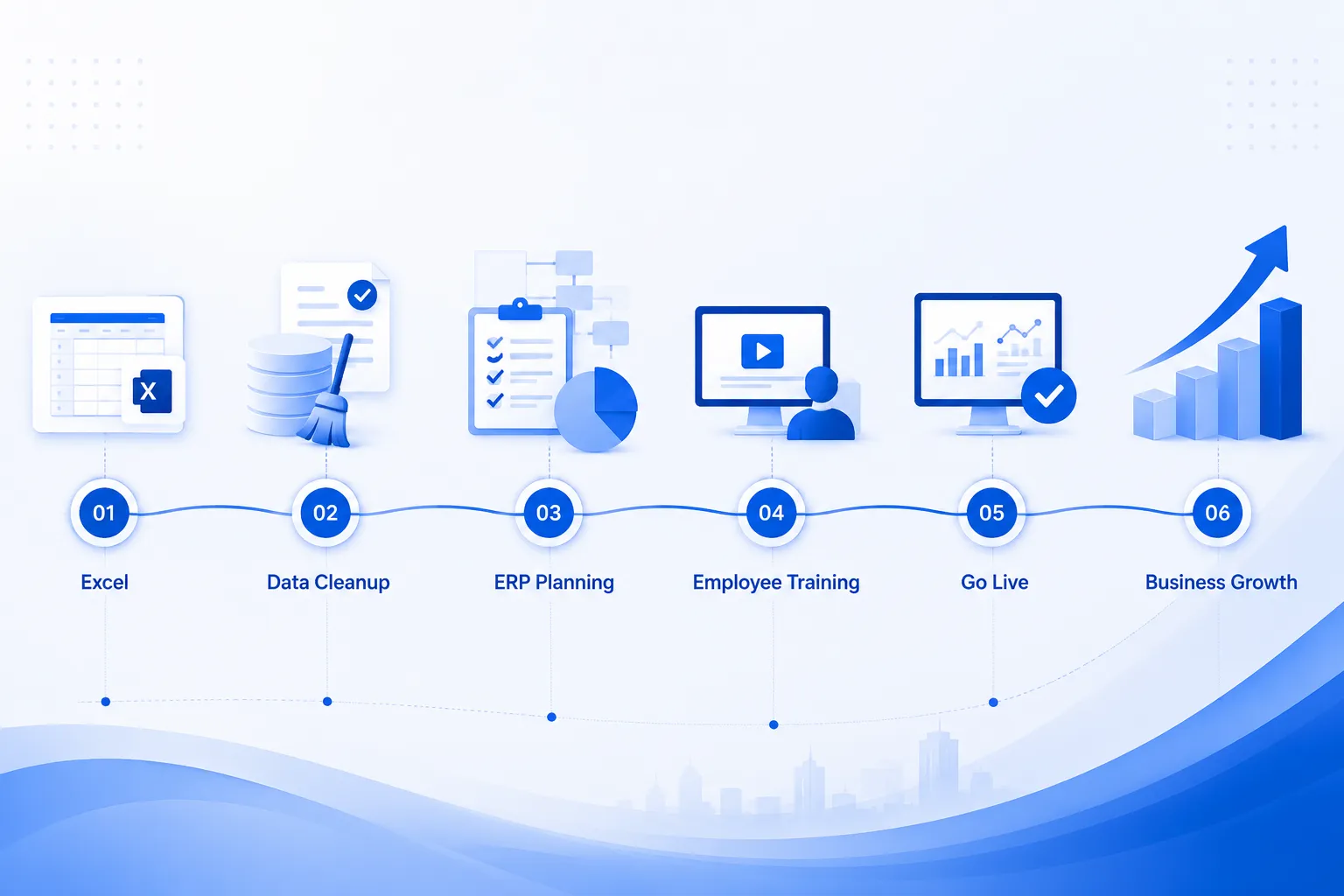
Quick answer: A successful transition starts with cleaning up existing data, running a pilot with one department before a full rollout, training staff on their specific role, and choosing an implementation partner who understands your industry, not just the software.
One lesson learned from real implementations: businesses that skip data cleanup end up importing the same inconsistencies from Excel straight into the new system, which just relocates the problem instead of solving it.
A pilot rollout, limited to one department or branch, gives the team room to adjust workflows before the whole company depends on the new system. It also surfaces configuration issues while the stakes are still low.
Training matters more than most businesses expect going in. Staff who only get a brief overview tend to fall back on old habits, including quietly keeping a personal Excel copy alongside the new system, which defeats the purpose.
Choosing the right implementation partner is often the difference between a smooth transition and a frustrating one. A partner who studies your current workflow before configuring anything tends to deliver a system that actually fits how your team works. Odiware approaches ERP implementation this way for growing businesses considering Odoo.
Common Myths About ERP
Quick answer: The most common myths are that ERP is only for large companies, that it's too expensive or difficult for small teams, and that it replaces employees. Most of these ideas come from outdated assumptions about ERP systems from a decade or more ago.
Myth: ERP is only for large companies. Modular, cloud-based systems now let a small business start with one or two departments and grow into the rest.
Myth: ERP is too expensive. The comparison usually ignores the hidden cost of staying manual, covered earlier in this guide.
Myth: ERP is difficult to use. Difficulty usually comes from poor training, not the software itself. Role-specific training addresses this directly.
Myth: ERP replaces employees. In practice, it removes repetitive manual work so staff spend time on tasks that actually need human judgment.
Myth: ERP implementation always fails. Failures are real but usually trace back to unclear requirements or rushed rollouts, not the software category itself.
Common Mistake: Assuming the software caused a failed implementation, when the actual cause was skipping the requirement-mapping stage before configuration began.
ERP Buying Checklist
☐ Does the vendor understand your specific industry?
☐ Can the system start with just one or two modules?
☐ Is pricing transparent, including implementation and training?
☐ Does the vendor offer support after go-live, not just during setup?
☐ Can existing Excel data be imported without heavy manual rework?
☐ Is there a reference business of similar size using this system?
Decision Checklist: Excel or ERP?
☐ Count how many spreadsheets currently hold the same type of data
☐ Check how often inventory counts disagree with the system
☐ Time how long your last month-end report actually took
☐ List any expansion plans for the next 12 months
☐ Ask staff how much time they spend reconciling numbers weekly
☐ Compare that time cost against the price of an ERP demo
Frequently Asked Questions
Is ERP better than Excel?
It depends on what the business needs. Excel is better for quick, flexible, one-off analysis and works fine for very small operations. ERP is better once multiple people, departments, or locations need to work from the same accurate data at the same time. Neither tool is universally "better," they solve different problems. A business with one product line and one person managing everything may not gain much from ERP yet. A business juggling multiple departments, locations, or product lines usually finds that ERP removes far more friction than Excel ever could, simply because it connects data instead of scattering it across separate files.
Can ERP replace Excel completely?
For core business functions like inventory, sales, accounting and CRM, yes, ERP is designed to replace the spreadsheets currently handling those jobs. But Excel rarely disappears entirely from a business, even after ERP adoption. Finance teams still export data for custom analysis, and managers still build one-off comparisons that don't need to live permanently in the main system. The realistic outcome is that ERP becomes the system of record, holding the accurate, shared version of the truth, while Excel continues to serve as a flexible workspace for ad hoc tasks that don't justify a permanent dashboard.
Is Excel enough for inventory management?
It's enough for a small, single-location business with a limited product range and low order volume, where one person can reasonably keep track of stock manually. It becomes a liability once multiple people update stock, once the business adds locations, or once product variety grows past what one spreadsheet can track cleanly. The core issue is that Excel doesn't update automatically when a sale or purchase happens, so the numbers only reflect reality if someone remembers to update them by hand, every time, without exception. That's a fragile system once volume increases.
Is ERP worth it for small businesses?
For a small business already feeling friction from manual processes, like frequent stock mismatches or slow reporting, ERP is usually worth serious consideration. The return typically comes from time saved and errors avoided rather than a single dramatic cost reduction. Industry research, including studies from Nucleus Research, has consistently found measurable ROI from ERP adoption when implementation is planned carefully and matched to the business's actual size and needs. The value depends heavily on choosing the right scope from the start, rather than over-buying modules the business doesn't need yet.
Which industries benefit most from ERP?
Manufacturing, wholesale distribution, retail with multiple locations, construction, healthcare-related distribution, and service businesses managing multiple client projects all see clear benefits, though the specific pain point differs by industry. Manufacturers gain the most from batch costing and production tracking. Distributors benefit from purchase and inventory visibility across many SKUs. Retailers with more than one location benefit from shared stock visibility. Construction and services benefit from project-level cost and time tracking. The common thread is that these industries all involve multiple moving parts that Excel struggles to connect in real time.
What is the biggest limitation of Excel?
The biggest limitation is that Excel doesn't know what's happening anywhere except inside its own file. It has no built-in connection to your accounting system, your point-of-sale, or another department's spreadsheet, so keeping numbers consistent across a business depends entirely on manual updates. Every additional file, user, or department multiplies the chances of a mismatch. This isn't a flaw in Excel as a calculation tool, it's simply outside what spreadsheets were designed to do. ERP's core advantage is solving exactly this problem, by keeping one connected dataset instead of many disconnected ones.
Can Excel integrate with ERP?
Yes, most ERP systems support exporting data to Excel and, in many cases, importing structured data from Excel files as well. This makes Excel useful even after ERP adoption, particularly for one-off reports, custom charts, or analysis that doesn't need a permanent dashboard. What changes is the role Excel plays. Instead of being the primary place where business data lives and gets manually updated, it becomes a secondary tool used to explore data that ERP already holds accurately. This combination tends to work well in practice, since it keeps Excel's flexibility without depending on it for core records.
Is cloud ERP safer than Excel?
Generally, yes. Spreadsheet files stored on individual laptops have little protection against accidental deletion, hardware failure, or unauthorized editing, since anyone with the file can typically change any number without a record of who did it. Cloud ERP systems usually include role-based access control, so employees only see and edit what's relevant to their role, along with an audit trail showing every change and automatic backups. This doesn't mean Excel is inherently unsafe for casual use, but as a system holding critical business records, it lacks the access and recovery controls that cloud ERP typically provides by default.
How long does ERP implementation take?
For a small business, implementation typically runs anywhere from a few weeks to a few months, depending on how many departments are involved, how much data needs cleaning, and how much customization is required. A business needing just inventory and billing moves faster than one implementing manufacturing, HR, and multi-branch operations together. Rushing the timeline to save a few weeks often costs more later, since skipped data cleanup or training tends to surface as problems after go-live. A realistic, phased timeline, agreed with the implementation partner upfront, tends to produce a smoother result than an aggressive one.
How much does ERP cost?
Cost varies significantly based on the number of users, the modules needed, and the amount of customization required, so there's no single figure that applies across businesses. What matters more than a general price range is comparing that cost against what manual processes are already costing in staff time, errors, and missed opportunities, covered earlier in this guide. Many small businesses reduce initial cost by starting with a limited set of modules, like inventory and billing, then expanding once the value becomes clear through actual use rather than a sales projection.
Which ERP is best for SMEs?
There's no single best ERP for every small business, since the right fit depends on industry, budget, and which departments need to be connected first. Odoo is a common choice among growing SMEs because of its modular structure, letting a business start with one or two modules and expand later without switching platforms. Other systems may fit specific industries or budgets better. The more useful question isn't which brand is best in general, but which implementation partner takes the time to understand your specific operations before recommending a configuration.
Does ERP improve productivity?
Yes, primarily by removing repetitive manual work like re-entering the same data in multiple places, reconciling numbers between files, and building reports by hand. Once staff aren't spending hours each week on this kind of reconciliation, that time shifts toward tasks that actually require judgment and attention. Gartner and other industry analysts have long tracked automation and integrated systems as key productivity levers for growing businesses. The productivity gain isn't instant, it tends to build over the weeks following implementation, as manual habits fade and the team adjusts to working from one shared, accurate dataset.
Conclusion
Excel isn't the villain in this comparison. It's a genuinely strong tool for a business that's still small enough for one person to track accurately, and it stays useful even after ERP adoption, just in a smaller role.
The shift toward ERP isn't really about Excel failing. It's about a business reaching a size and complexity where no single spreadsheet, or person, can hold the full picture reliably anymore.
Judging where your business stands isn't about a revenue target or headcount number. It's about how much time your team currently spends reconciling numbers that a connected system would simply keep in sync on its own.
Where to Go From Here
If parts of this comparison sound familiar, especially the reconciliation time, the version conflicts, or the delayed reporting, it may be worth a closer look at whether your current setup is quietly holding growth back.
Odiware works with small and growing businesses evaluating this exact decision, helping them figure out whether Odoo ERP fits their current stage and, if so, implementing it around how the business actually operates. Odoo Implementation Services Company
If you're still building out your foundational digital records, our earlier guide on moving from paper records to business software is a useful starting point before this comparison.
How to Move from Paper Records to Business Software: A Complete Guide for Small Business
Get a free 30-minute review with an Odiware Odoo consultant — bring your current setup and we'll map the fastest route to a working configuration.
 ODOO IMPLEMENTATION PARTNER