Most small businesses don't fail because of a bad product. They fail because the back-office work behind that product turns into chaos. Orders sit in one spreadsheet. Invoices live in another. Stock counts get checked by walking to the warehouse and counting boxes by hand.
Most small businesses don't fail because of a bad product. They fail because the back-office work behind that product turns into chaos. Orders sit in one spreadsheet. Invoices live in another. Stock counts get checked by walking to the warehouse and counting boxes by hand.
If any of that sounds familiar, you already know the real cost. Staff spend hours re-entering the same data into different tools. Nobody trusts the numbers because three systems show three different answers. And the moment the business tries to grow, the whole setup starts to crack.
This is exactly where Odoo ERP for small business owners becomes worth a serious look. It replaces scattered spreadsheets and disconnected apps with one connected system covering sales, accounting, inventory, HR, and more.
In this guide, we'll walk through why Odoo ERP is best for small businesses, what it actually does day to day, where it fits, and where it might not be the right call. No hype, just what 12+ years of ERP implementation work has taught us.
What Is Odoo ERP?
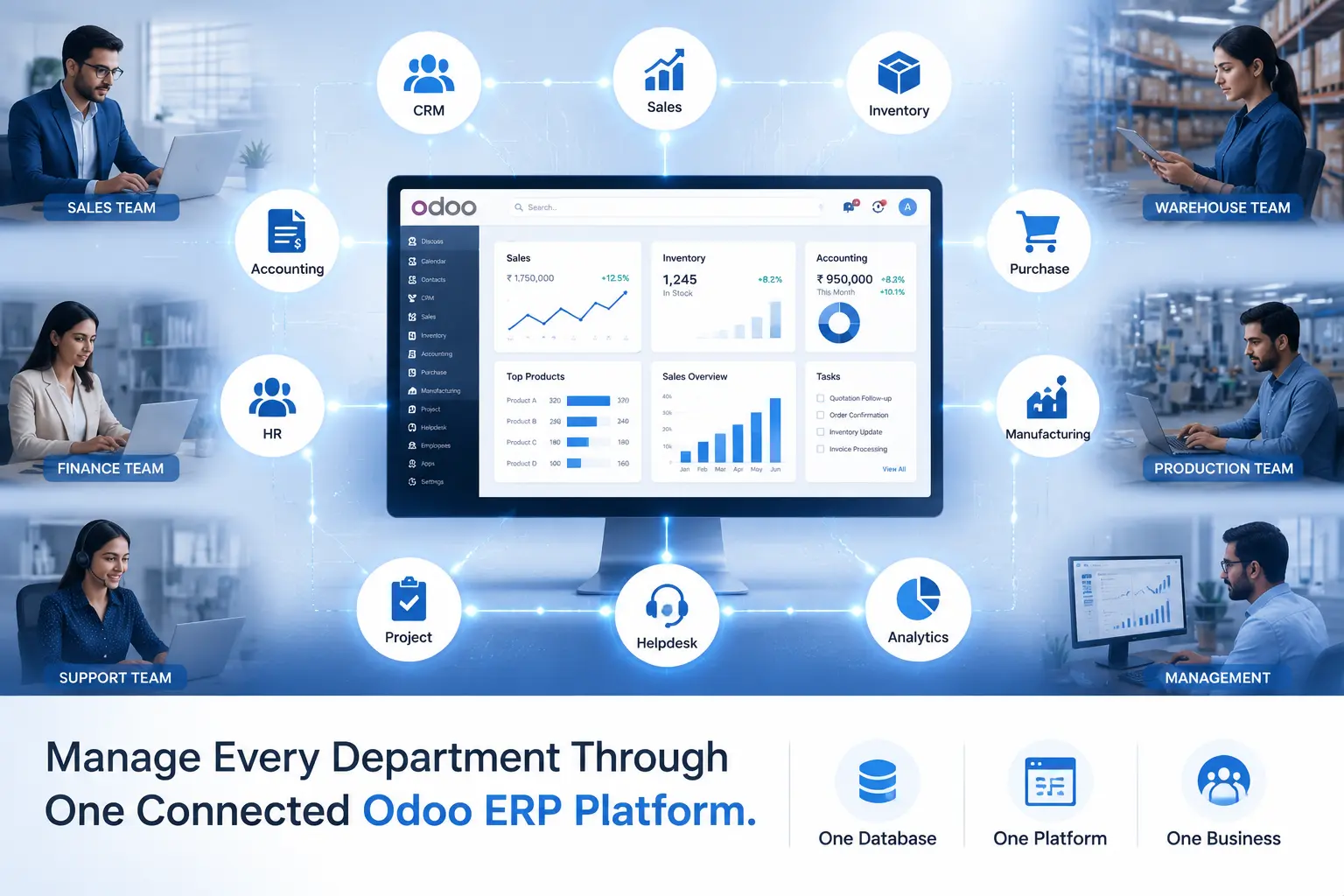
Odoo is an open source ERP software platform built from a collection of business applications that all share one database. Sales, accounting, inventory, purchasing, HR, and manufacturing all read and write to the same records.
That single point of truth is the whole idea. When a salesperson confirms an order, inventory updates. When inventory ships a product, accounting sees the revenue. Nobody has to re-key anything.
What makes Odoo different
Most traditional ERP software forces you to buy the entire suite even if you only need three modules. Odoo doesn't work that way. You pick the apps your business actually uses and add more later.
It also looks and feels like modern software. Menus are simple, the interface is uncluttered, and most employees pick it up within a few days without formal training.
Open-source architecture
Odoo's core is open source, which means the underlying code is publicly available and can be inspected, extended, or customized. There's no vendor lock-in forcing you to accept whatever the software does out of the box.
This matters for small businesses with unusual workflows. A local distributor with a specific approval chain, for example, can have that logic built directly into the system through Odoo Customization Services rather than working around software limitations.
Modular approach
Each Odoo app functions as its own module: CRM, Sales, Inventory, Accounting, and so on. You activate only what you need today and switch on more modules as the business grows.
A five-person retail shop might start with just Sales and Inventory. Two years later, once hiring picks up, HR and Payroll get added without touching anything already running.
Why Small Businesses Need ERP Software
Small business ERP software isn't just for large operations pretending to be enterprises. It solves problems that show up the moment a business grows past three or four employees.
Managing multiple tools
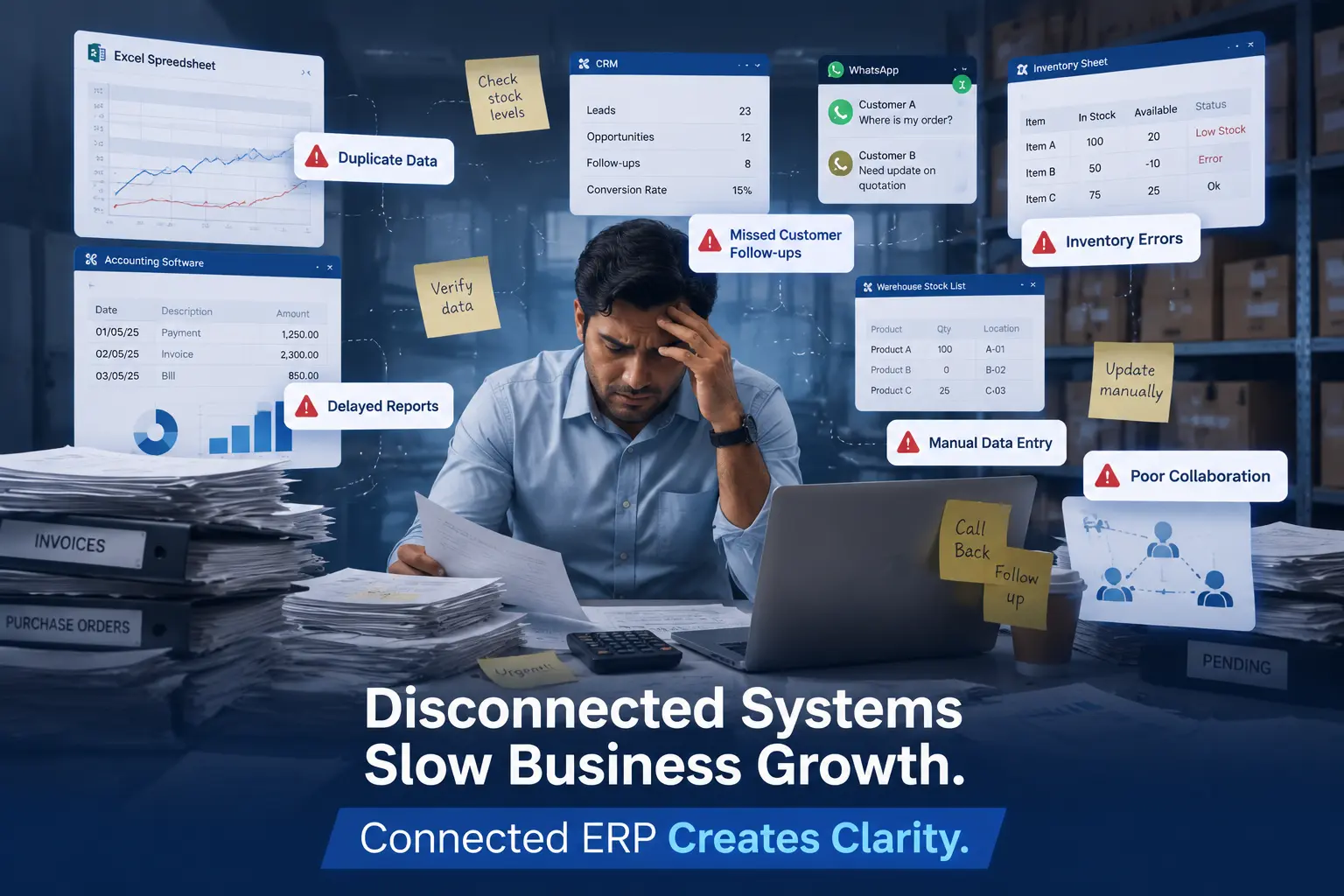
A typical SME juggles a spreadsheet for inventory, a separate invoicing tool, a CRM trial account, and WhatsApp for internal updates. None of these talk to each other.
Every disconnected tool is another place data can go wrong, and another login someone forgets.
Data duplication
When customer details live in three different places, updates rarely happen everywhere at once. A phone number changes in the CRM but not in accounting, and the next invoice goes to the wrong contact.
Centralized data removes this problem entirely because there's only one record to update.
Poor reporting
Without a connected system, monthly reports mean manually pulling numbers from four sources and hoping they match. Most small business owners make decisions on gut feeling because real numbers take too long to compile.
Real-time dashboards fix this by pulling live data automatically, so reports are ready the moment someone asks for them.
Manual operations
Manual data entry is slow and error-prone. A missed decimal on a purchase order or a duplicate customer record can quietly cost thousands of rupees over a year.
Automating these routine steps through business automation frees staff to focus on customers instead of paperwork.
Top Reasons Why Odoo ERP Is Best for Small Businesses
Here's where the real value shows up. These are the reasons small business owners consistently give after using Odoo for a full year or more.
Affordable compared to traditional ERP
Traditional ERP systems often demand large upfront licensing fees before implementation even starts. Odoo's modular pricing means you pay for the apps you use, which keeps the entry cost of an affordable ERP software solution within reach for most SMEs.
Modular system
You're never forced into a rigid all-or-nothing package. Start with Sales and Accounting, then add Manufacturing or a Helpdesk module the day you actually need them.
Easy customization
Odoo's open architecture allows fields, workflows, and approval rules to be adjusted to match how your business already operates, instead of forcing your team to change habits around rigid software.
Cloud and on-premise deployment
Businesses can run Odoo as cloud ERP, hosted and maintained remotely, or on their own servers for tighter control over data. Growing SMEs usually prefer cloud for lower maintenance overhead.
User-friendly interface
A clean, modern layout means less time spent training new hires. Most employees navigate core screens like Sales orders or Inventory moves within their first week.
Scalable as business grows
Business scalability is baked into the modular design. Adding a new warehouse, a second sales region, or a manufacturing line doesn't require replacing the system, just switching on the relevant module.
Real-time reporting
Dashboards update as transactions happen. Owners can check today's sales, stock levels, or outstanding invoices without waiting for someone to compile a report.
Automation of daily operations
Recurring tasks like reorder alerts, invoice reminders, and approval routing run automatically through workflow automation, cutting down repetitive manual work across departments.
Mobile accessibility
Odoo's mobile-friendly design lets sales staff, warehouse teams, and managers check data or approve requests from a phone, which matters for businesses with staff frequently out of the office.
Large community support
Because Odoo has a large global user base, most common issues already have documented solutions, and finding a certified implementation partner is straightforward almost anywhere.
Key Odoo ERP Modules for Small Businesses
Odoo's app catalogue is large, but most SMEs only need a handful of core modules to get real value:
|
Module |
Benefit |
|
CRM |
Lead management and sales pipeline tracking |
|
Sales |
Quotation and order management |
|
Purchase |
Procurement and vendor management |
|
Inventory |
Stock control and warehouse operations |
|
Accounting |
Finance, invoicing, and reconciliation |
|
Manufacturing |
Production planning and work orders |
|
HR |
Employee records, payroll, and salary processing |
|
Project |
Project and task tracking |
|
Helpdesk |
Customer support and ticketing |
Benefits of Odoo ERP for Growing Businesses
Improve productivity
When staff stop switching between five tools, they simply get more done in the same working hours. Automating repetitive entry alone can save hours per week across a small team.
Reduce operational cost
Fewer software subscriptions, less duplicate data entry, and fewer costly mistakes all add up to measurable cost savings over a year of use.
Better customer experience
Sales and support teams see the full customer history in one place, so responses are faster and follow-ups don't fall through the cracks.
Faster decision making
Live dashboards mean owners aren't waiting until month-end to know whether a product line is profitable or a client payment is overdue.
Improved collaboration
Sales, inventory, and finance teams work off the same records, which removes the back-and-forth emails needed to confirm basic facts like stock availability.
Business scalability
As transaction volume grows, Odoo's structure supports more users, more warehouses, and more complex workflows without a system overhaul.
Odoo ERP vs Traditional Business Software
This comparison comes up constantly during discovery calls, so it's worth laying out plainly:
|
Odoo |
Traditional ERP |
|
Affordable |
Expensive |
|
Modular |
Fixed package |
|
Cloud or on-premise |
Mostly on-premise |
|
Open source |
Proprietary |
|
Easy integration |
Limited integration |
|
Highly customizable |
Less flexible |
Traditional systems still make sense for very large enterprises with complex legacy infrastructure already in place. For most SMEs, though, Odoo's flexibility outweighs that trade-off.
Industries That Can Use Odoo ERP
Odoo's modular design makes it usable across a wide spread of industries, including:
- Retail
- Manufacturing
- Healthcare
- Distribution
- Construction
- Trading
- Education
- Hospitality
- Ecommerce
- Professional services
A retailer might lean heavily on Inventory Management Software and POS, while a manufacturer will rely more on the Manufacturing ERP Software and Purchase modules.
How Odoo Helps Different Business Teams
Sales
Sales teams track leads, quotations, and orders in one pipeline instead of a shared spreadsheet that only one person can edit at a time.
Finance
Accounting staff see invoices, payments, and reconciliation status without waiting for sales to manually forward order confirmations.
Inventory
Warehouse teams get real-time stock counts, so nobody promises a product that's actually out of stock.
HR
HR staff manage employee records, leave, and payroll through one HRMS Software module instead of separate spreadsheets per employee.
Purchase management
Procurement teams track vendor pricing and reorder points automatically, reducing last-minute rush orders.
Customer support
Support staff resolve tickets faster because they can see a customer's full order and payment history without switching screens.
Is Odoo ERP Cost-Effective for Small Businesses?
This is usually the first question business owners ask, and it deserves an honest answer rather than a sales pitch.
Cost typically breaks down into a few areas: the ongoing subscription, the one-time implementation, any customization work, and support afterward. Each of these varies depending on the number of users and modules chosen.
The return on investment usually shows up through fewer manual errors, faster reporting, and staff time saved rather than a single dramatic saving. For an exact figure based on your team size, it's worth checking current Odoo Pricing directly rather than relying on generic estimates.
Implementation and customization costs are best discussed with an implementation partner who can scope the work against your actual modules and data volume, through Odoo Implementation Services.
Best Practices Before Implementing Odoo ERP
Define goals
Write down exactly what problem you're solving, whether that's inventory accuracy, faster invoicing, or better reporting. Vague goals lead to vague implementations.
Select modules
Start with the two or three modules solving your biggest pain point. Adding everything on day one usually overwhelms the team.
Choose implementation partner
A certified partner offering proper Odoo Consulting Services will map your existing processes to Odoo instead of forcing generic templates onto your business.
Train employees
Even the best system fails if staff don't use it correctly. Budget real training time, not just a one-hour walkthrough.
Monitor KPIs
Track a handful of metrics after go-live, like order processing time or reporting delays, to confirm the system is actually delivering the expected gains.
Common Challenges and How Odoo Solves Them
|
Problem |
Solution |
|
Manual work |
Automation |
|
Data duplication |
Centralized database |
|
Poor reporting |
Real-time dashboard |
|
Inventory issues |
Real-time stock tracking |
|
Customer follow-up gaps |
CRM |
|
Accounting errors |
Integrated finance module |
Real Business Example
Consider a hypothetical small trading company with 18 employees, running its operations across spreadsheets and a basic invoicing tool before switching to Odoo.
Before Odoo, the sales team maintained orders in a shared spreadsheet, inventory counts were done manually every week, and monthly reports took nearly four working days to compile because figures had to be cross-checked across three systems.
After implementing Sales, Inventory, and Accounting modules together, the same reporting task dropped from four days to under half a day, since data updated automatically as transactions happened.
|
Metric |
Before Odoo |
After Odoo (approx.) |
|
Monthly reporting time |
4 working days |
Half a day |
|
Inventory count accuracy |
~80% (manual counts) |
~97% (real-time tracking) |
|
Order processing time per order |
25 minutes |
10 minutes |
|
Revenue over 12 months |
Baseline |
Up roughly 12-15%, partly from fewer stockouts |
Results like these vary from business to business. They depend heavily on existing processes, how much customization is done, and how quickly the team adopts the new system.
Why Choose Odiware for Odoo ERP Implementation
Picking the right implementation partner matters as much as picking the right software. A rushed setup with the wrong modules can undo most of Odoo's benefits.
- Certified consultants with hands-on Odoo implementation experience across industries
- Customization support to match your specific workflows rather than generic templates
- Odoo Migration Services for businesses moving off legacy or spreadsheet-based systems
- Ongoing Odoo Support & Maintenance after go-live, not just during setup
- Structured employee training so adoption doesn't stall after week one
If you're weighing whether Odoo fits your business, a short conversation with an implementation team is usually more useful than another hour of research.
Frequently Asked Questions
What is Odoo ERP?
Odoo ERP is an open source business management platform that combines apps like Sales, Inventory, Accounting, and HR into one connected system. Instead of running separate tools that don't talk to each other, every module shares the same underlying database, so information stays consistent across departments without manual re-entry.
Is Odoo ERP free?
The Community edition of Odoo is free and open source, covering basic functionality across several modules. Most growing businesses eventually move to the paid Enterprise edition for advanced features, official support, and hosting, so it's worth checking current Odoo Pricing based on your actual module and user needs.
Why is Odoo better than other ERP software?
Odoo stands out mainly because of its modular pricing and open architecture, letting small businesses pay only for what they use instead of a full enterprise suite. It's also easier to customize than many closed, proprietary ERP systems, which matters for SMEs with specific workflows.
Can small businesses use Odoo?
Yes, Odoo is widely used by small businesses precisely because it scales down as easily as it scales up. A five-person shop can run just Sales and Inventory, while a fifty-person company can add Manufacturing, HR, and Accounting without switching platforms.
Is Odoo suitable for startups?
Odoo works well for startups that need affordable, flexible software without committing to a large upfront investment. Because it's modular, a startup can begin with one or two apps and expand only as revenue and team size actually justify it.
Which industries use Odoo?
Odoo is used across retail, manufacturing, healthcare, distribution, construction, trading, education, hospitality, and ecommerce, among others. Its modular structure means each industry activates a different combination of apps rather than using one rigid, one-size-fits-all setup.
What modules does Odoo offer?
Core Odoo modules include CRM, Sales, Purchase, Inventory, Accounting, Manufacturing, HR, Project, and Helpdesk, along with dozens of smaller apps. Businesses typically start with three or four modules covering their biggest pain points before adding more over time.
How much does Odoo cost?
Odoo's cost depends on the number of users, chosen modules, hosting type, and any customization required, so there's no single fixed number. It's best to review current Odoo Pricing directly and get an implementation quote scoped to your specific requirements.
How long does Odoo implementation take?
A straightforward implementation covering two or three core modules for a small team can take a few weeks. Larger setups involving multiple departments, data migration, and heavy customization typically take a few months, depending on team availability and process complexity.
Is Odoo cloud based?
Odoo is available both as a cloud-hosted solution and as an on-premise deployment. Most small businesses prefer cloud ERP for lower maintenance overhead and automatic updates, while some choose on-premise when data residency or infrastructure control is a priority.
When Odoo Might Not Be the Right Choice
Odoo isn't automatically the right answer for every business, and it's worth saying so plainly.
- Very small businesses that only need basic invoicing may find a simple standalone invoicing tool cheaper and simpler
- Businesses unwilling to invest time in proper setup and training often see limited returns, regardless of which ERP they choose
- Companies with highly specialized legacy workflows may need significant customization before Odoo fits comfortably
Being upfront about these limits is part of choosing the right software, not a reason to avoid ERP altogether.
Conclusion
Odoo ERP earns its reputation with small businesses because it solves a real, everyday problem: disconnected tools that slow down decisions and hide mistakes.
The modular structure means you're not locked into paying for features you'll never touch, and the same system that runs a five-person shop today can support fifty employees and multiple warehouses tomorrow without a rebuild.
That scalability is the real long-term value. Businesses that plan for growth from day one, rather than patching spreadsheets until they break, tend to make the switch earlier and with fewer headaches.
If manual work, scattered data, or slow reporting sound like your current reality, it's worth having a direct conversation with an implementation partner about what a properly scoped Odoo Implementation Services engagement would look like for your team, your modules, and your budget.
Get a free 30-minute review with an Odiware Odoo consultant — bring your current setup and we'll map the fastest route to a working configuration.
 ODOO IMPLEMENTATION PARTNER