Every company that starts evaluating Odoo eventually hits the same fork in the road. Do you set up the platform as it comes, configure it around your existing processes, and get moving? Or do you invest in building custom modules and workflows so the system matches exactly how your business operates?
Every company that starts evaluating Odoo eventually hits the same fork in the road. Do you set up the platform as it comes, configure it around your existing processes, and get moving? Or do you invest in building custom modules and workflows so the system matches exactly how your business operates?
This question comes up constantly, and honestly, there isn’t a single right answer. A trading company with straightforward purchase and sales cycles has very different needs than a manufacturer running multi-level assembly with quality checks at every stage. What works beautifully for one business can feel restrictive for another.
A lot of the confusion comes from vendors themselves. Some push heavy customization because it’s more profitable for them. Others insist standard Odoo can handle anything, which isn’t quite true either. The businesses that end up happiest with their ERP are usually the ones that worked with an Odoo Implementation Company that took time to actually understand their operations before recommending a direction, rather than defaulting to whatever approach suited the vendor.
This article breaks down both paths honestly, including where each one makes sense, where it doesn’t, and how businesses typically decide between them.
Understanding Odoo Implementation
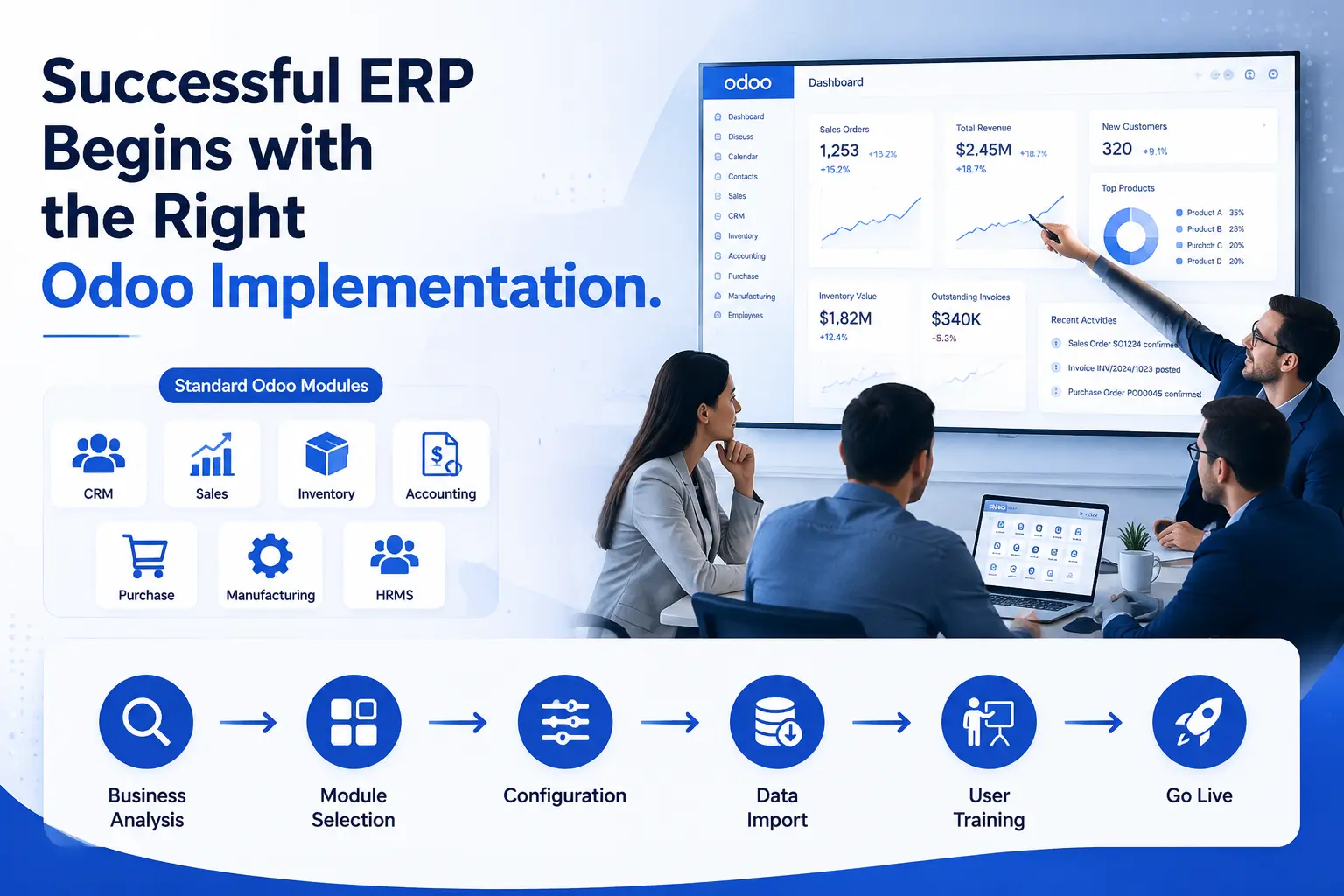
Implementation, in its simplest form, means setting up Odoo using what already exists in the platform. No new code gets written. Nothing gets built from scratch. The work is mostly about configuration.
That includes things like:
- Turning on the right modules for your business - sales, inventory, accounting, purchase, and so on
- Setting up your chart of accounts, tax rules, and payment terms
- Defining user roles so the right people see the right screens
- Mapping your existing processes to Odoo’s built-in workflows
- Importing your data - customers, vendors, products, opening balances
- Training your team to actually use the system day to day
Odoo already covers a huge range of business processes out of the box. Sales quotations, purchase orders, stock movements, invoicing, basic manufacturing - these are all there without writing a single line of code. For a lot of companies, especially smaller ones or those with fairly conventional operations, implementation alone gets them 80 to 90 percent of what they need.
The appeal here is speed and predictability. A well-scoped implementation project has a clear timeline, a defined budget, and fewer moving parts that can go wrong. You’re working with tested, stable functionality rather than something built specifically for your use case, which also means fewer surprises later.
What Is Odoo Custom Development?
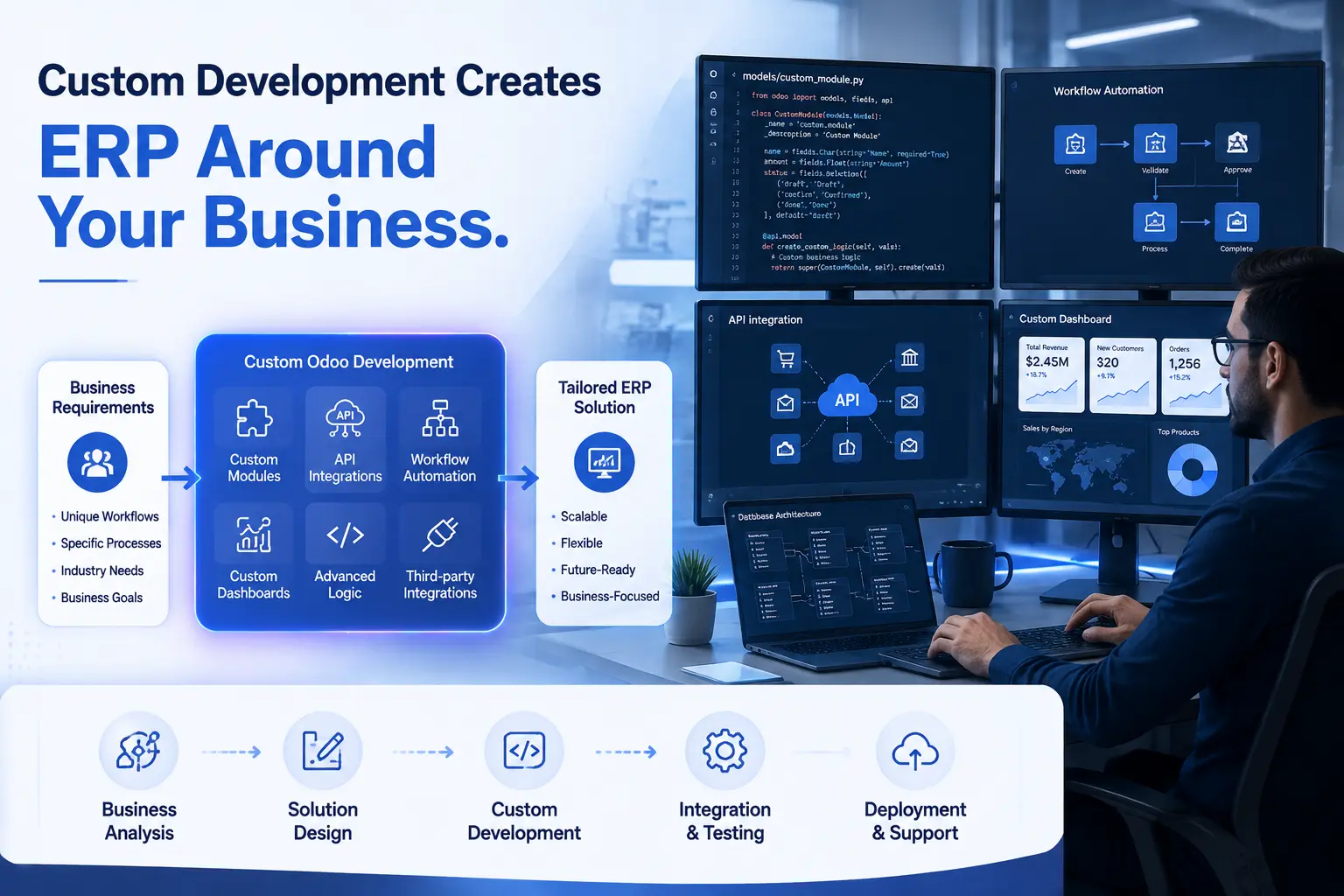
Custom development starts where standard configuration stops. It’s what happens when your business has a requirement that Odoo simply doesn’t support natively, and configuration alone can’t bridge the gap.
This might look like:
- Building a new module for something Odoo doesn’t cover - say, a specific type of job costing used in your industry
- Changing how an existing workflow behaves, beyond what settings allow
- Connecting Odoo to other systems you already use, like a courier API, a payment gateway, or a legacy accounting tool
- Creating custom reports that pull data in a format your management team actually needs
- Automating a multi-step process that currently eats up hours of manual work every week
- Writing scripts or using Odoo’s API to sync data between platforms
Does every company actually need this level of work? Not really. But some genuinely do. A pharmaceutical distributor tracking batch numbers and expiry dates across multiple warehouses has compliance requirements that go well beyond what a generic ERP module offers. A manufacturer with a five-stage quality inspection process tied to specific machine data probably needs something built around that reality.
Custom development gives you a system shaped precisely around your business. The tradeoff is that it takes longer, costs more upfront, and adds complexity that someone has to manage going forward.
Odoo Implementation vs Custom Development: Key Differences
Here’s how the two approaches stack up across the factors that actually matter for decision-making.
|
Feature |
Custom Development |
|
|---|---|---|
|
Cost |
Lower upfront investment; predictable pricing |
Higher upfront cost; depends on scope and complexity |
|
Time |
Faster, often weeks depending on scope |
Longer, can extend project timelines significantly |
|
Maintenance |
Easier, since it relies on Odoo’s core code |
More involved, since custom code needs ongoing upkeep |
|
Flexibility |
Limited to what standard Odoo supports |
High, built specifically around your workflows |
|
Scalability |
Good for standard growth patterns |
Depends heavily on how well the custom code is architected |
|
Risk |
Lower risk, tested functionality |
Higher risk if not planned or coded properly |
|
Upgrades |
Smoother, fewer compatibility issues |
Requires re-testing and sometimes rework during upgrades |
|
ROI |
Faster to realize, lower total cost |
Can be higher long-term if customization solves a real bottleneck |
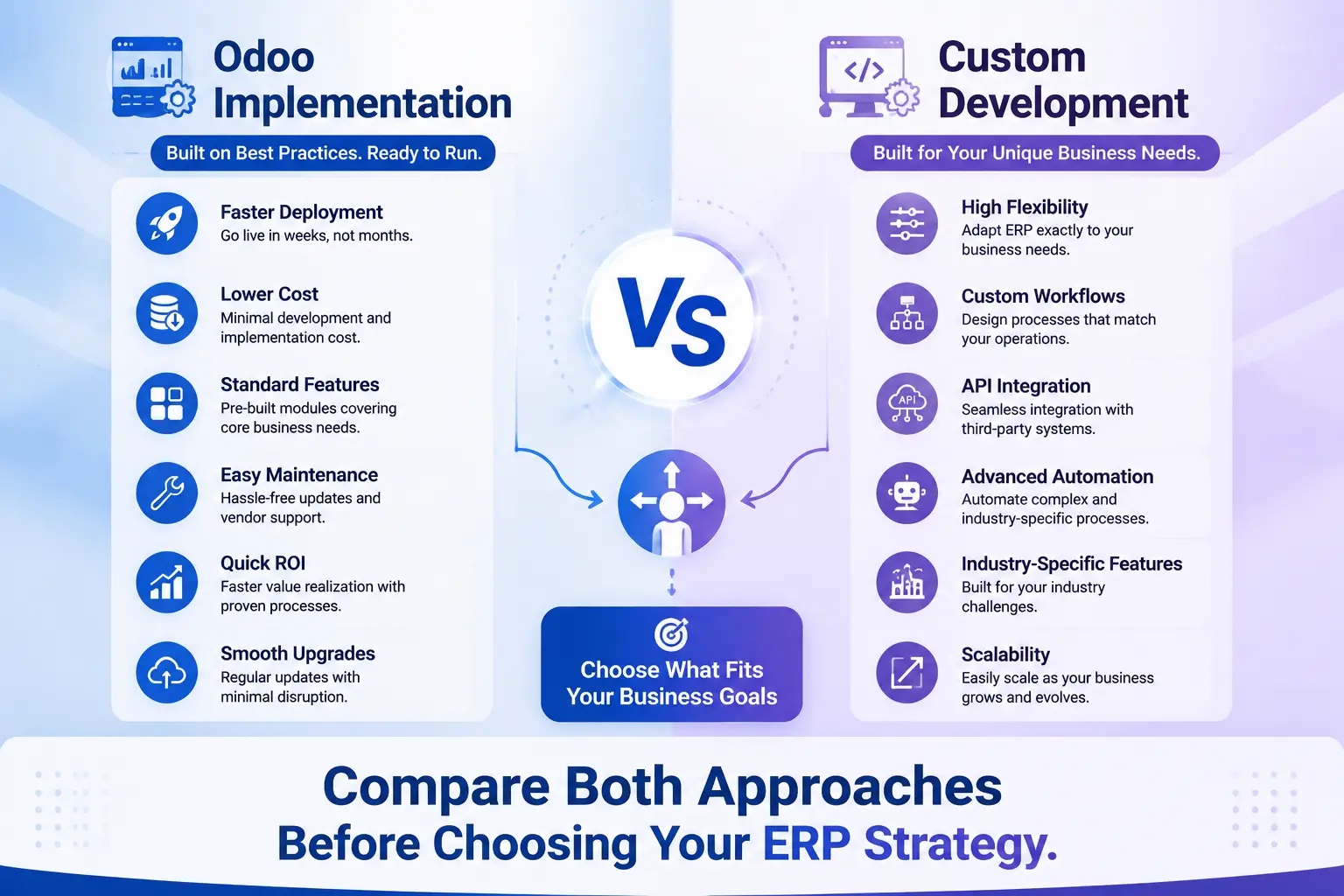
None of these rows exist in isolation. A business with tight cash flow might accept slower ROI on implementation just to avoid the upfront cost of custom work. A business scaling fast might see custom development pay for itself within a year because it removes a process that was genuinely holding growth back.
When Should You Choose Odoo Implementation?
Standard implementation makes the most sense when your processes already look reasonably close to how most businesses in your industry operate. If your sales team creates quotations, converts them to orders, and invoices customers in a fairly conventional sequence, Odoo handles that without any special engineering.
It’s also the practical choice when budget is a real constraint. SMEs and startups often can’t justify a large custom development spend before they’ve even proven their processes at scale. Getting a working ERP system live quickly, even if it’s not perfectly tailored yet, tends to matter more than getting it perfect.
Speed matters too. If there’s pressure to go live before a specific deadline - a new financial year, an investor requirement, a regulatory cutoff - implementation-only projects are far easier to plan around with confidence. Fewer unknowns mean fewer delays.
There’s also a good argument for starting with implementation even if you eventually plan to customize. Running standard Odoo for a few months shows you exactly where the real gaps are, instead of guessing at what customization you might need before anyone on your team has even used the system.
When Is Custom Development the Better Choice?
Custom development earns its cost when a business process is genuinely unique to how you operate, not just different for the sake of being different. A distributor with a commission structure tied to multiple sales tiers, regions, and product categories probably won’t find a clean fit in standard Odoo commission rules.
Industry-specific compliance is another common trigger. Certain manufacturing sectors, healthcare-adjacent businesses, and regulated trading companies have documentation and traceability requirements that go beyond generic ERP functionality.
Complex automation is where custom development often pays off fastest. If your team is currently doing repetitive manual work - reconciling data between two systems, generating the same report every week by hand, chasing approvals over email - automating that through custom logic can free up hours that translate directly into cost savings.
Integrations deserve a mention here too. If your business depends on a specific third-party tool that doesn’t have an existing Odoo connector, that’s custom development territory, whether it’s a niche logistics platform, an industry-specific compliance tool, or an older system you’re not ready to retire.
Can You Combine Odoo Implementation and Custom Development?
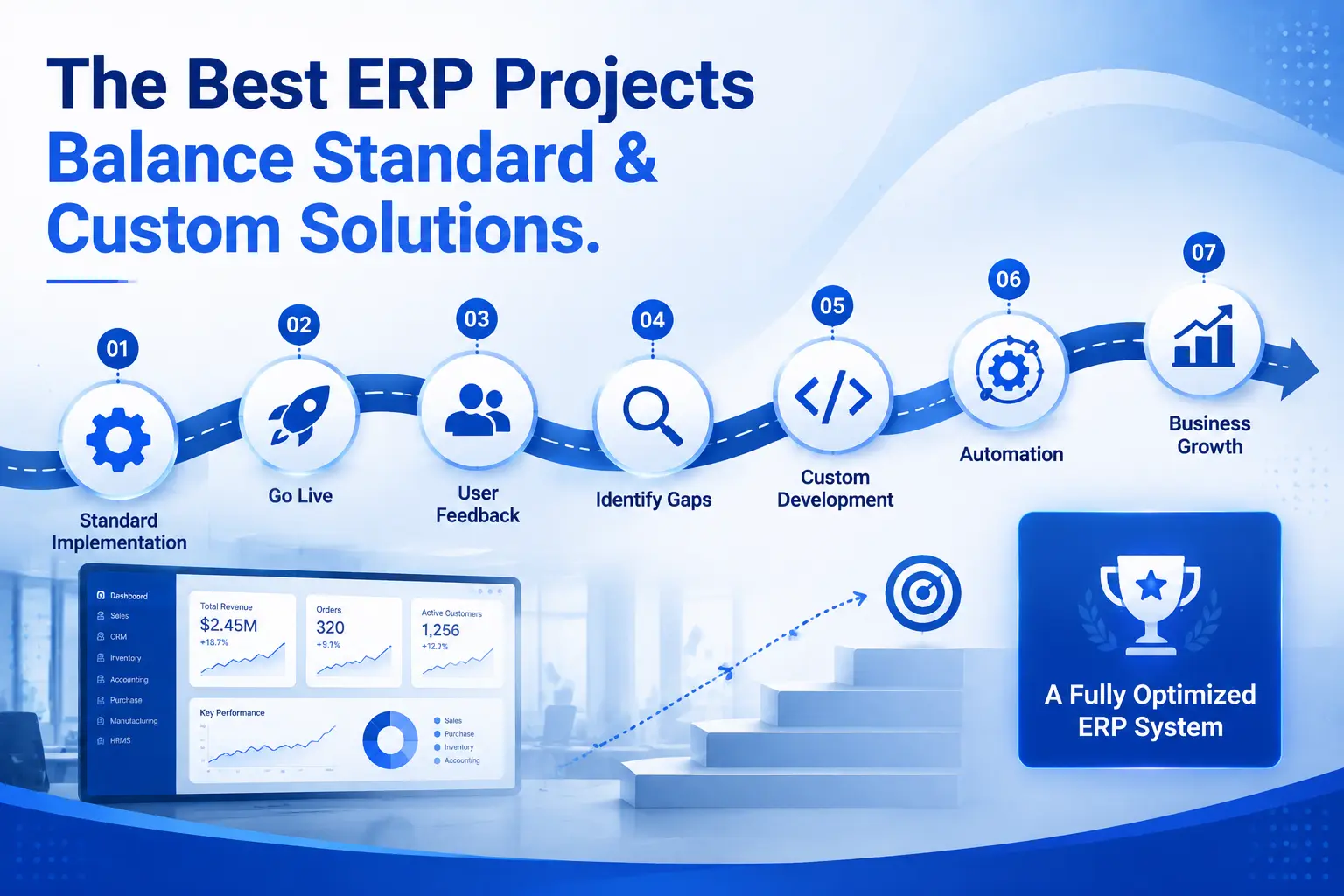
Most real-world Odoo projects, if we’re being honest, aren’t purely one or the other. They’re a mix. Implementation forms the foundation, and custom development gets layered on top only where standard functionality genuinely falls short.
This hybrid approach tends to produce the best outcomes because it avoids two common failure patterns. The first is over-customizing everything from day one, which drives up cost and complexity for requirements that turn out not to matter much in practice. The second is forcing every process into standard Odoo even when it clearly doesn’t fit, which leaves teams working around the system instead of with it.
A practical version of this looks like: implement Odoo across your core operations first, get the team live and comfortable, then identify the two or three specific pain points where custom development actually moves the needle. That’s usually a smaller, more focused, and more affordable scope than trying to customize everything upfront.
Working with an experienced Odoo Implementation Partner matters most here, because deciding what to customize and what to leave standard requires judgment that only comes from having done this across different industries before.
Cost Comparison
It’s worth being upfront that any specific pricing figures floating around online are rarely reliable, since Odoo project costs depend on scope, number of users, modules, data volume, and integration complexity. What’s more useful is understanding the cost factors themselves.
Initial investment is generally lower for implementation-only projects because you’re configuring existing functionality rather than building new code. Custom development adds development hours, testing cycles, and often a discovery phase to properly document requirements before any code gets written.
Maintenance costs differ quite a bit between the two. Standard implementations benefit from Odoo’s own maintenance and security updates with minimal extra work. Custom modules need someone - internal or external - who understands the code and can maintain it as the business evolves.
Upgrade costs are where custom development can get expensive if it wasn’t planned well. Every major Odoo version can introduce changes that affect custom code, meaning upgrades sometimes require re-testing or even rewriting parts of the customization. This is a real long-term consideration, not just a one-time cost.
Long-term ROI tends to favor implementation for straightforward businesses and favors custom development for businesses where the customization removes a genuine operational bottleneck. If a custom automation saves fifteen hours of manual work every week, it can pay for itself faster than people expect, even with a higher starting cost.
Pros and Cons
Odoo Implementation
|
Pros |
Cons |
|---|---|
|
Faster go-live timeline |
May not fit highly unique workflows |
|
Lower upfront cost |
Some manual workarounds might be needed |
|
Easier upgrades and maintenance |
Limited flexibility for niche requirements |
|
Lower project risk |
Can feel restrictive as the business scales |
Custom Development
|
Pros |
Cons |
|---|---|
|
Matches your exact workflow |
Higher upfront investment |
|
Solves complex, industry-specific needs |
Longer development and testing timeline |
|
Enables deeper automation |
Requires ongoing code maintenance |
|
Can create real competitive advantage |
Upgrades need more planning and effort |
Common Mistakes Businesses Make
Over-customizing early is probably the most frequent mistake. Teams sit down before go-live and list every possible feature they might ever want, then ask for all of it to be built before anyone has actually used the base system. Half of those requirements usually turn out to be unnecessary once people are working in Odoo day to day.
Ignoring what standard Odoo already offers is another one. Some businesses assume their process is unique when it’s actually a fairly common workflow that Odoo already handles well, just under a different label or module than they expected.
Poor planning shows up in projects where scope keeps shifting mid-implementation. Without a clear requirements document upfront, timelines stretch and costs climb, and nobody is quite sure why.
No scalability planning is a quieter mistake that shows up later. A custom module built for today’s transaction volume might not hold up once the business doubles in size, and rebuilding it after the fact costs more than designing it properly the first time.
And then there’s choosing the cheapest vendor purely on price. ERP implementation is one area where the lowest quote often reflects the least experience, and the savings on day one can turn into far higher costs down the line through rework, poor configuration, or a system that never quite gets adopted properly by the team.
How to Decide Which Option Is Right for Your Business
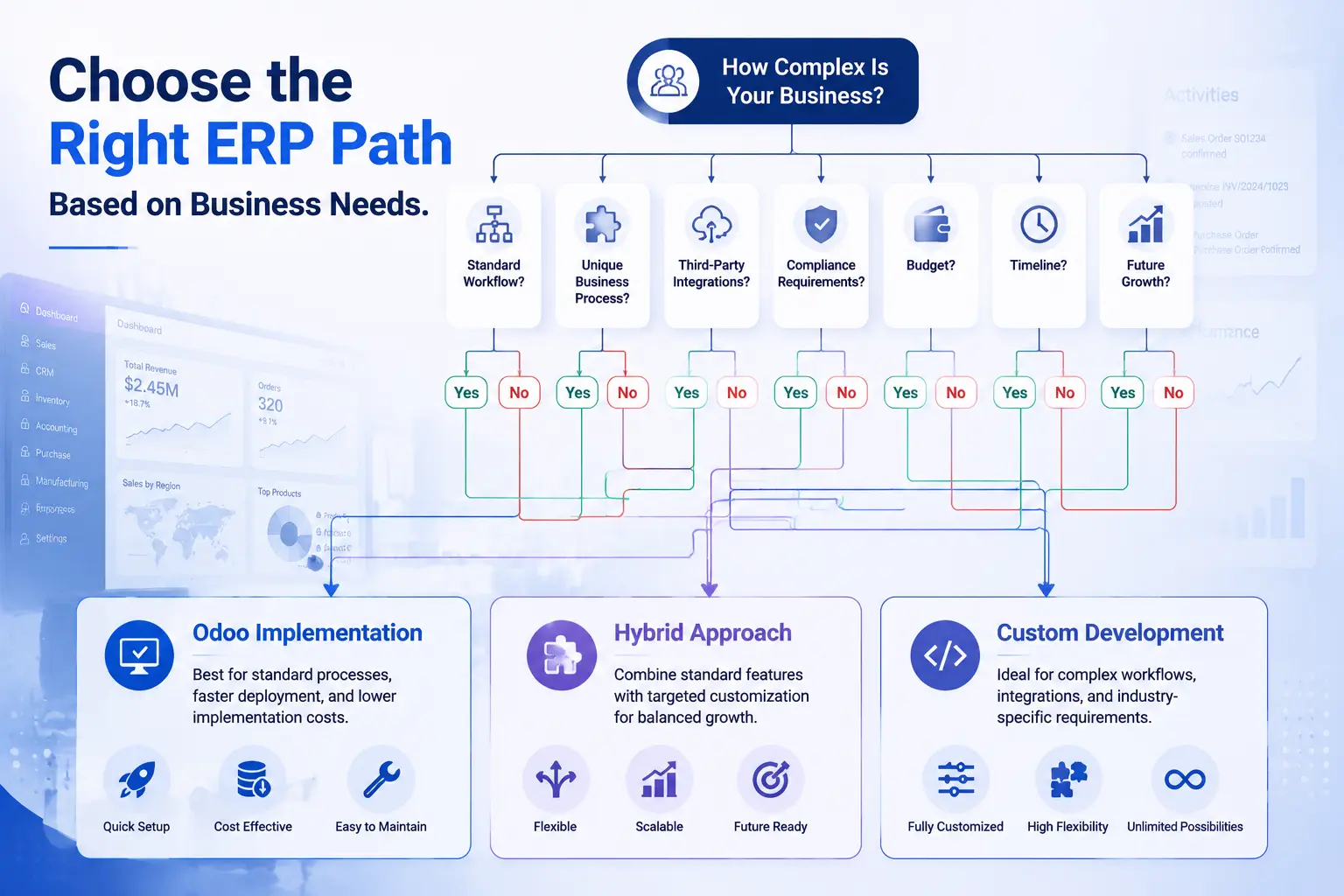
A decision framework helps here more than any generic rule of thumb. Consider these factors together, not in isolation:
Company size. Smaller teams with straightforward operations usually do well starting with implementation alone. Larger organizations with multiple departments and more complex approval chains often need at least some custom work from the start.
Budget. If cash flow is tight, implementation gives you a working system without a large upfront commitment. If the budget allows for it, and there’s a clear business case, targeted custom development can be worth the investment.
Timeline. Businesses under pressure to go live quickly should lean toward implementation first and layer customization in afterward, once there’s less urgency.
Business complexity. The more your operations deviate from standard retail, trading, distribution, or services workflows, the more custom development becomes necessary rather than optional.
Future growth. It’s worth asking not just what your business needs today, but where it’s headed in the next two to three years. A system that fits now but can’t scale creates a second implementation project down the road, which costs more than planning for growth the first time.
None of these factors should be evaluated alone. A small business with a complex, highly specialized process might still need customization despite its size. A large company with simple, conventional processes might do just fine with implementation across most departments.
Why Odiware Recommends a Balanced Approach
Years of working across manufacturing, retail, distribution, and services projects have shown a consistent pattern: businesses get the most value when standard Odoo is optimized first, and custom development is reserved for the specific areas where it creates measurable impact.
This isn’t about avoiding custom work to keep projects simple. It’s about making sure every customization decision is backed by a real business reason, rather than a feature request that sounds good in a planning meeting but doesn’t actually change day-to-day operations. The goal of Professional Odoo ERP Implementation work should always be a system your team actually uses well, not just one that technically has every feature imaginable.
That’s why the process usually starts with configuring and testing standard Odoo across core operations, involving the actual users early, and only recommending custom development where there’s a clear gap that configuration genuinely can’t close. It tends to produce systems that are easier to maintain, cheaper to upgrade, and more likely to be adopted properly by the people using them every day.
Frequently Asked Questions
Is Odoo implementation enough for most businesses?
For a large share of SMEs and mid-sized businesses with conventional processes, yes. Standard Odoo covers sales, purchasing, inventory, accounting, and basic manufacturing well enough that customization isn’t always necessary from day one.
Does custom development increase project cost?
Generally yes, since it involves development time, testing, and often a longer discovery phase. The increase depends entirely on how much customization is actually needed.
Will customization affect future upgrades?
It can. Custom code sometimes needs adjustments when Odoo releases a new version, which is why it’s worth planning customization with upgrades in mind from the start.
Can custom modules be added later?
Yes. This is actually a common and often smarter approach - implement standard Odoo first, then add custom modules once real gaps become clear through actual usage.
Which option is better for SMEs?
Implementation is usually the better starting point for SMEs, given budget constraints and the need to go live quickly. Custom development can follow later if specific needs emerge.
Can Odoo implementation and customization be combined?
Yes, and this hybrid approach is how most successful Odoo projects actually work in practice.
How long does a typical Odoo implementation take?
It varies with scope, number of modules, and data volume, but implementation-only projects are generally faster than projects involving significant custom development.
Does customization mean higher maintenance forever?
Not necessarily forever, but it does mean ongoing attention is needed, especially around version upgrades, compared to a purely standard setup.
Is it risky to fully customize Odoo from the start?
It can be, particularly if requirements aren’t well tested against real usage first. Many businesses find that some early customization requests turn out to be unnecessary once the team starts working in the system.
How do I know if my business needs custom development?
If a process is core to how you compete or operate, and standard Odoo genuinely can’t support it through configuration, that’s usually a sign custom development is worth considering.
Can an Odoo migration involve both implementation and customization?
Yes. Businesses migrating from another system often need standard implementation for most functions plus custom work for anything unique that the old system handled in a specific way.
Should I involve an implementation partner even for standard configuration?
It helps significantly. Even standard configuration benefits from experience, since the right setup decisions early on affect how easily the system scales and adapts later.
Final Thoughts
There isn’t a universal answer to whether Odoo implementation or custom development is the better choice, because it genuinely depends on your business, your budget, your timeline, and how far your processes sit from what’s considered standard.
What matters most is approaching the decision with a clear view of your actual requirements, rather than assuming more customization automatically means a better system. In most cases, starting with a solid implementation and adding custom development only where it’s genuinely justified leads to a system that’s easier to maintain, more affordable to run, and more likely to actually get used well by your team.
If you’re weighing this decision for your own business, working through it with an experienced Odoo Implementation Services team can save considerable time and help avoid the common missteps that come from figuring it all out alone.
Most projects land somewhere between the two: a standard implementation plus a targeted amount of custom work. Odiware scopes that second part as Odoo customization services, classified as configuration or code before development starts.
We will map your requirements against standard Odoo first, then scope only the custom work you actually need.
 ODOO IMPLEMENTATION PARTNER