Quick answer: Manufacturing companies reduce inventory costs with Odoo by connecting inventory, purchasing, and production (MRP) in one system. This gives real-time stock visibility, automatic reordering, accurate bills of materials (BOMs), and demand-based planning. Together, these reduce excess stock, prevent stockouts, and lower carrying costs — often by cutting manual errors and idle inventory that traditional spreadsheets or disconnected software cannot catch.
Quick answer: Manufacturing companies reduce inventory costs with Odoo by connecting inventory, purchasing, and production (MRP) in one system. This gives real-time stock visibility, automatic reordering, accurate bills of materials (BOMs), and demand-based planning. Together, these reduce excess stock, prevent stockouts, and lower carrying costs — often by cutting manual errors and idle inventory that traditional spreadsheets or disconnected software cannot catch.
Manufacturing companies tie up a lot of money in inventory. Raw materials sit in the warehouse. Work-in-progress parts sit on the shop floor. Finished goods sit waiting for orders. Every one of these items costs money to store, insure, and manage — even before it is sold.
If you run a manufacturing business, you already know this pain. Too much stock ties up cash. Too little stock stops production. Getting the balance right by hand, using spreadsheets or disconnected tools, is extremely hard.
This guide explains, in plain language, how manufacturing companies use Odoo inventory management for manufacturing to reduce inventory costs. You'll find real formulas, a before-and-after example, ROI math you can adapt to your own numbers, KPI dashboards to track, configuration tips, common mistakes, and a step-by-step workflow — plus how Odiware's Odoo implementation team approaches these projects in practice.
What Is Inventory Cost and Why It Matters for Manufacturers
Inventory cost is not just the price you paid for materials. It includes every cost connected to holding that stock until it becomes revenue.
The main categories are:
- Ordering costs – placing purchase orders, receiving, and inspecting goods
- Carrying (holding) costs – warehouse space, insurance, taxes, spoilage, and the cost of capital tied up in stock
- Stockout costs – lost sales, rush shipping, and idle production lines when materials run out
- Obsolescence costs – value lost when stock becomes outdated, expired, or unusable
The Inventory Carrying Cost Formula
A standard formula used across operations management is:
Inventory Carrying Cost (%) = (Total Carrying Costs ÷ Total Inventory Value) × 100
Carrying costs typically include storage, insurance, taxes, shrinkage, and capital cost. Many operations textbooks and industry sources cite a commonly used estimate that annual carrying cost sits somewhere between 20% and 30% of total inventory value, though your actual figure could be lower or higher — it's worth calculating your own number rather than assuming an industry average applies to you.
The Economic Order Quantity (EOQ) Formula
EOQ helps determine the ideal order size that minimizes total ordering and carrying costs:
EOQ = √((2 × D × S) ÷ H)
Where:
- D = annual demand (units)
- S = cost per order
- H = annual holding cost per unit
Odoo's replenishment rules can be configured using logic similar to EOQ principles, alongside minimum/maximum stock rules and reordering points, so manufacturers do not have to calculate this manually for every SKU.
Common Inventory Cost Problems Manufacturers Face (Before Odoo)
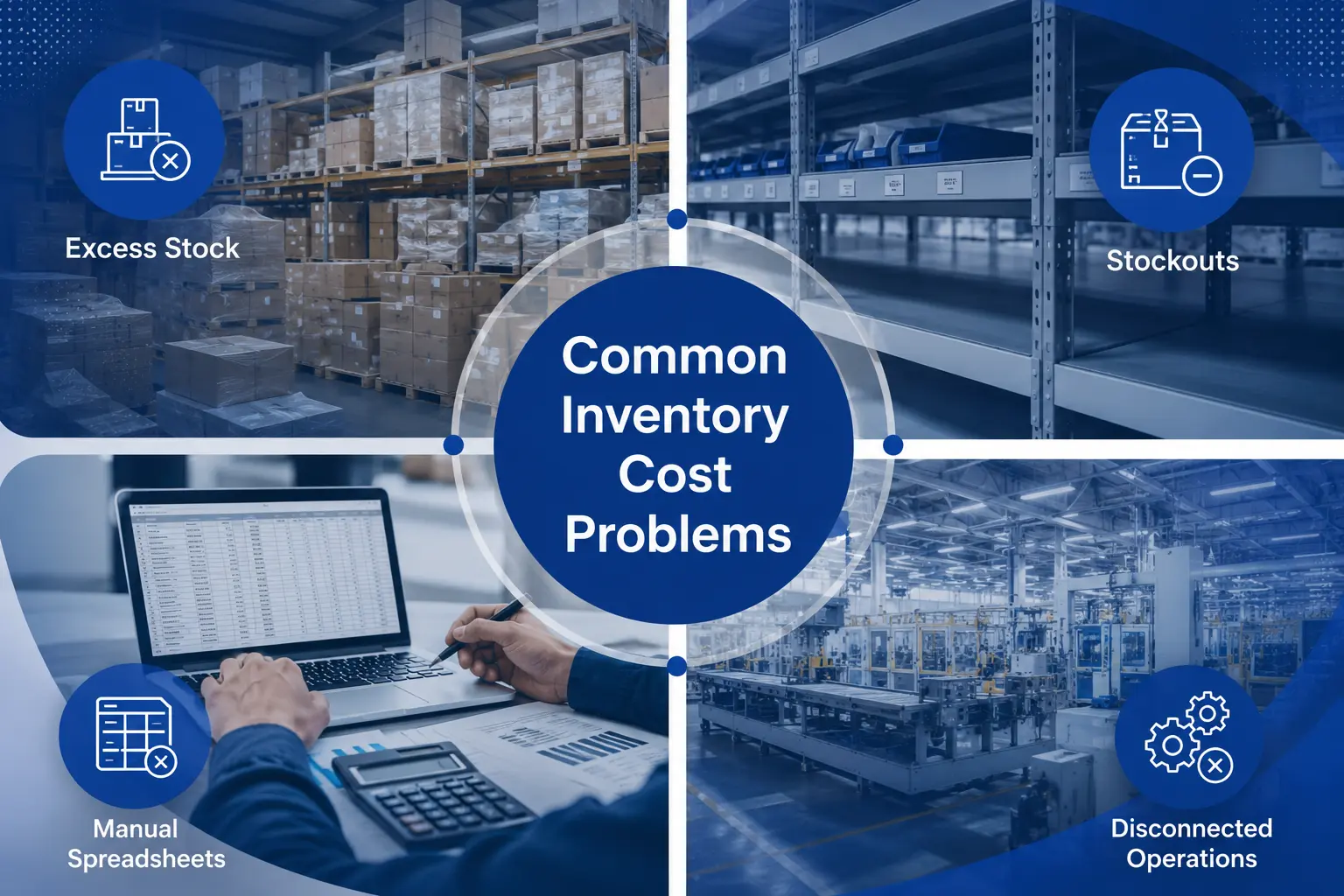
Manufacturers relying on spreadsheets, standalone inventory software, or legacy ERPs commonly report these issues (based on general patterns discussed in manufacturing operations literature, not a specific survey):
- Disconnected data – Sales, purchasing, and production teams work off different, outdated numbers
- Manual reordering – Purchase orders are created based on gut feeling, not real demand
- Inaccurate Bills of Materials (BOMs) – Wrong component counts lead to over-buying or shortages
- No real-time stock visibility – Teams don't know what's in stock until a physical count
- Poor multi-warehouse tracking – Stock gets "lost" between locations
- No linkage between demand forecasting and purchasing
These problems compound. A wrong BOM leads to overordering. Overordering leads to excess stock. Excess stock raises carrying costs. And disconnected systems make it hard to see any of this happening until the money is already spent.
How Odoo Helps Manufacturers Reduce Inventory Costs
Odoo addresses these problems by connecting Inventory, Manufacturing (MRP), Purchase, Sales, and Accounting in a single data model. When one department updates something — a sales order, a stock count, a production order — every other module sees it instantly. A properly scoped Odoo consulting engagement typically starts by mapping exactly which of these modules your current process needs before configuration begins.
Real-Time Stock Visibility Across Warehouses
Odoo Inventory tracks stock levels, lead times, and movements across multiple warehouses and locations in real time. This means purchasing and production teams are always working from the same, current numbers instead of a count that's days or weeks old.
Bills of Materials (BOM) and Multi-Level BOMs
Odoo lets manufacturers build single-level or multi-level BOMs that describe exactly what raw materials and sub-assemblies go into a finished product. Accurate BOMs are the foundation of accurate material planning — if the BOM is wrong, every purchase and production decision built on it will be wrong too.
Automated Replenishment Rules
Instead of manually deciding what to reorder, Odoo can be configured with minimum/maximum stock rules and automated reordering, so purchase or manufacturing orders are proposed automatically when stock drops below a set threshold. This reduces both emergency stockouts and the tendency to over-order "just in case."
Demand-Driven Production Planning (MRP)
Odoo's Manufacturing module bases production plans on actual demand, available materials, and plant capacity, rather than fixed schedules disconnected from real orders. This is often referred to as make-to-order or demand-driven planning, and it helps avoid building products (and buying materials) that don't have confirmed demand behind them.
Lot and Serial Number Traceability
For manufacturers dealing with batches, expiry dates, or regulatory traceability requirements, Odoo supports tracking by lot or serial number. This reduces waste from expired or misplaced batches and speeds up recalls or quality investigations if they're ever needed.
Production Cost Tracking and Variance Analysis
Odoo allows manufacturers to compare planned production costs against actual costs, helping identify where material waste, labor inefficiency, or scrap is quietly inflating inventory costs.
Subcontracting and Multi-Location Support
For manufacturers who outsource part of production, Odoo can track raw material inventory held at a subcontractor's site and automatically manage the resupply of components to them — keeping that portion of inventory visible instead of "off the books."
Before vs. After: An Illustrative Scenario
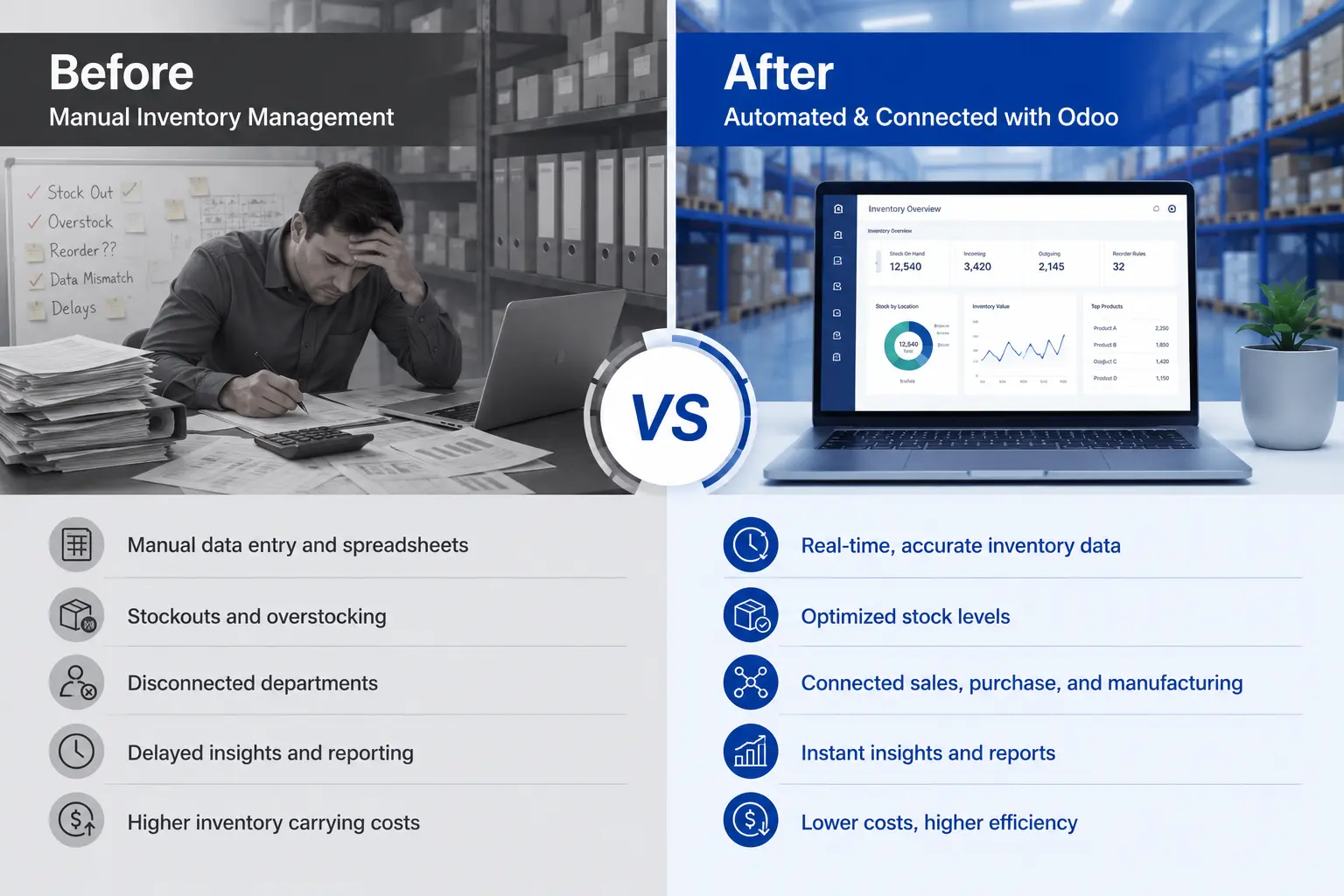
The following scenario is a hypothetical, simplified example meant to illustrate the mechanics of the change — it is not a documented case study of a real company, and your results will vary based on your own operations.
Before Odoo (Spreadsheet-Based Inventory):
- Purchasing orders raw materials based on rough monthly estimates
- No live link between the sales forecast and the BOM
- Warehouse team does a full physical count once a month to "true up" the numbers
- Excess safety stock is held on nearly every SKU "just in case"
- Stockouts on 2–3 critical components happen periodically, pausing production for days
After Odoo (Connected Inventory + MRP):
- Reordering rules trigger purchase requests automatically when stock hits the minimum threshold
- The BOM is linked directly to sales orders, so material needs are calculated from real, confirmed demand
- Real-time dashboards replace most manual counts, with cycle counts used to spot-check accuracy
- Safety stock levels are set per SKU based on actual lead time and demand variability, not a blanket buffer
- Production delays caused by missing components drop because shortages are visible weeks in advance
The pattern illustrated here — moving from reactive, manual inventory management to automated, demand-linked planning — is the mechanism by which Odoo (or any well-implemented ERP) tends to reduce carrying costs and stockouts. The specific percentage improvement for your business needs to be measured against your own baseline data. You can review documented client outcomes, including HRMS, CRM, and operations projects, on our case studies page.
ROI Calculation: Estimating Your Own Savings
Rather than quoting a fixed ROI percentage (which would vary too much by industry, company size, and current maturity to state as fact), here is a formula you can use with your own numbers:
Step 1: Calculate your current carrying cost
Carrying Cost = Average Inventory Value × Carrying Cost Rate (%)
Example (illustrative numbers only): Average Inventory Value = $500,000 Assumed Carrying Cost Rate = 25% Carrying Cost = $500,000 × 0.25 = $125,000/year
Step 2: Estimate the reduction in average inventory value
If better demand planning and automated reordering allow you to reduce average inventory levels — for instance by lowering excess safety stock — apply that percentage to your current inventory value. Use a conservative estimate first, then revisit it once you have real data from your own system.
Step 3: Calculate annual savings
Annual Savings = Reduction in Inventory Value × Carrying Cost Rate
Step 4: Compare against implementation cost
ROI (%) = (Annual Savings − Implementation Cost) ÷ Implementation Cost × 100
We are intentionally not stating a universal "X% ROI" figure here, because credible ROI depends entirely on your current inventory value, industry, and how disciplined your team is about using the new system. Ask your ERP partner to help you build this calculation using your own historical inventory data before committing to a number.
Key KPIs to Track Inventory Performance in Odoo
A KPI dashboard turns inventory management from guesswork into a measurable process. Common KPIs manufacturers track (these are standard operations metrics, not Odoo-specific inventions):
|
KPI |
Formula |
What It Tells You |
|
Inventory Turnover Ratio |
Cost of Goods Sold ÷ Average Inventory Value |
How efficiently stock is being sold/used |
|
Days Sales of Inventory (DSI) |
(Average Inventory ÷ COGS) × 365 |
How many days of stock you're holding |
|
Stockout Rate |
Number of Stockout Events ÷ Total Order Lines |
How often you run out of needed materials |
|
Carrying Cost % |
Total Carrying Costs ÷ Average Inventory Value |
Cost of holding stock relative to its value |
|
Order Fill Rate |
Orders Fulfilled Complete ÷ Total Orders |
Service level for customers/production |
|
Scrap/Waste Rate |
Scrapped Material Value ÷ Total Material Value |
Material efficiency in production |
|
Forecast Accuracy |
1 − ( |
Forecast − Actual |
Odoo's built-in reporting and dashboard tools can surface most of these automatically once inventory, purchasing, and manufacturing data flow through the same system — removing the need to rebuild these reports manually in spreadsheets every month.
Odoo Inventory Configuration Tips for Manufacturers
- Set up multi-step routes correctly. Odoo defaults to one-step receipts/deliveries. Many manufacturers need two- or three-step routes (e.g., input → quality check → stock) for proper quality control — this has to be enabled deliberately.
- Build accurate, versioned BOMs from day one. Garbage in, garbage out — MRP planning is only as good as the BOM behind it.
- Use reordering rules per warehouse, not globally, if you operate multiple locations with different demand patterns.
- Enable lot/serial tracking only where it's actually needed (e.g., regulated industries), since over-tracking can slow down warehouse staff.
- Connect Quality checkpoints into the manufacturing workflow so defective components don't get counted as usable stock.
- Review and adjust safety stock quarterly based on actual lead time variability, not a one-time guess.
- Use the Master Production Schedule (MPS) feature for products with predictable, recurring demand, to smooth out production planning.
Common Implementation Mistakes to Avoid
- Migrating messy data as-is. Importing inaccurate stock counts or outdated BOMs into Odoo just moves the problem into a new system.
- Skipping user training. Odoo's automation only works if staff enter data (receipts, production confirmations) correctly and on time.
- Turning on every module at once. Many implementation specialists recommend starting with core Inventory and Manufacturing, then expanding once those processes are stable.
- Not defining reordering rules before go-live. Without them, teams often revert to manual, spreadsheet-style purchasing out of habit.
- Ignoring change management. Shop floor and warehouse staff need a clear, simple explanation of new workflows, or adoption stalls.
- Not assigning KPI ownership. Dashboards only drive improvement if someone is accountable for reviewing them regularly.
Step-by-Step Workflow: From Purchase to Finished Goods in Odoo
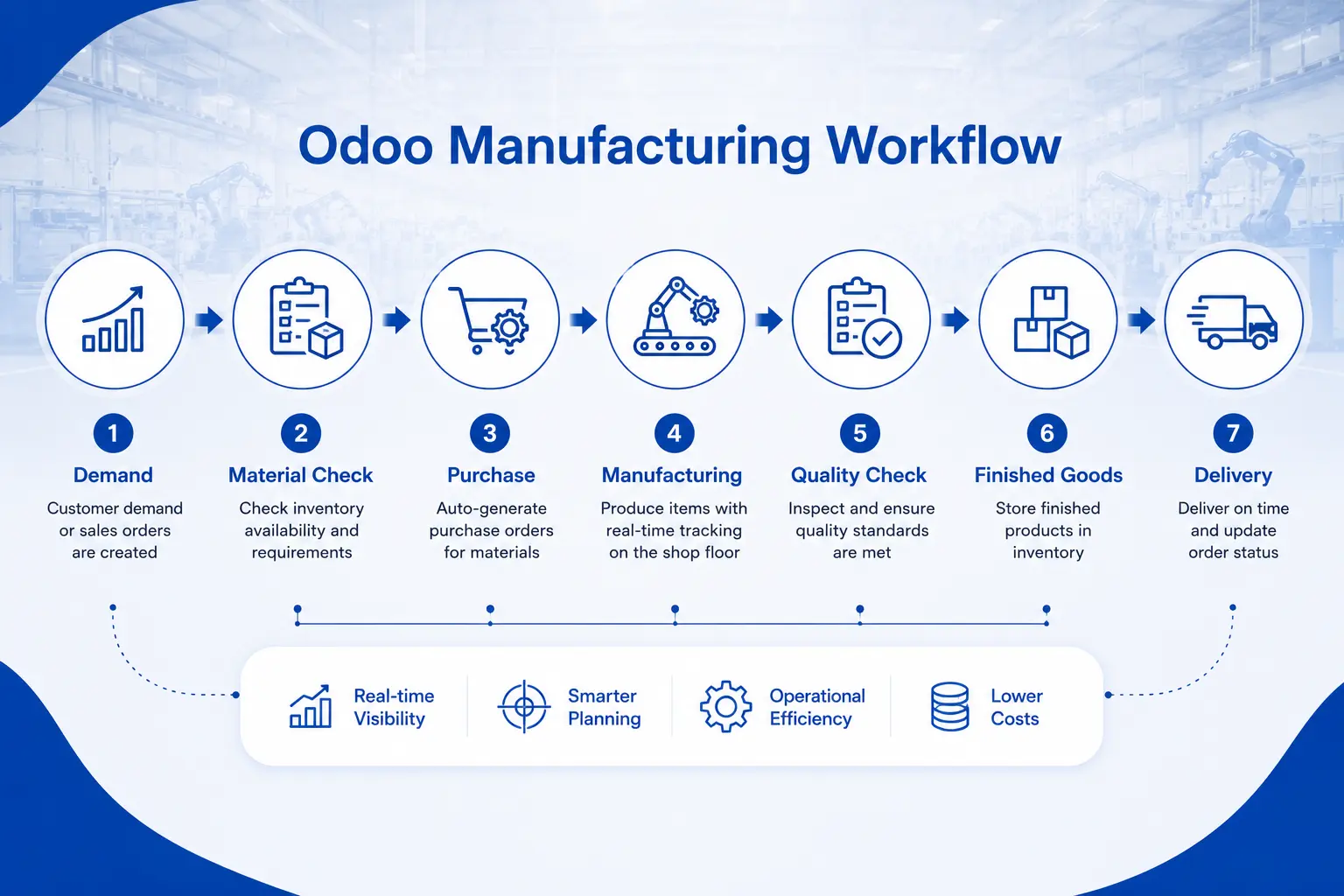
- Demand signal received – A sales order or forecast enters the system
- MRP checks material availability – Odoo compares the BOM against current stock
- Purchase or manufacturing order proposed – Based on reordering rules or MPS
- Raw materials received – Stock is checked in, optionally through quality control
- Manufacturing order created – Based on the BOM and routing/work centers
- Work orders executed – Tracked in real time, including at subcontractor sites if applicable
- Quality checks performed – Before finished goods are added to sellable stock
- Finished goods updated in inventory – Stock levels update automatically
- Delivery to customer – Triggers invoicing and updates inventory valuation
- KPI dashboards refresh – Turnover, DSI, and fill rate update automatically for the next planning cycle
Odoo vs. Traditional/Spreadsheet Inventory Management
|
Factor |
Spreadsheets / Disconnected Tools |
Odoo (Inventory + MRP) |
|
Stock visibility |
Manual, often outdated |
Real-time, across warehouses |
|
Reordering |
Manual, based on estimates |
Automated rules based on demand |
|
BOM accuracy |
Prone to version errors |
Centralized, versioned BOMs |
|
Multi-location tracking |
Difficult, error-prone |
Built-in multi-warehouse support |
|
Cost tracking |
Separate from production data |
Integrated cost/variance analysis |
|
Traceability (lots/serials) |
Manual logs |
Automated, click-to-trace |
|
Reporting |
Manually rebuilt each cycle |
Live dashboards |
|
Scalability |
Breaks down as SKU count grows |
Scales with configuration, not headcount |
Frequently Asked Questions
How does Odoo reduce inventory carrying costs for manufacturers?
Odoo connects real-time stock data with demand planning and automated reordering rules, which helps manufacturers hold less excess safety stock while still avoiding stockouts — directly lowering the carrying cost component of inventory expense.
What is Odoo MRP and how is it different from regular inventory software?
Odoo MRP (Manufacturing Resource Planning) plans production based on bills of materials, work centers, and routing, and it's integrated with Inventory, Purchase, and Accounting. Standalone inventory software typically only tracks stock levels without planning production around demand.
Can small and mid-sized manufacturers afford Odoo?
Odoo is modular, so manufacturers can start with core Inventory and Manufacturing apps and add others later. Pricing is subscription-based and varies by user count and modules selected — see our Odoo pricing breakdown for current rates and implementation cost factors, since pricing structures can change.
How long does an Odoo manufacturing implementation typically take?
Timelines vary significantly based on data complexity, number of BOMs, and customization needs. A narrow, single-warehouse implementation will generally take less time than a multi-location, multi-BOM rollout — ask your implementation partner for a scoped timeline based on your specific setup rather than relying on a generic industry number.
Does Odoo support lot and serial number tracking for regulated industries?
Yes, Odoo supports tracking by lot and serial number, which supports traceability requirements common in industries like food, pharmaceuticals, and electronics — though you should confirm your specific regulatory requirements with a compliance professional, as this content is not legal or regulatory advice.
What KPIs should manufacturers track after implementing Odoo?
Common KPIs include inventory turnover ratio, days sales of inventory (DSI), stockout rate, carrying cost percentage, order fill rate, and forecast accuracy — all of which can typically be built into Odoo's reporting dashboards.
Ready to Reduce Your Inventory Costs?
If excess stock, stockouts, or disconnected spreadsheets are costing your manufacturing business time and money, a properly configured Odoo Inventory and MRP setup can help you plan production around real demand instead of guesswork.
Talk to an Odoo implementation specialist about your current inventory challenges and get a scoped recommendation for your operation — no generic templates, just a plan built around your BOMs, warehouses, and demand patterns.
Get a Free Odoo Inventory Consultation →
Manufacturing in Singapore or Canada? See our region-specific implementation approach: Odoo Implementation in Singapore · Odoo Implementation in Canada
Looking for more Odoo guides like this? Browse our full resource library.
Get a free 30-minute review with an Odiware Odoo consultant — bring your current setup and we'll map the fastest route to a working configuration.
 ODOO IMPLEMENTATION PARTNER